
Your employees can send each other messages within the Belbo calendar.
Everything about: Customers
Advanced Customer Directory: Service Fields
If you want your customers to provide certain information when booking a service online, you can create service fields for this purpose. For each of your services, you can define your own service fields, so customers only need to provide the information that is necessary for the desired service.
Card tabs
You can add custom customer fields to each customer file. You can group these into card tabs to display all information clearly in each customer file.
Manual data disclosure on customer request
Your customers have the right to view all data stored about them. As a processor of this data, you must comply with the legally specified deadline to fulfill your customer's request in this regard. If you fail to provide the data, severe penalties threaten. Belbo supports you in complying with this request in accordance with the law.
Manual Data Deletion on Customer Request
Your customers have the right to request the deletion of all data stored about them. As a processor of this data, you must comply with the legally defined deadline to fulfill your customer's request. If you do not delete the data, severe penalties are threatened. Belbo supports you in complying with this request in accordance with the law.
If you would like to test this process once, please use an email address that has not been used in the calendar before. If you test this with your own login through to the end, it will be completely deleted and you will no longer be able to log in to Belbo.
Privacy Requests
Your customers have the right to view all data stored about them or to have it deleted. As a processor of this data, you must comply with the legally specified deadline to fulfill your customer's request. If you fail to provide or delete the data, severe penalties are threatened. Belbo supports you in complying with this request in accordance with the law.
Information Obligation under the General Data Protection Regulation
You are legally required to inform your customers that you are processing their data. Furthermore, you must inform your customers about the duration, the legal basis and the purpose of the storage and other circumstances. You should also communicate the name and contact details of the responsible party and, if applicable, your data protection officer to your customers in the event of data processing. In addition, the customer should be informed of their rights (including the ability to request or delete data as well as the possibility of filing a complaint with the competent supervisory authority).
Customer Messages
You can send your customers messages via email and SMS. These messages include:
- Appointment confirmations (these are sent immediately after saving the appointment in the calendar or completing the online booking)
- Appointment reminders (these are sent at the time period you set in the calendar settings)
- Marketing messages (these include newsletters, birthday greetings or review requests)
Privacy Settings Overview
In the data protection settings, you can make some important settings that help you comply with the legal data protection requirements according to the GDPR.
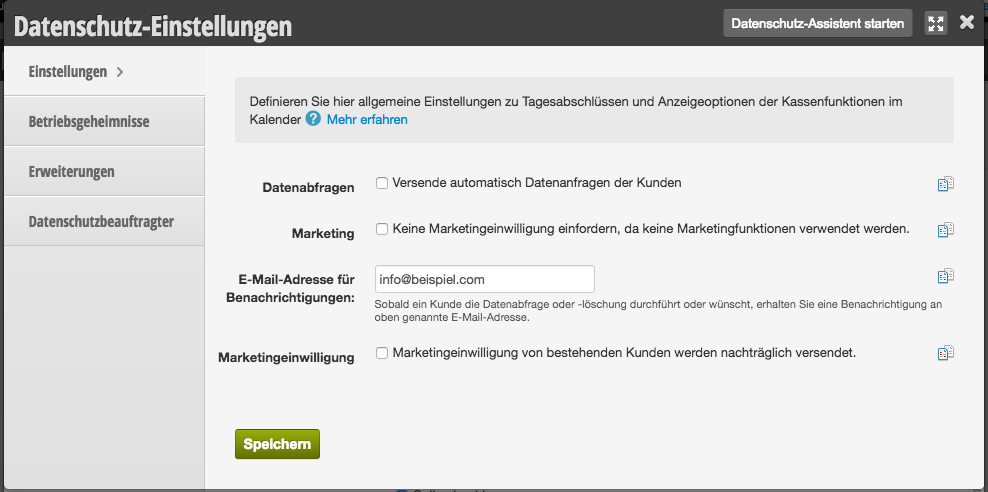
Data Requests
Your customers have the right to request the data stored about them or to have it deleted. Part of the regulation is that according to the GDPR, you only have a certain time period to fulfill this request.
Data Protection Settings: Extensions
You can add your own passages to the data protection terms shown to your customers on your online booking page.