
belbo
  • Overview
    • Getting to know Belbo
    • Location Settings
    • Switch to Belbo
    • Calendar View & Navigation
    • Recurring Appointments & Courses
    • Appointment Entry & Management
    • Logins & Permissions
    • Multiple Locations & Head Office
    • Manage Employees
    • Absences & Holidays
    • General
    • Working Hours
    • Time Tracking
    • Data Protection (GDPR)
    • Customer Communication (Email, SMS)
    • Customer Management & Records
    • Bonus & Loyalty Programs
    • Campaigns (Newsletter & SMS)
    • Marketing Consents (GDPR)
    • Tracking & Analytics
    • Overview
    • Services & Prices
    • Products
    • Service Packages & Subscriptions
    • Vouchers
    • Purchasing & Suppliers
    • Stock & Inventory
    • Scanning & Sales
    • Cost of goods & expenses
    • Design & Texts
    • Setup & Settings
    • Integration (Website, Google, Instagram, Facebook)
    • Online payment
    • Accounting & Exports
    • Cash Register Settings & Hardware
    • Checkout process
    • Daily Closing & Reports
    • TSE & Cash Register Anti-Tampering Ordinance
    • Export Overview
    • Employee Utilization
    • Revenue & Reports
    • Belbo Satellite
    • Printer
    • EC Terminal & Card Payment
    • Troubleshooting Hardware
    • Scanner & POS Devices
    • General Settings
    • API & Integrations
    • Notifications & Emails
    • Contracts & Legal
Skip to content

Customer Messages

You can send your customers messages via email and SMS. These messages include:

  • Appointment confirmations (these are sent immediately after saving the appointment in the calendar or completing the online booking)
  • Appointment reminders (these are sent at the time period you set in the calendar settings)
  • Marketing messages (these include newsletters, birthday greetings or review requests)
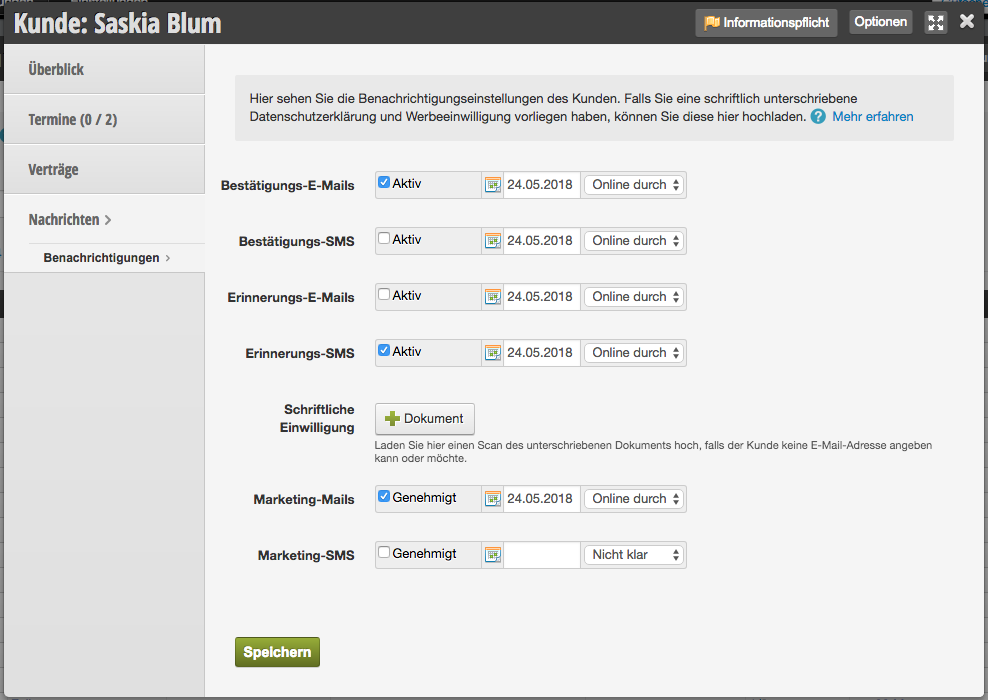
You can access this area in every customer file via
Messages > Notifications

Each customer has the option to specify in their own profile which messages they wish to receive. The prerequisite for this is that you have entered an email address in the customer master data. In this area, you can see what preferences the customer has set regarding the receipt of messages.
Please note that you are obligated to respect the customer's wishes. Failure to do so may result in legal consequences related to the General Data Protection Regulation.

Customers who cannot or do not wish to provide an email address can confirm in writing that they agree to the sending of certain marketing messages. You can upload a scan of this document in the upload field on the messages page. A purely verbal agreement cannot be proven at a later date and is therefore insufficient in case of dispute.

Categories: Customer Communication (Email, SMS)
This manual is a service by belbo. Legal notice