
belbo
  • Overview
    • Getting to know Belbo
    • Location Settings
    • Switch to Belbo
    • Calendar View & Navigation
    • Recurring Appointments & Courses
    • Appointment Entry & Management
    • Tasks
    • Overview
    • Multiple Locations & Head Office
    • Manage Employees
    • Logins
    • Rights
    • Overview
    • Absences & Holidays
    • Working Hours
    • Time Tracking
    • Overview
    • Data Protection (GDPR)
    • Customer Communication (Email, SMS)
    • Customer Management & Records
    • Overview
    • Bonus & Loyalty Programs
    • Campaigns (Newsletter & SMS)
    • Marketing Consents (GDPR)
    • Tracking & Analytics
    • Overview
    • Services & Prices
    • Service Packages & Subscriptions
    • Vouchers
    • Products
    • Procurement & Suppliers
    • Stock & Inventory
    • Scan & Sale
    • Goods used & Costs
    • Overview
    • Design & Texts
    • Setup & Settings
    • Integration (Website, Google, Instagram, Facebook)
    • Online payment
    • Overview
    • Accounting & Exports
    • Cash Register Settings & Hardware
    • Checkout process
    • Daily Closing & Reports
    • TSE & Cash Register Anti-Tampering Ordinance
    • Overview
    • Export Overview
    • Employee Utilization
    • Revenue & Reports
    • Belbo Satellite
    • Printer
    • EC Terminal & Card Payment
    • Troubleshooting Hardware
    • Scanner & POS Devices
    • General Settings
    • API & Integrations
    • Notifications & Emails
    • Contracts & Legal
Skip to content

Everything about: Export Overview

Open customer export in Excel (Windows PC)

The CSV files exportable from Belbo are valid standard data. If you have problems setting the desired view in Excel, you can proceed as follows.

In this article, you will learn how to open CSV files in Excel for Windows. If you are using a Mac, read on here.

Read more →

Exports in Belbo

If you want to back up your data locally, you can do so. On this page you will find an overview of the export options available in Belbo.Read more →

Open customer export in Excel (Mac OS)

The CSV files exportable from Belbo are valid standard data. If you have problems setting up the desired view in Excel, you can proceed as follows.

In this article, you will learn how to open CSV files in Excel for Mac OS. If you are using a Windows PC, read more here.

Read more →

Appointment Export

You can export your appointments stored in Belbo.

You can access this area via Settings > Statistics & Reports

Read more →

Export customers

You can access this area via Settings > Account > Export Customers

You can export your customers at any time to import the list into third-party programs or save it locally.
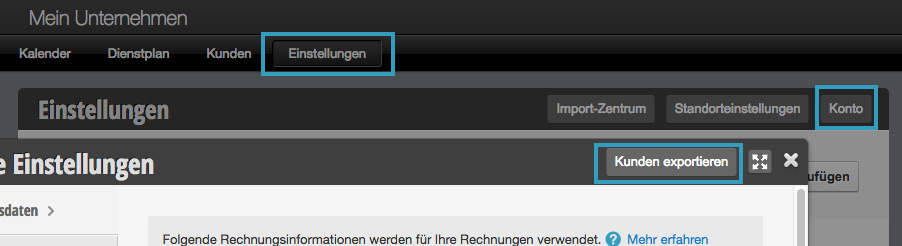
This is only permitted for employees who have the appropriate permissions.

Read more →

Duty schedule: Exports

The service schedule exports give you the option to save various formats of your service schedules.

You can access this area via Service Schedule > Options

Read more →

This manual is a service by belbo. Legal notice