
belbo
  • Overview
    • Getting to know Belbo
    • Location Settings
    • Switch to Belbo
    • Calendar View & Navigation
    • Recurring Appointments & Courses
    • Appointment Entry & Management
    • Logins & Permissions
    • Multiple Locations & Head Office
    • Manage Employees
    • Absences & Holidays
    • General
    • Working Hours
    • Time Tracking
    • Data Protection (GDPR)
    • Customer Communication (Email, SMS)
    • Customer Management & Records
    • Bonus & Loyalty Programs
    • Campaigns (Newsletter & SMS)
    • Marketing Consents (GDPR)
    • Tracking & Analytics
    • Overview
    • Services & Prices
    • Products
    • Service Packages & Subscriptions
    • Vouchers
    • Purchasing & Suppliers
    • Stock & Inventory
    • Scanning & Sales
    • Cost of Goods & Expenses
    • Design & Texts
    • Setup & Settings
    • Integration (Website, Google, Instagram, Facebook)
    • Online payment
    • Accounting & Exports
    • Cash Register Settings & Hardware
    • Checkout process
    • Daily Closing & Reports
    • TSE & Cash Register Anti-Tampering Ordinance
    • Export Overview
    • Employee Utilization
    • Revenue & Reports
    • Belbo Satellite
    • Printer
    • EC Terminal & Card Payment
    • Troubleshooting Hardware
    • Scanner & POS Devices
    • General Settings
    • API & Integrations
    • Notifications & Emails
    • Contracts & Legal
Skip to content

Everything about: Data Protection (GDPR)

Manual Data Disclosure Upon Customer Request

Your customers have the right to view all data stored about them. As a processor of this data, you must comply with the legally specified deadline to fulfill your customer's request in this regard. If you do not provide the data, severe penalties will be imposed. Belbo supports you in complying with this request in accordance with the law.

Please note in this context Article 15 GDPR

Notifications for Data Requests

Online data request by the customer
Your customers have the option to request access to their own data in the online booking. You will then receive:

  • an email to the email address specified in the data protection settings
  • a new entry in the data protection requests on the settings page of your calendar

Customer data request by other means
Even if a customer expresses the wish to gain insight into the data processed about him or her in conversation with an employee, you can fulfill this request. To do so, please first go to "Customers" and access the relevant customer file to file the data request.

Processing Data Requests

Under Settings > Data Protection Requests (top right) > Data Requests all received data requests can be viewed and processed. To issue a data disclosure, click on "Download" in the desired request and save the data file locally.

Send the data set to the email address shown within the data request and set the status to "completed".

Important: If you use the customer's data in any other way than in Belbo, you must include this in your message. This applies, for example, if you use another cash register system or an external marketing tool with which you also process customer data.

Manual Data Deletion on Customer Request

Your customers have the right to request the deletion of all data stored about them. As a processor of this data, you must comply with the legally defined deadline to fulfill your customer's request. If you do not delete the data, severe penalties are threatened. Belbo supports you in complying with this request in accordance with the law.

If you would like to test this process once, please use an email address that has not been used in the calendar before. If you test this with your own login through to the end, it will be completely deleted and you will no longer be able to log in to Belbo.

Please note in this context Article 17 GDPR

Notifications for deletion requests

Online deletion request by the customer
Your customers have the option to request deletion of their own data in the online booking. You will then receive:

  • an email to the email address specified in the Privacy Settings
  • a new entry in the Data protection requests on the settings page of your calendar

Customer's deletion request by other means
Even if a customer expresses the wish in a conversation with a staff member to have the processed data about him/her completely deleted from the calendar, you can fulfill this request. To do this, please first go to "Customers" and open the corresponding customer file and register the deletion request.


Processing deletion requests

Attention: Please research before deletion whether there may be duplicates of this customer in your customer file. Merge these before deletion, or delete them manually.
If you are also using the customer data in a third-party program or regularly backing up your customer data as a CSV file, the customer data to be deleted must also be removed from these records.

Under Settings > Data Protection Requests > Deletion Request all received deletion requests can be viewed and processed. To perform a data deletion, click on one of the requests and set the status to "completed". After saving, the record will be deleted.


Within the statutory retention periods, some basic customer data will continue to be visible to the owner and finance accountant. However, the customer file will be removed from your database.

Privacy Requests

Your customers have the right to view all data stored about them or have it deleted. As a processor of this data, you must comply with the legally defined deadline to fulfill your customer's request in this regard. If you do not provide or delete the data, severe penalties threaten. Belbo supports you in complying with this request in accordance with the law.

Please note in this context Articles 16 – 20 GDPR


Your customers can request data retrieval or deletion on the online booking page. Belbo offers you the following options for handling these requests:

Fulfilling these requests

You will be notified by email and in the calendar that customers have made the request and you must comply with it within the legally prescribed deadline yourself.

  • Guide to data deletion: Manual data deletion at customer request
  • Guide to data disclosure: Manual data disclosure following customer request

View requests

As soon as a customer has made a corresponding request, you will be notified. This allows you to respond and potentially remove the customer from other services into which you enter customer data (e.g. external cash register systems, address books or analytics tools).

You can find an overview of all requests under Settings > Privacy requests

Information obligation under the General Data Protection Regulation

You are legally required to inform your customers that you process their data. Furthermore, you must inform your customers about the duration, legal basis and purpose of storage and other circumstances. You should also provide your customers with the name and contact details of the person responsible and, if applicable, your data protection officer in the event of data processing. Additionally, customers should be informed of their rights (including the right to request or delete data and the possibility of lodging a complaint with the competent supervisory authority).

In this context, we refer you to Article 13 GDPR. Please note that we are not permitted to provide you with binding legal advice.

With Belbo's online booking system, the customer is informed by email about the storage and all other required information. This happens automatically when your customers make an online booking. If the customer does not want to or cannot provide an email contact, it is possible to keep a written template for the customer in your business.
If a customer books an appointment by telephone or visits your business in person, you must inform the customer by telephone or in person about the data processing. You can also send an email to the customer from the customer file:

Information obligation in the customer file

In every customer file, you will be notified with a note icon if a customer has not yet received the information about the collection of personal data. If an email address has been provided for the customer, you can send this information to the customer by email.

Simply click on the button marked with an orange flag to get a preview of the message that will be sent to the customer in the next step. You can then send the message to the customer.

Information obligation for existing customers

The information obligation arises as soon as you collect new data (for example, by booking an appointment for this customer). Existing customer data that was entered before 25.05.2018 remains unaffected by the regulation until new customer data is collected.

Edit email text yourself

The email sent to your customers has a standard text. If you would like to write it yourself, you can override the template. You can find this function under Settings > Data Protection > Information Obligation.

Privacy Settings Overview

In the data protection settings, you can make some important settings that help you comply with the legal data protection requirements according to the GDPR.
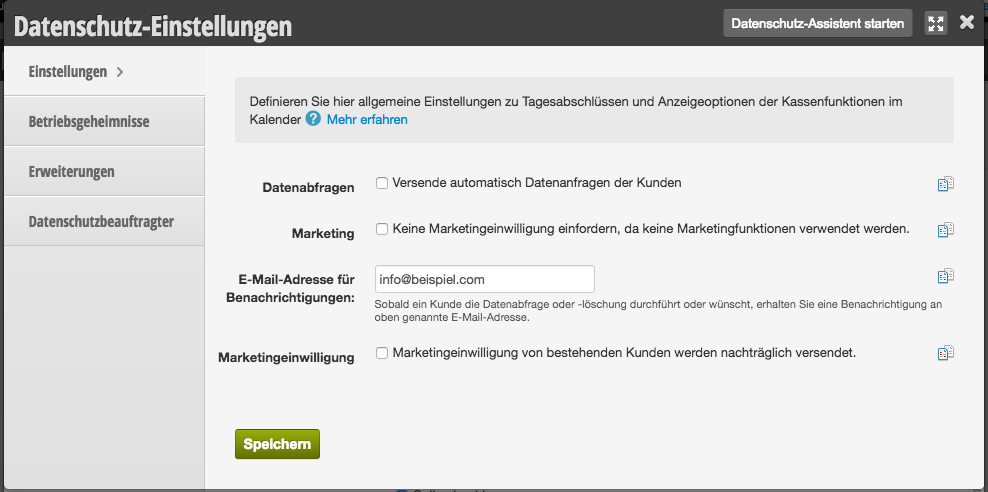
You can access this area via Settings > Location Management > Data Protection Settings

Data Requests

Your customers have the right to request the data stored about them or to have it deleted. Part of the regulation is that according to the GDPR, you only have a certain time period to fulfill this request.

Activation of Data Requests
We recommend enabling data requests. In this case, your customers have the option to request their own data or to have it deleted in compliance with the GDPR. This way you fulfill the legal requirements without having to personally handle such requests. You will be notified in case of a request or deletion. This allows you to also remove the customer from other systems you use. Since you are subject to retention obligations as a service provider, the data required for this requirement will be retained in any case. However, the customer file will be deleted from the database.
If you disable this function and select manual sending, you must become familiar with the legal regulations and promptly fulfill the customer's request accordingly.

Marketing

If you want to use the marketing functions, you must ensure that all customers who have active marketing consent have also given legally compliant consent. If you do not plan to use Belbo's marketing functions, you do not need to enable this field.

Email Address for Notifications

Whenever a customer performs or requests a data request or deletion, you will receive a notification at the email address listed above. This allows you to also remove the customer from other systems where you have stored the customer's data.

Marketing Consent

If you had already granted marketing consents before the GDPR came into effect on 25.05.2018, you can use the sending of retroactive marketing consent to legally determine whether the marketing emails also correspond to the customer's wishes.

Data Protection Settings: Extensions

You can add your own passages to the data protection terms shown to your customers on your online booking page.

You can access this area via
Settings > Location Settings > Data Protection Settings > Extensions

Privacy Settings: Data Protection Officer

If you have appointed a data protection officer in your company, you can enter this person's data in the Belbo system.

You can access this area via Settings > Location Settings > Data Protection Settings

Note: A business such as a hairdresser/cosmetics institute/fitness studio typically does not need to appoint a data protection officer as long as the number of people in your company who process data is less than 10. Please check with your legal advisor or the responsible authority whether this applies to your company.

The data protection officer's information will then appear in your privacy policy, which your customers can view when booking online. Additionally, you can inform your customers as part of your information obligations.

Mark customer fields as trade secrets (GDPR)

According to the General Data Protection Regulation, your customers have the right to access the data that is processed about them. With Belbo, you have the option to comply with this request in accordance with the law. Customers can either view their own data directly or express this request in the profile area of the booking interface. The customer will then receive their data in the requested format. According to § 14 GDPR (paragraph 5), there are some exceptions for the data in which professional secrecy is explicitly mentioned.

Depending on the industry, this can involve different information. These data fields may only contain information that does not uniquely identify the customer and is performance-related. Examples of these are: color formulations (hairdresser), machine configurations and results of skin image analysis (cosmetics), current strength (EMS sports). Which data this is in your case can be clarified within a legal consultation.

In Belbo, you can mark customer fields as trade secrets. You must ensure that fields marked as "trade secrets" comply with the legal definition. Fields that do not contain trade secrets must not be marked as such.

Mark customer field as trade secret

You can access this area via Settings > Location Settings > Privacy Settings > Trade Secret

In the privacy settings, you have the option to view and mark the existing customer fields. In step 4, please check all fields that you want to mark as a trade secret. Your customer will be informed during the data request that the data field exists, however, the content is not accessible to the customer.

This area is currently being revised and will be available to you soon.

If you have any questions, please feel free to contact us at +49 30 5770 9641 or info@belbo.com.

Data Security

With the Belbo calendar, you have the opportunity to comprehensively document your business processes so that, for example, in the event of a tax audit, you can fully present the required documents.

In this article, we provide you with information and guidance on data security with regard to the retention obligation for business-relevant data. For comprehensive, legally sound advice on tax matters, please contact your tax office or a specialist lawyer.

With the Belbo calendar, you use a digital system for data processing. We support you in meeting your legal retention obligations by securely storing all your calendar data. You have numerous export options for business-relevant data so you can store them in digital or printed form. This includes financial data such as daily and monthly statements, pricing information, as well as appointment and customer data. In addition, we permanently store your data on our secure servers.

Frequently Asked Questions

Can the tax office access my data?

Your current and historical data are safely stored on our servers and protected against external access. However, you are obligated to provide your data to certain authorities upon request ("duty to cooperate"). This may also include financial and appointment data. With the Belbo calendar, you always have the option to provide complete documentation of this data.

Can accidentally or intentionally deleted appointments be restored?

Appointments removed from the calendar can be viewed at any time. This is important to simplify communication within the team and to assess the reliability of your customers. You will still see deleted appointments in the protocol and in each customer file so you can trace changes and deletions. Permanent removal of entered appointments from the database is not possible.

What happens if a customer does not appear at the scheduled appointment?

Despite the reminder function via email and SMS, it can happen that your customers do not appear at the scheduled appointment. In this case, we recommend that you do not delete the missed appointment, but instead mark it as "Missed" and provide a reason for the no-show. More information can be found here. Customers who book appointments online can book the freed time slot even if the missed appointment was not deleted.

Where can I find the appointments of deleted employees?

We recommend not removing departing employees, but instead giving them an appropriate employee role. This way you can always access the employee's data. However, they will be hidden in the calendar, schedule, and cash register system to simplify your daily workflows.
Even if you delete departing employees from the calendar, your data will be retained. Upon request from us, they can be displayed again at any time. This can be very advantageous in the event of labor law conflicts with departing employees or during external audits.

I have a seasonal discount promotion that affects my prices for a specific period.

Discount promotions can be an effective marketing tool. Always keep records of these promotions long-term and carefully document the discounts given in your cash register system. This way you can always justify the resulting change in your pricing.
If you use the Belbo cash register system, you can enter and document discounts given during the checkout process.

I have changed my prices in the past.

You can also carefully document price changes. Export the list of your services before a price change, mark it with a clear date, and keep it together with your other documents.

I have irregularities in my cash register balance.

If you or your employees notice discrepancies between expected and actual cash register balance, you can correct them. In most cases, the payment method was confused during the checkout process, which is easy to correct. Every reversal and every correction of your data is documented. All your employees must be familiar with the rules of proper cash register management and perform them carefully.
In the unfortunate event that you suspect an employee of manipulating your cash balance, you are required to file a police report – if necessary, even against an unknown party.

How can I prevent new or temporary employees from having access to all my data?

You can restrict your employees' access rights to areas necessary for daily operations. In each employee file, you have the option to restrict calendar access to today and the future. Additionally, you can also determine which appointment columns are visible to your employees.
In the rights management, you can restrict access rights to the customer file, settings, and many other areas. We recommend setting up a general login for your employees, which is limited to the functions necessary in daily operations – also to simplify daily workflows. You can assign selected employees additional logins with further administration rights.

Can I additionally secure individual logins?

Yes. In addition to restricting access rights, you can additionally protect individual logins with two-factor authentication (2FA). This means that a compromised password alone is no longer sufficient to gain access to sensitive data such as customer data, sales, and reports.

An overview of all options for restricting access can be found here.
This manual is a service by belbo. Legal notice