
belbo
  • Overview
    • Getting to know Belbo
    • Location Settings
    • Switch to Belbo
    • Calendar View & Navigation
    • Recurring Appointments & Courses
    • Appointment Entry & Management
    • Tasks
    • Overview
    • Multiple Locations & Head Office
    • Manage Employees
    • Logins
    • Rights
    • Overview
    • Absences & Holidays
    • Working Hours
    • Time Tracking
    • Overview
    • Data Protection (GDPR)
    • Customer Communication (Email, SMS)
    • Customer Management & Records
    • Overview
    • Bonus & Loyalty Programs
    • Campaigns (Newsletter & SMS)
    • Marketing Consents (GDPR)
    • Tracking & Analytics
    • Overview
    • Services & Prices
    • Service Packages & Subscriptions
    • Vouchers
    • Products
    • Purchasing & Suppliers
    • Inventory & Stock Counts
    • Scan & Sales
    • Cost of Goods & Expenses
    • Overview
    • Setup & Settings
    • Design
    • I'm ready to help you translate the category name from German to English. However, I don't see the actual text to translate in your message. Please provide the German category name that needs to be translated, and I'll translate it for you while preserving all HTML tags, comments, and WordPress shortcodes exactly as they are.
    • Integration (Website, Google, Instagram, Facebook)
    • Online payment
    • Overview
    • Accounting & Exports
    • Cash Register Settings & Hardware
    • Checkout process
    • Daily Closing & Reports
    • TSE & Cash Register Anti-Tampering Ordinance
    • Overview
    • Export Overview
    • Employee Utilization
    • Revenue & Reports
    • Belbo Satellite
    • Printer
    • EC Terminal & Card Payment
    • Troubleshooting Hardware
    • Scanner & POS Devices
    • General Settings
    • API & Integrations
    • Notifications & Emails
    • Contracts & Legal
Skip to content

Logins & Rights

Distribute Permissions

Feature: General › Employees › Cash Register PermissionsFeature: General › Employees › RightsFeature: General › Employees › Contract Rights

Employees can only receive different rights if they have a user login.

Available rights:

General rights

  • Release absences
  • Working times
  • GDPR Supervisor
  • Edit settings
  • Head office
  • Configuration
  • Customer database
  • Customer fields
  • Customer message error messages
  • Services & online booking process
  • Login
  • Manual bookings
  • Manage employee PIN
  • Manage employees
  • Manage packages
  • Create and edit packages
  • View prices
  • Invoices
  • Multi-location settings
  • Statistics & Reports
  • View statistics
  • Tax office
  • Delete daily closings
  • Appointments
  • Edit time tracking times

Cash register rights

  • Create old vouchers
  • Manage expenses
  • Edit prices in billing process
  • Create invoice
  • Cancel invoice
  • Create daily closings
  • Change revenue assignment retroactively
  • View past daily closings
If you use the Belbo cash register system, you can give your employees individual cash register rights.

Distribute rights

  1. Click on "Settings" in the navigation bar.
  2. Under the heading "Employees", select the function: "View and change employee rights".
  3. Click on the column of the desired right within the row of the desired employee.

Example of different rights distribution:
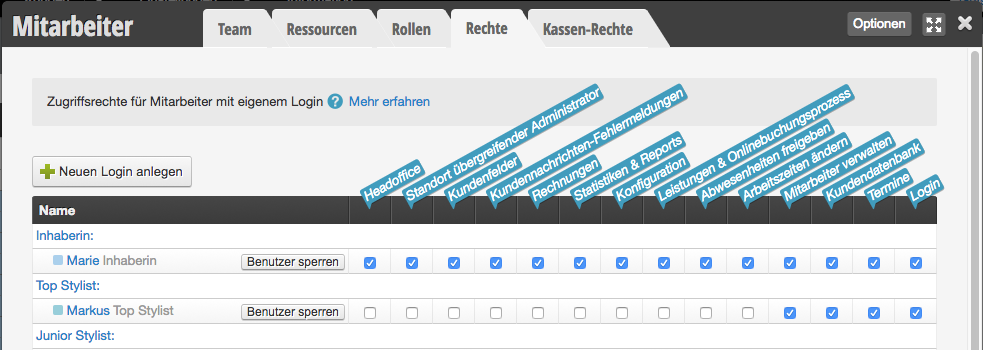
Here you will find case studies on how you can distribute rights as well as our recommendation.

An overview of all options for restricting access can be found here.

Guides

POS Law: Create legacy vouchers
You can access this area via Settings > Employees > Cash Register Rights This right relates to the…
Cash register law: Manage expenses
You can access this area via Settings > Employees > Rights This right applies to the cash register…
Cash Register Law: Edit prices in the invoicing process
You can access this area via Settings > Employees > Cash Register Rights This right relates to the…
Cash Register Law: Create Invoice
You can access this area via Settings > Employees > Rights This right applies to the cash register…
Receipts Law: Void Receipt
You can access this area via Settings > Employees > Cash Register Rights This right relates to the…
Cash Register Law: Creating Daily Closing Statements
You can access this area via Settings > Employees > Cash Register Rights This right relates to the…
Cash register law: Change revenue allocation retroactively
The right to change revenue allocation retroactively allows you to change the team member who provided the service…
Cash Register Law: View Past Daily Closings
You can access this area via Settings > Employees > Cash Register Rights This right relates to the…
Rights: Release Absences
You can access this area via Settings > Employees > Permissions If you have the schedule setting "Absences…
Right: GDPR Supervisor
You can access this area via Settings > Employees > Rights The "GDPR Supervisor" right unlocks functions with…
Law: Edit Settings
You can access this area via Settings > Employees > Cash Register Rights This right relates to the…
Law: Head Office
You can access this area via Settings > Employees > Permissions If you have multiple locations, you can…
Rights: Configuration
You can access this area via Settings > Employees > Permissions The configuration permission is linked to many…
Rights: Customer Database
You can access this area via Settings > Employees > Permissions With this permission, logins can browse the…
Rights: Customer Fields
You can access this area via Settings > Employees > Rights With additional customer fields, you can customize…
Law: Customer Message Error Messages
You can access this area via Settings > Staff > Permissions Reminder and confirmation emails are important for…
Rights: Services & Online Booking Process
You can access this area via Settings > Employees > Rights Employees with the "Services & Online Booking…
Law: Manual Entries
You can access this area via Settings > Employees > Cash Register Rights This right refers to the…
Rights: Manage employee PIN
You can access this area via Settings > Employees > Permissions With the "Employee PIN" function, you can…
Right: Manage Employees
You can access this area via Settings > Employees > Permissions With this permission, employees can be created,…
Law: Manage package
You can access this area via Settings > Employees > Permissions With the Service Packages function, you can…
Rights: Create and edit packages
You can access this area via Settings > Employees > Rights With the Service Packages function, you can…
Rights: Invoices
You can access this area via Settings > Employees > Permissions Employees with the "Invoices" permission can view…
Rights: Cross-location Settings
You can access this area via Settings > Employees > Rights If you have linked multiple locations in…
Right: Statistics & Reports
You can access this area via Settings > Employees > Rights Employees who have the right "Statistics &…
Rights: View Statistics
You can access this area via Settings > Employees > Cash Register Rights This right relates to the…
Law: Tax office
You can access this area via Settings > Employees > Cash Register Rights This right relates to the…
Law: Delete Daily Closings
You can access this area via Settings > Employees > Cash Register Rights With this right, a daily…
Rights: Appointments
You can access this area via Settings > Employees > Rights This is another minimal right that allows…
Rights: Edit time tracking entries
You can access this area via Settings > Employees > Permissions With the Time tracking function, you can…
Rights: Working Hours
With this right, work times, breaks and absences can be created, changed and deleted for all employees. If…
Rights: Login
You can access this area via Settings > Employees > Rights This is the minimal right required to…
Permissions: View prices
You can access this area via Settings > Employees > Rights Restrict whether an employee can view cash…
This manual is a service by belbo. Legal notice