
belbo
  • Overview
    • Getting to know Belbo
    • Location Settings
    • Switch to Belbo
    • Calendar View & Navigation
    • Recurring Appointments & Courses
    • Appointment Entry & Management
    • Logins & Permissions
    • Multiple Locations & Head Office
    • Manage Employees
    • Absences & Holidays
    • General
    • Working Hours
    • Time Tracking
    • Data Protection (GDPR)
    • Customer Communication (Email, SMS)
    • Customer Management & Records
    • Bonus & Loyalty Programs
    • Campaigns (Newsletter & SMS)
    • Marketing Consents (GDPR)
    • Tracking & Analytics
    • Overview
    • Services & Prices
    • Products
    • Service Packages & Subscriptions
    • Vouchers
    • Purchasing & Suppliers
    • Stock & Inventory
    • Scanning & Sales
    • Cost of goods & expenses
    • Design & Texts
    • Setup & Settings
    • Integration (Website, Google, Instagram, Facebook)
    • Online payment
    • Accounting & Exports
    • Cash Register Settings & Hardware
    • Checkout process
    • Daily Closing & Reports
    • TSE & Cash Register Anti-Tampering Ordinance
    • Export Overview
    • Employee Utilization
    • Revenue & Reports
    • Belbo Satellite
    • Printer
    • EC Terminal & Card Payment
    • Troubleshooting Hardware
    • Scanner & POS Devices
    • General Settings
    • API & Integrations
    • Notifications & Emails
    • Contracts & Legal
Skip to content

Manual Data Disclosure Upon Customer Request

Your customers have the right to view all data stored about them. As a processor of this data, you must comply with the legally specified deadline to fulfill your customer's request in this regard. If you do not provide the data, severe penalties will be imposed. Belbo supports you in complying with this request in accordance with the law.

Please note in this context Article 15 GDPR

Notifications for Data Requests

Online data request by the customer
Your customers have the option to request access to their own data in the online booking. You will then receive:

  • an email to the email address specified in the data protection settings
  • a new entry in the data protection requests on the settings page of your calendar

Customer data request by other means
Even if a customer expresses the wish to gain insight into the data processed about him or her in conversation with an employee, you can fulfill this request. To do so, please first go to "Customers" and access the relevant customer file to file the data request.

Processing Data Requests

Under Settings > Data Protection Requests (top right) > Data Requests all received data requests can be viewed and processed. To issue a data disclosure, click on "Download" in the desired request and save the data file locally.
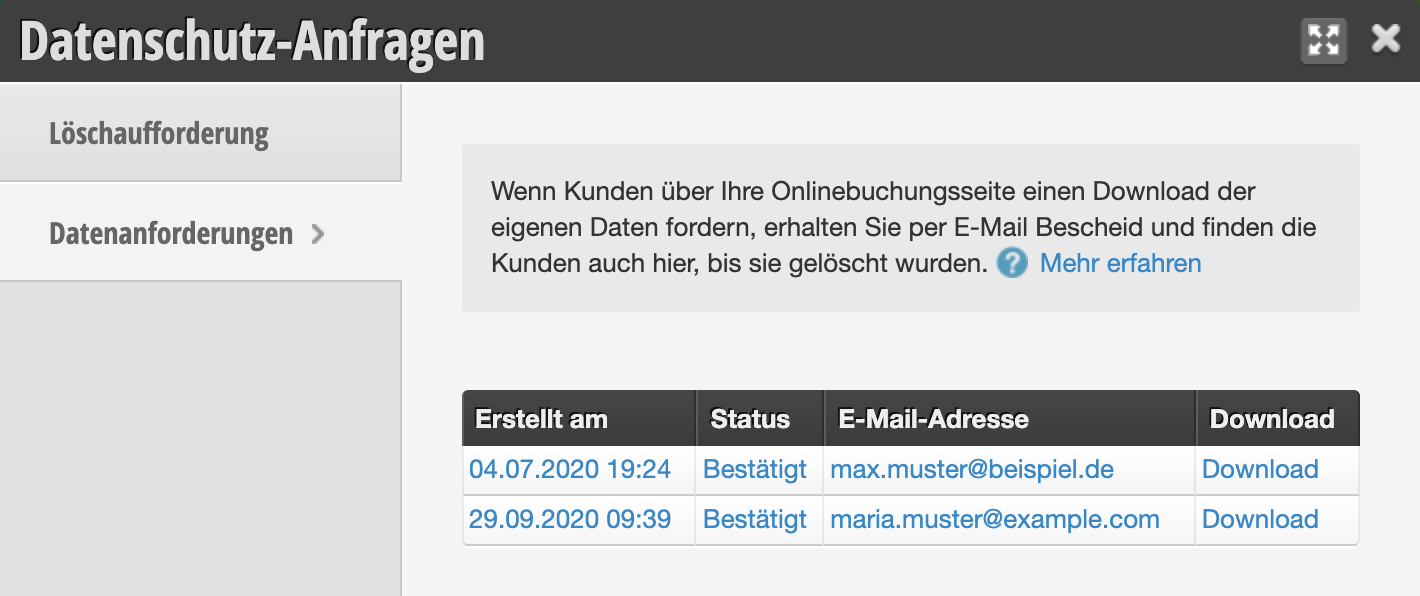
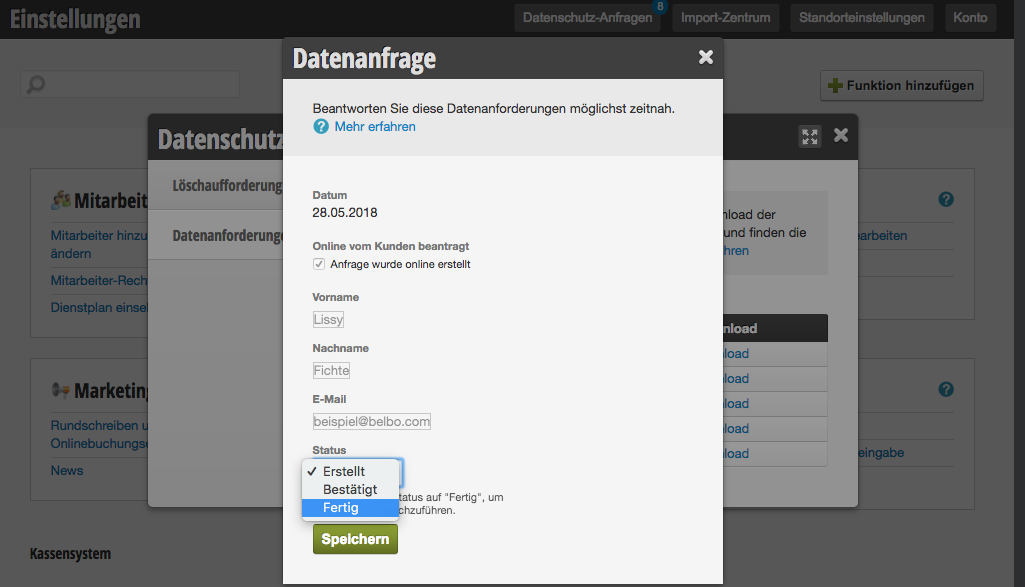
Send the data set to the email address shown within the data request and set the status to "completed".

Important: If you use the customer's data in any other way than in Belbo, you must include this in your message. This applies, for example, if you use another cash register system or an external marketing tool with which you also process customer data.
Categories: Data Protection (GDPR)
This manual is a service by belbo. Legal notice
