
In the customer file, a note may appear at a customer's email address indicating that this address is blocked. This block was not set by you or your team and is not a customer unsubscribe from your messages – it comes automatically from our shipping system.
Read moreEverything about: Customers
Duplicates are not found - Trick
If "ignore" was clicked during a merge in the past, these will not be recognized as duplicates.
Read moreSender email address
You can set up your own sender email address for outgoing emails from belbo instead of using the standard address termine@belbo.com. This is possible, but requires additional settings outside of belbo – directly at your domain.
Read moreSend customer questionnaires as direct message via email
With the Customer Questionnaires function, customers can fill in certain data themselves. For example, they can be filled out and signed directly on-site on an iPad. If you would like to send the questionnaires via email to specific customers, proceed as described here.
Read moreCost Estimate
Cost estimate: A new customer field type "Multiple Products" allows you to store services & products in the customer file, which can also be sent by email. Users without a Belbo cash register system can also use this function.
Read moreCreate customer questionnaire in practice
In Belbo, you create a customer questionnaire in two steps:
- The customer fields to be queried are structured and created in tabs
- The tabs are stored in customer questionnaires in query steps
1. Create customer fields in a structured way
Under Settings > Customers > Customer Settings > Tabs > + Tab you can first create a new tab:
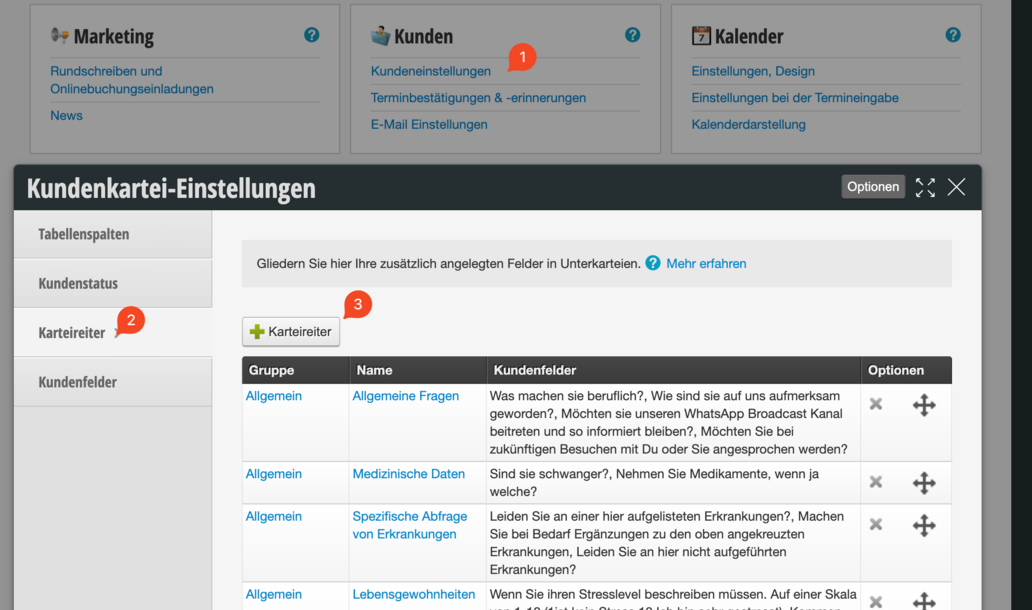
We recommend creating one tab per section in the patient history form.

To keep things even more organized, we recommend assigning the same "Parent Tab" for each patient history form. It is important that the name of the parent tab is spelled the same everywhere!

Now you can create the customer fields in the tabs. To do this, click on the blue tab name (1), then on Customer Fields (2) and then on "+ Customer Field" (3)
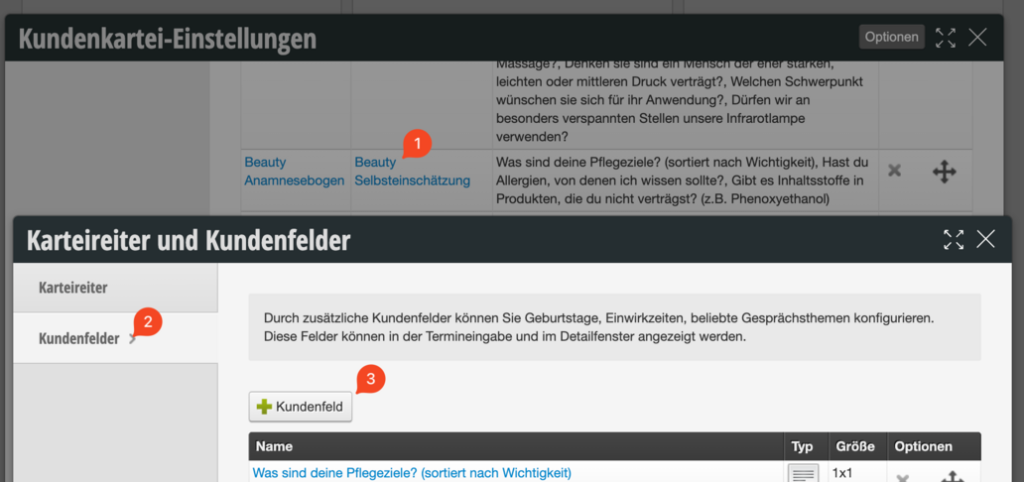
Customer fields in Belbo have different types. For customer questionnaires, the "Checkbox Group" type can be used in 90% of cases. Other options are "Text Field" or "Large Text Field".
Examples:
Yes / No - Queries with checkbox groups:
Here the field name is the question and the type is checkbox group:
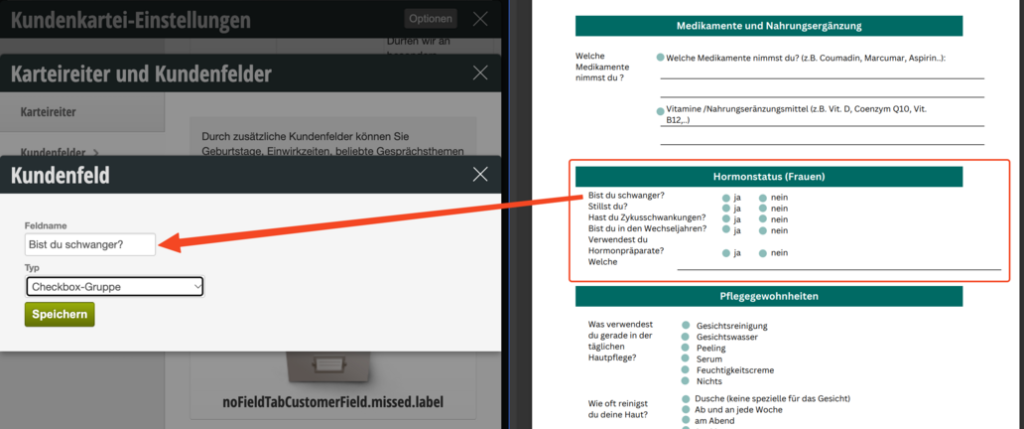

If you now click on the blue field name, you enter the detailed view of the field. Here you can enter the selection options in the description: "Yes" ENTER "No". A new line creates a new selection option.
Checkbox Groups:
It's similar with checkbox groups where customers should check multiple fields. The selection options are then each written on a new line:

Create customer questionnaires in a structured way
After all customer fields have been created in the appropriate tabs, the customer questionnaire can be created in the second step.
In the "Customer Questionnaires" function under Settings > Customer Questionnaires you can now create a new customer questionnaire.
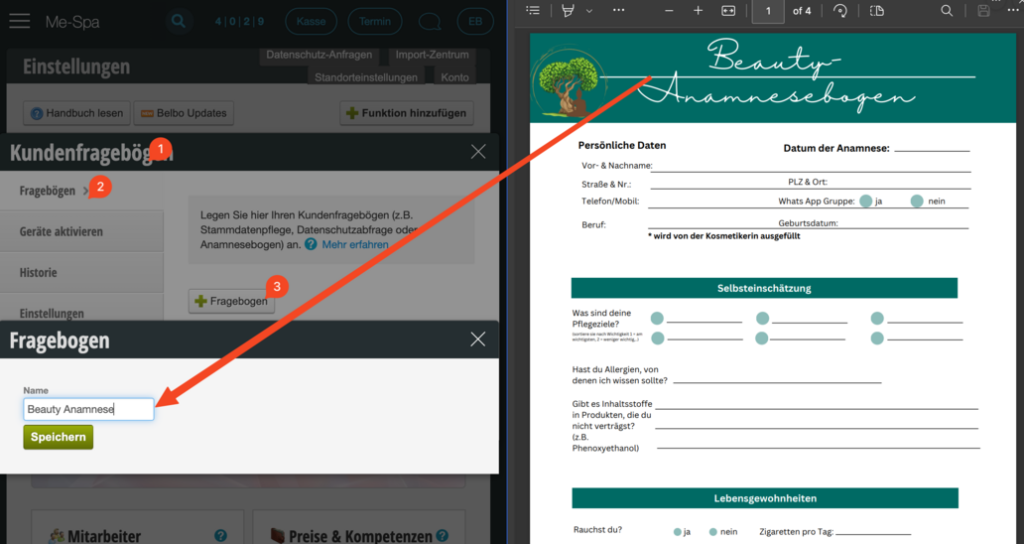
Now we configure the questionnaire. In general, we recommend always setting the following checkmarks:


Now we create a query step for each tab or section in the patient history form.
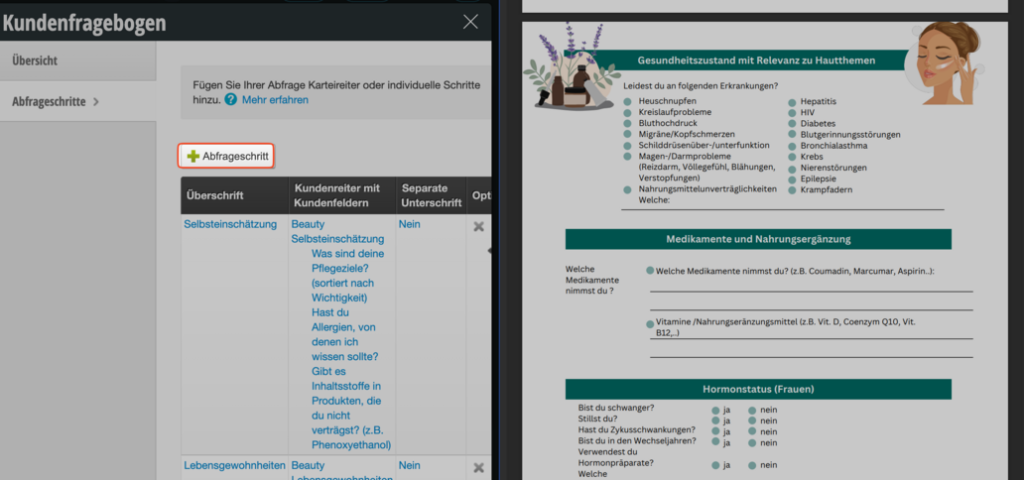
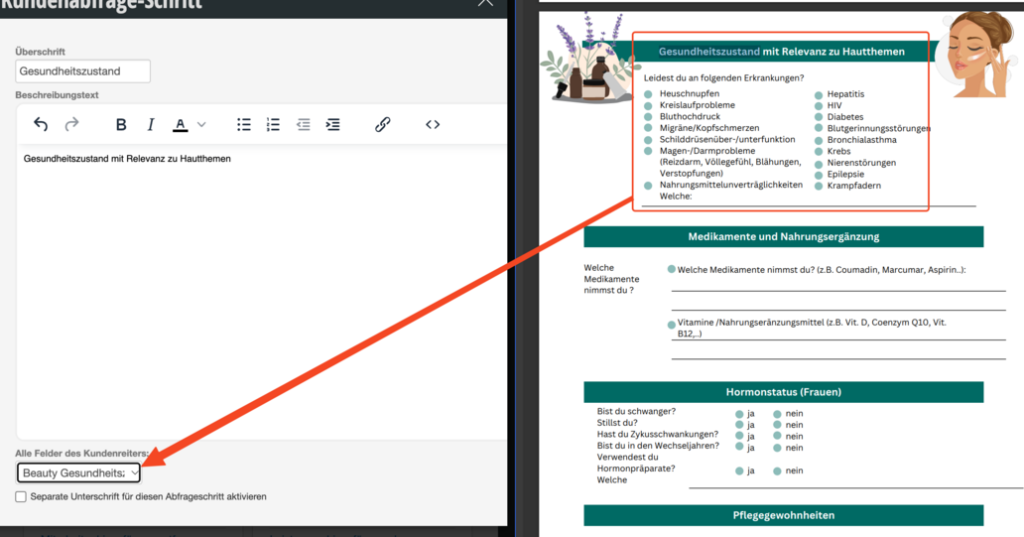
When we create a new query step, we select a heading, optionally also a description text, and can then select the corresponding tab in the lower section that should be queried in this step.
You can also enable the signature either at the end of the questionnaire or for individual steps, as needed, via the corresponding checkbox.
How a customer questionnaire can now be queried is described in the following article from step 4 onwards: /kundenabfrage/
Videos:
We have also recorded videos on the topic of creating customer questionnaires:
Customer field "Mark and label images"
With the customer field type "Mark and label images", you can store a schematic image in your customer files, which can be individually labeled for each customer.
Customer Categorization Using Customer Fields
To make your customers filterable beyond customer status, we recommend using additional customer fields.Read more
Reminder Overview
If you want to check which of your customers will receive a reminder for your appointment, you can use the reminder overview.
Contact Customers of the Day
If you want to contact all customers on a specific day (for example, because an employee is sick), you can do this in Belbo via email and SMS. Read more