
In the customer file, a note may appear at a customer's email address indicating that this address is blocked. This block was not set by you or your team and is not a customer unsubscribe from your messages – it comes automatically from our shipping system.
Why does this warning appear?
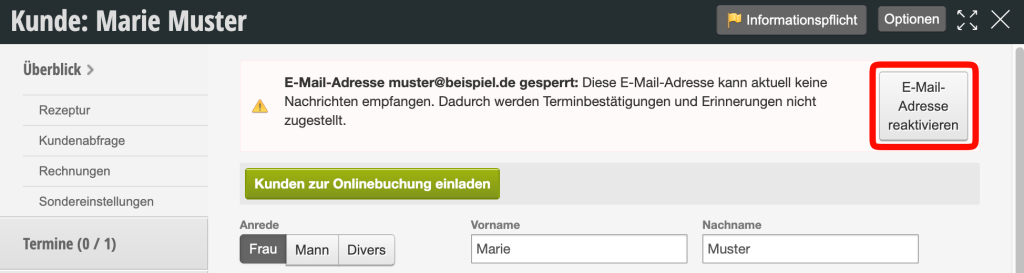
We reliably send emails such as appointment confirmations and reminders through our systems. Nevertheless, it can happen that individual emails are not delivered or are rejected by an email provider.
The reason for this usually does not lie in the actual sending, but in the very strict security mechanisms of email hosts. These providers fight huge amounts of spam every day – estimates suggest around 160 billion spam emails per day worldwide. To protect their users, they automatically check whether mass-sent emails have similar content, show suspicious patterns, or comply with certain filter rules.
Unfortunately, it can happen that legitimate messages are incorrectly blocked or rejected even though they were sent by a trustworthy sender with a good reputation. In email jargon, this is referred to as the reputation of the sender – which is generally very good with our shipping. However, a 100% delivery guarantee is technically not possible with emails.
If an email address is repeatedly rejected by a provider or reported as spam, our shipping system automatically sets a block note on this address. This prevents further unsuccessful attempts to send to this address and protects the shipping reputation, on which the delivery to all other customers also depends.
What does "Remove block note" do?
By clicking "Remove block note", you remove this internal block. The email address then receives its normal status again, and future messages such as appointment confirmations or reminders will be sent to this address again.
Previously, we could only carry out this reactivation internally for you. Now the function is available directly in the customer file, so you can use it yourself without contacting us.
Has the customer unsubscribed themselves?
No. The block note has nothing to do with a customer unsubscribing from newsletters or reminders. It is created purely technically when an email was rejected during sending or classified as spam. An independent unsubscribe by the customer would be noted elsewhere in the customer file, not as a block note at the email address.
What can you do?
- Remove the block note using the corresponding button in the customer file so that the address is supplied normally again.
- Ask the customer to add your messages as a safe sender. Unfortunately, we cannot provide a general instruction for this, as the procedure differs from one email provider to another.