
You can set up your own sender email address for outgoing emails from belbo instead of using the standard address termine@belbo.com. This is possible, but requires additional settings outside of belbo – directly at your domain.
Prerequisites
- The address must belong to your own domain that you operate yourself.
- Public email providers are not allowed, e.g. peter.lustig@gmail.com or peter.lustig@gmx.de do not work as a sender.
- You need access to the DNS management of the domain – or someone who has this access for you (see below).
Setup in email settings
Enter your desired address in the email settings. belbo will then show you the values for three DNS entries (SPF, DKIM, Return-Path) that must be added to the domain.
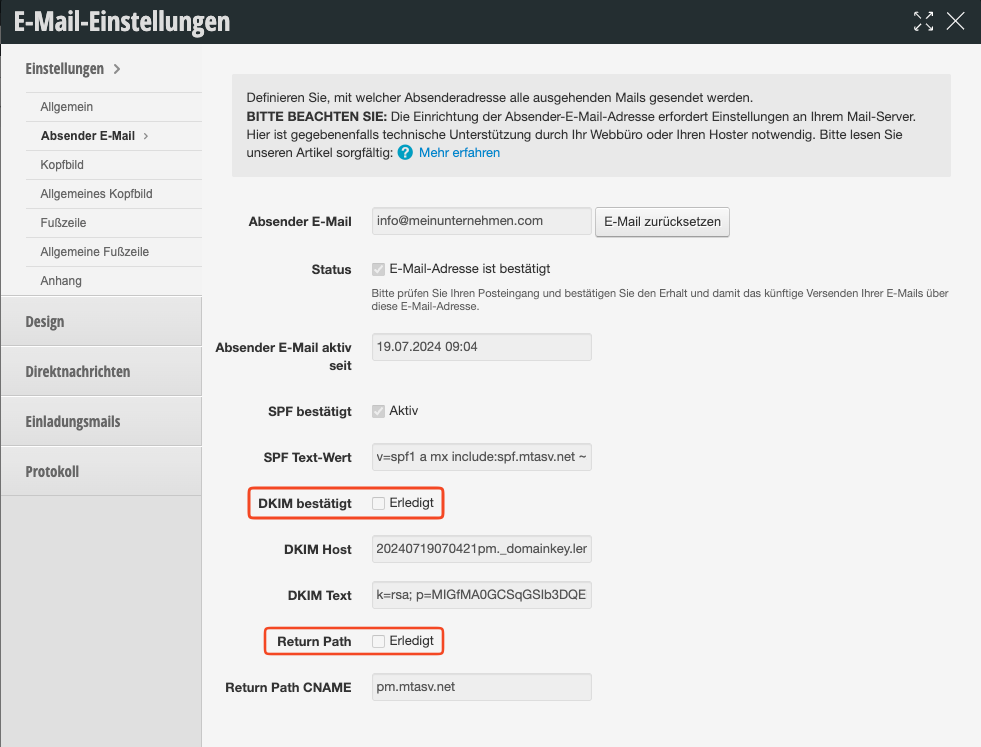
As long as SPF, DKIM and Return-Path are not all marked as verified/complete, sending via your own address is not reliably secured.
⚠️ Changing DNS entries is not a simple click
These entries cannot be set in belbo itself. They must be entered in the DNS management of your domain – that is, where the domain is registered or hosted (e.g. with your provider, hoster or web agency). Based on experience, this is not trivial:
- You need admin access to the DNS zone of the domain. If you don't have this yourself, your hoster or web agency must set the entries for you.
- The syntax of the entries (TXT or CNAME records) must be exactly copied – even a single missing character will cause the verification to fail.
- Changes do not take effect immediately: DNS propagation can take several hours to 48 hours depending on the provider.
- Incorrect or incomplete setup can result in emails not being delivered at all – not just ending up in spam.
If in doubt, we recommend making this change together with the person or company that manages your domain or website.
Which entries are required?
- SPF – TXT record that designates belbo as an authorized sender for your domain.
- DKIM – cryptographically signs outgoing emails so that recipient servers recognize them as unchanged and legitimate.
- Return-Path – CNAME record; the hostname must be exactly
pm-bounces.
What to do if emails land in spam or don't arrive?
Most often, DKIM or Return-Path entries are simply still missing. Check this in the email settings and pass on the missing values to the administrator of your domain.
If your own domain cannot be set up (in the short term), simply reset the sender address. belbo will then send again via the verified standard address termine@belbo.com, without delivery problems.