(Article under construction) Here we explain the setting options for the "Time Tracking" function (or "Check-In" in Switzerland).
Read more

(Article under construction) Here we explain the setting options for the "Time Tracking" function (or "Check-In" in Switzerland).
When you use time tracking with Belbo, all team members check in at the start of their work and check out again at the end. Here we explain what reports are available.
With Belbo, you can record your team members' working hours down to the minute. In the calendar, in addition to the shifts entered in the schedule, the actual start and end time of work for each team member is displayed. A monthly report provides information on the hours worked.
Read moreWith Belbo, you can record your team members' working hours down to the minute. In the calendar, in addition to the target hours entered in the employee profile, the actual work start time and end time of the respective team members are displayed. A monthly report provides information about the hours worked.
This type of recording is suitable for permanent employees who have fixed target hours. For freelancers and hourly workers, recording via the duty schedule is more suitable.
Read moreIf you want to allow your employees to log in to your Belbo calendar on a private mobile device, for example, they can receive their own logins. This type of login can be restricted in various ways. In everyday work, the Team Login continues to be used on the company computer.
With the commission calculator function, commissions for employees can be easily managed, calculated and evaluated.
Read moreIn Belbo, you create a customer questionnaire in two steps:
Under Settings > Customers > Customer Settings > Tabs > + Tab you can first create a new tab:
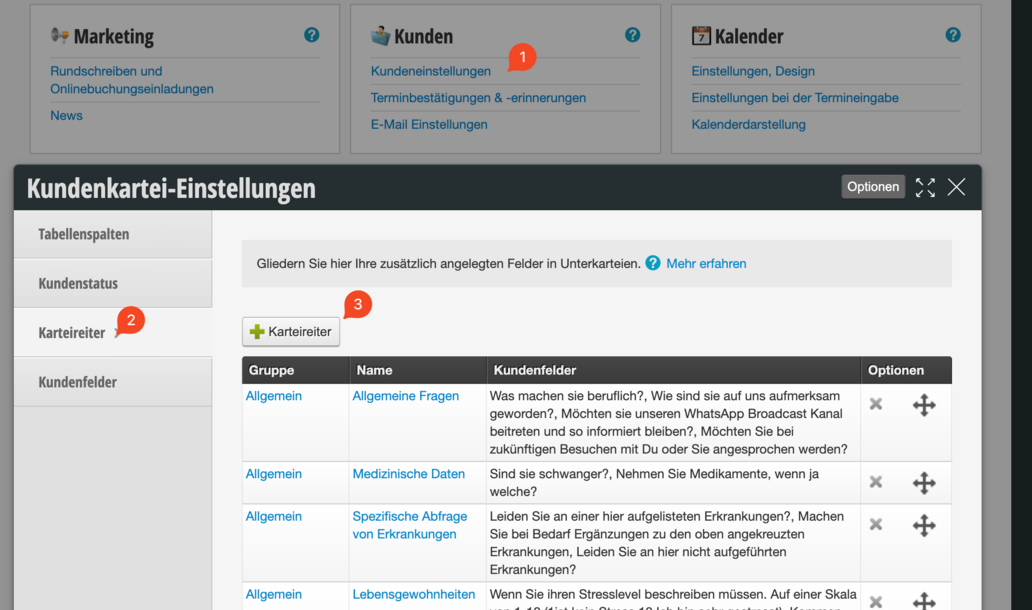
We recommend creating one tab per section in the patient history form.

To keep things even more organized, we recommend assigning the same "Parent Tab" for each patient history form. It is important that the name of the parent tab is spelled the same everywhere!

Now you can create the customer fields in the tabs. To do this, click on the blue tab name (1), then on Customer Fields (2) and then on "+ Customer Field" (3)
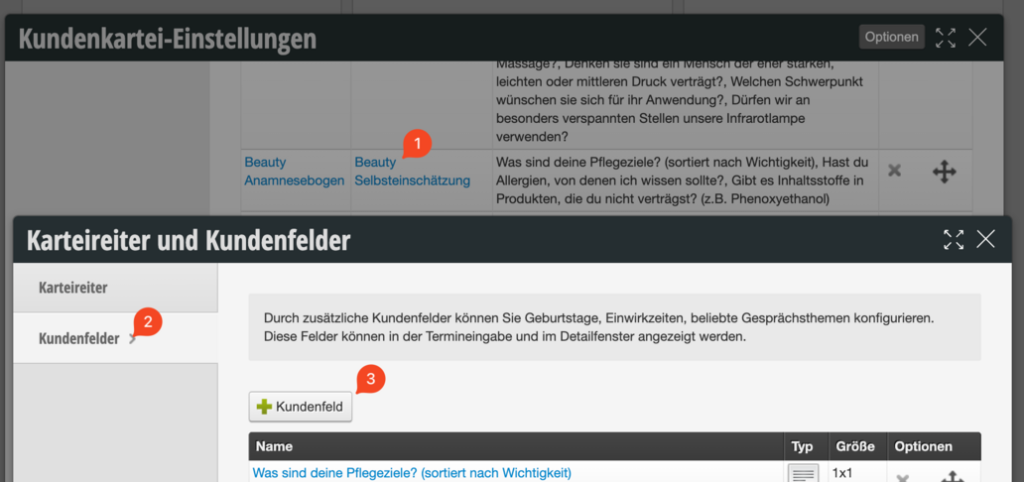
Customer fields in Belbo have different types. For customer questionnaires, the "Checkbox Group" type can be used in 90% of cases. Other options are "Text Field" or "Large Text Field".
Yes / No - Queries with checkbox groups:
Here the field name is the question and the type is checkbox group:
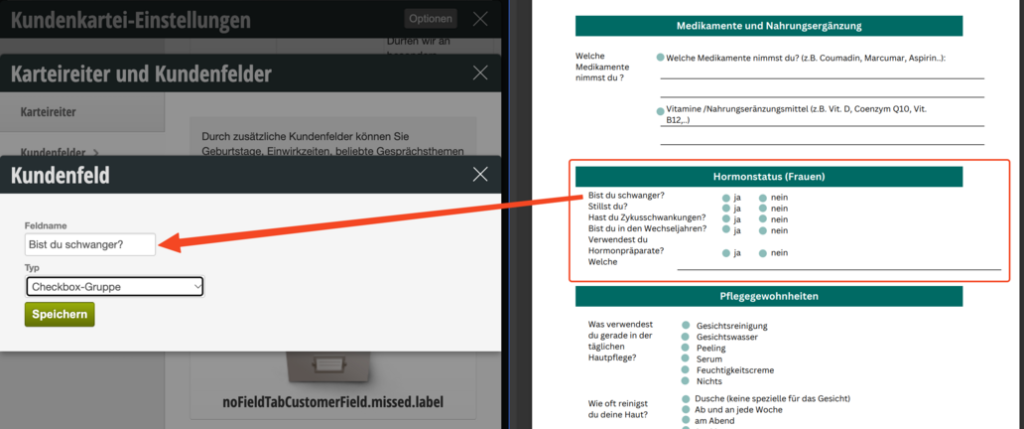

If you now click on the blue field name, you enter the detailed view of the field. Here you can enter the selection options in the description: "Yes" ENTER "No". A new line creates a new selection option.
Checkbox Groups:
It's similar with checkbox groups where customers should check multiple fields. The selection options are then each written on a new line:

After all customer fields have been created in the appropriate tabs, the customer questionnaire can be created in the second step.
In the "Customer Questionnaires" function under Settings > Customer Questionnaires you can now create a new customer questionnaire.
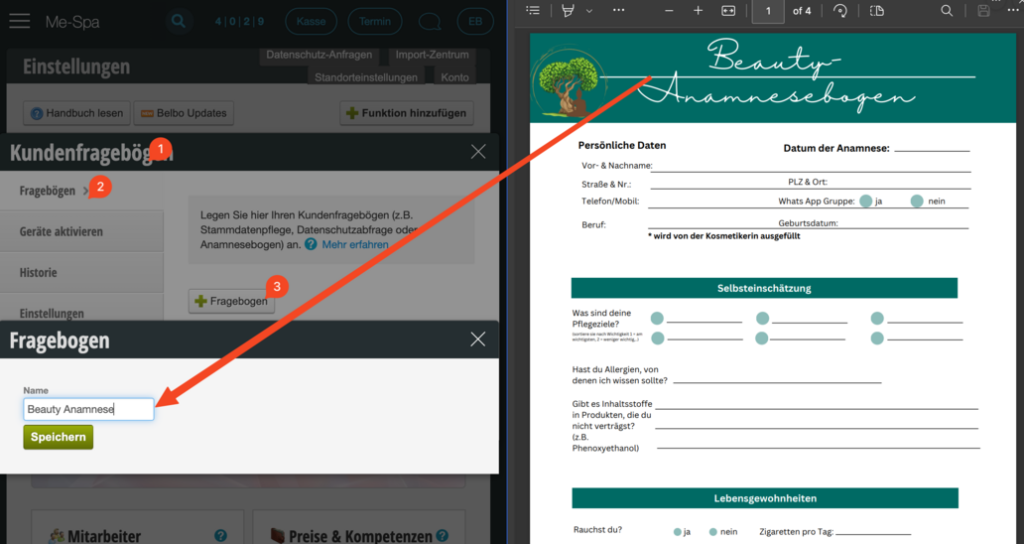
Now we configure the questionnaire. In general, we recommend always setting the following checkmarks:


Now we create a query step for each tab or section in the patient history form.
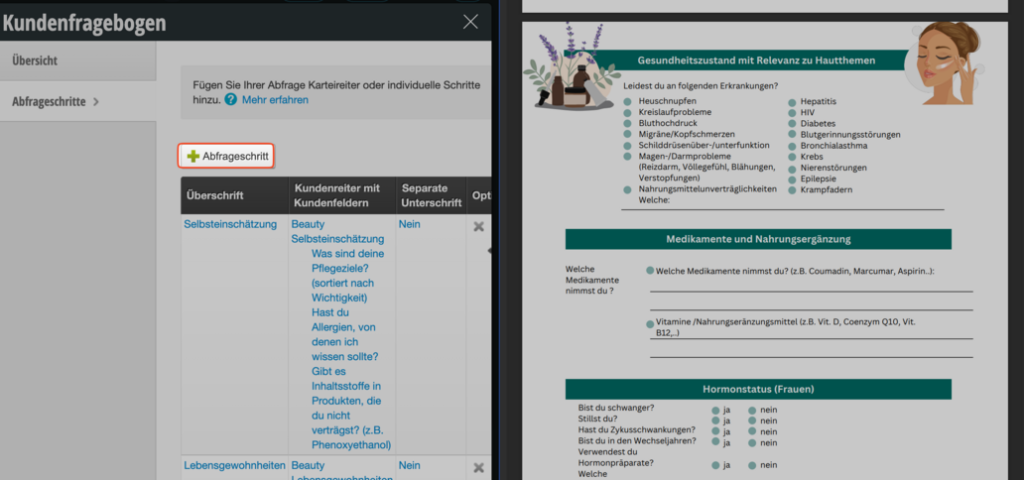
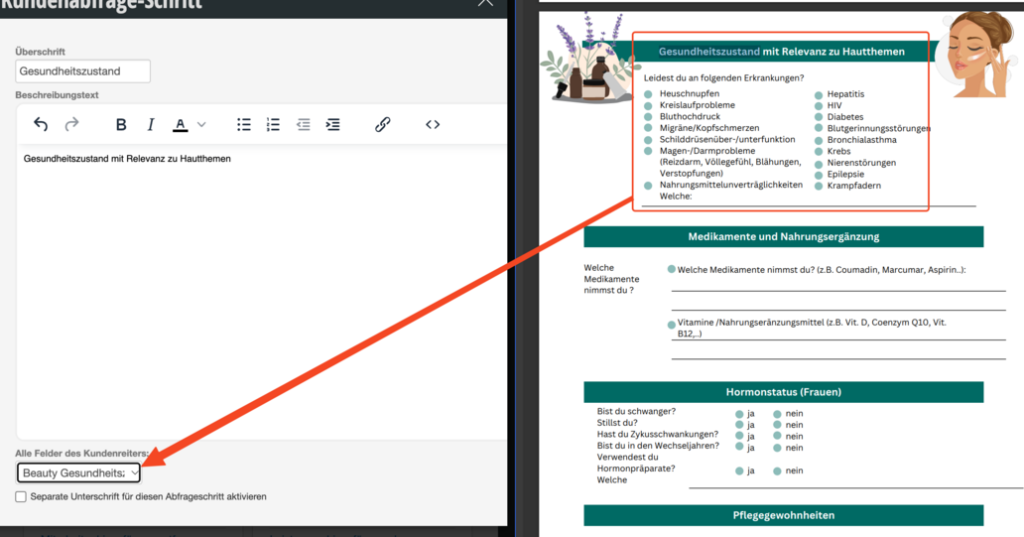
When we create a new query step, we select a heading, optionally also a description text, and can then select the corresponding tab in the lower section that should be queried in this step.
You can also enable the signature either at the end of the questionnaire or for individual steps, as needed, via the corresponding checkbox.
How a customer questionnaire can now be queried is described in the following article from step 4 onwards: /kundenabfrage/
We have also recorded videos on the topic of creating customer questionnaires:
If you offer services that involve two people working simultaneously, the revenue generated must usually also be allocated to these two people. If the service costs €100, for example, this amount can be distributed equally between the employees, or for example also 30/70. We explain how to do this here.
Read moreCash register operators in Germany must submit a cash register notification according to §146a AO once on 31.7.2025 when starting to use each cash register. This notification can be submitted either via your tax advisor or via Belbo.
Alternatively, the notification can of course also be made via the tax office. However, in case of updates or changes, you would have to take care of it yourself, since Belbo would then not automatically process the changes.