
Here we explain how to make a newly created service or service group available for online booking. This applies to customers who use the "Special Booking Process" function ("Booking Process" for Swiss customers).
Read moreFinding cancelled appointments
Here we show you different ways to find and view cancelled or deleted appointments.
Read morePrepaid Package Remaining Value as Voucher Payout
In the following video, we would like to show you how you can pay out the remaining value of a sold service package as a voucher.
Appointments enter - Under construction
Belbo Learning
Here you will find short, practical videos on the most important functions of Belbo – explained simply and ready to use immediately.
Recommended setup order
If you're just getting started, we recommend the following order. Your account is usually already populated with demo employees, services, and appointments so you can familiarize yourself with the system beforehand.
Read moreRefund online payments manually
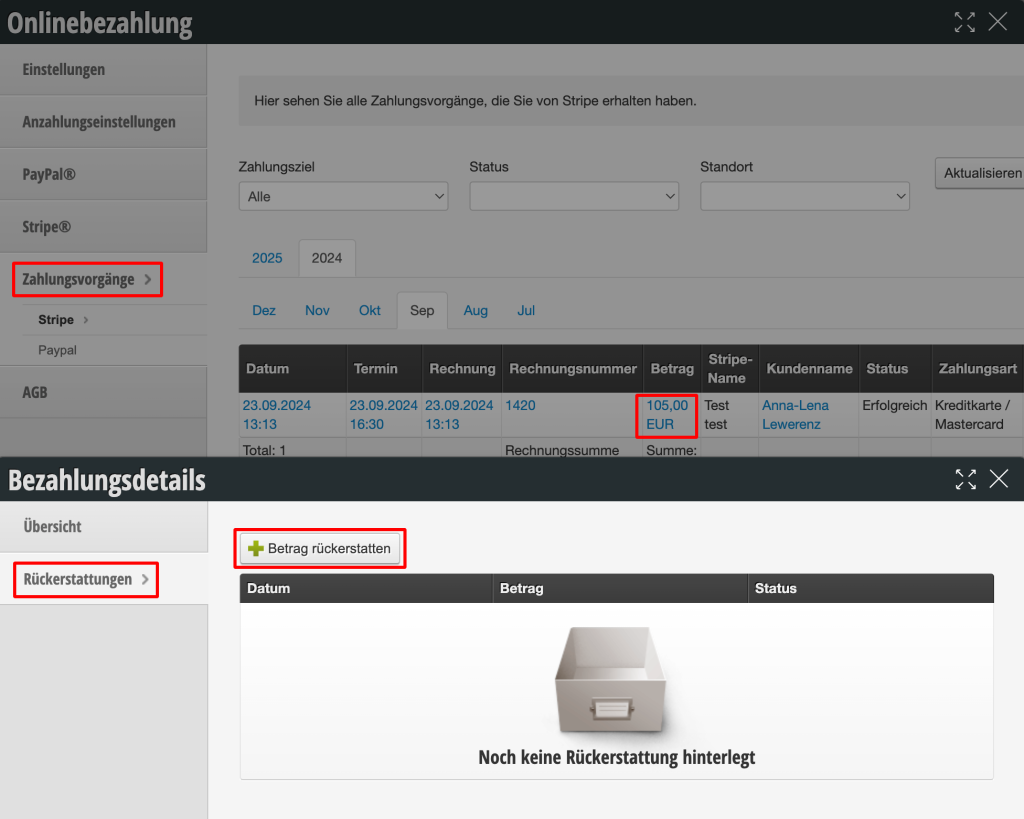
When customers cancel an appointment that has already been paid for online, the money is not automatically refunded to the customer.
Read moreEdit Sales Tax
If the small business exemption applies to you, or if you have recently become subject to sales tax, you can quickly and easily change the sales tax rates for your services and products.
Read moreCategories for Services and Groups
Use categories to define properties across product groups and manage them more effectively.
Read moreDMS Integration
Authentication is performed using OAuth 2.0 Bearer Token.
Interface Mapping
The search interface for search and detail queries must return the following fields per vehicle. For the search, at least vehicleNo must be populated, which is used at Belbo as an internal key between the DMS and belbo:
Read moreStatutory break times
As a rule, your employees are required to take a break after a certain length of working time. The duration of this break depends on the total length of the working time. If your employees take these breaks flexibly and you don't want to schedule fixed breaks in the calendar, you can set it so that this break is automatically deducted from the working time in the statistics.
Read more