belbo
  • Overview
    • Getting to know Belbo
    • Location Settings
    • Switch to Belbo
    • Calendar View & Navigation
    • Recurring Appointments & Courses
    • Appointment Entry & Management
    • Logins & Permissions
    • Multiple Locations & Head Office
    • Manage Employees
    • Absences & Holidays
    • General
    • Working Hours
    • Time Tracking
    • Data Protection (GDPR)
    • Customer Communication (Email, SMS)
    • Customer Management & Records
    • Bonus & Loyalty Programs
    • Campaigns (Newsletter & SMS)
    • Marketing Consents (GDPR)
    • Tracking & Analytics
    • Overview
    • Services & Prices
    • Products
    • Service Packages & Subscriptions
    • Vouchers
    • Purchasing & Suppliers
    • Stock & Inventory
    • Scanning & Sales
    • Cost of goods & expenses
    • Design & Texts
    • Setup & Settings
    • Integration (Website, Google, Instagram, Facebook)
    • Online payment
    • Accounting & Exports
    • Cash Register Settings & Hardware
    • Checkout process
    • Daily Closing & Reports
    • TSE & Cash Register Anti-Tampering Ordinance
    • Export Overview
    • Employee Utilization
    • Revenue & Reports
    • Belbo Satellite
    • Printer
    • EC Terminal & Card Payment
    • Troubleshooting Hardware
    • Scanner & POS Devices
    • General Settings
    • API & Integrations
    • Notifications & Emails
    • Contracts & Legal
Skip to content

Marketing Functions

With the marketing functions, you can send your own newsletters or bulk SMS messages to your customers.


You can access this area via Settings > Marketing.

Available marketing functions


Newsletters and bulk SMS
Send occasion-based or regular newsletters to your customers.
For more information about newsletters and bulk SMS click here.

Automatic emails
Send automatic birthday greetings or messages on a specific day after a customer's last appointment.
For more information about automatic emails click here.

Application example:
You want to encourage customers who haven't visited you in 3 months to book a new appointment at your business. For this purpose, compose an automatic email with a friendly invitation that is automatically sent to each customer as soon as they haven't had an appointment with you for 3 months.

Ratings
You can send each customer an automatic rating request after their appointment on your online booking page or for your own quality assurance.

[/toggle]

News
You can publish news in the Belbo customer app and on your online booking page.
For more information about news click here.


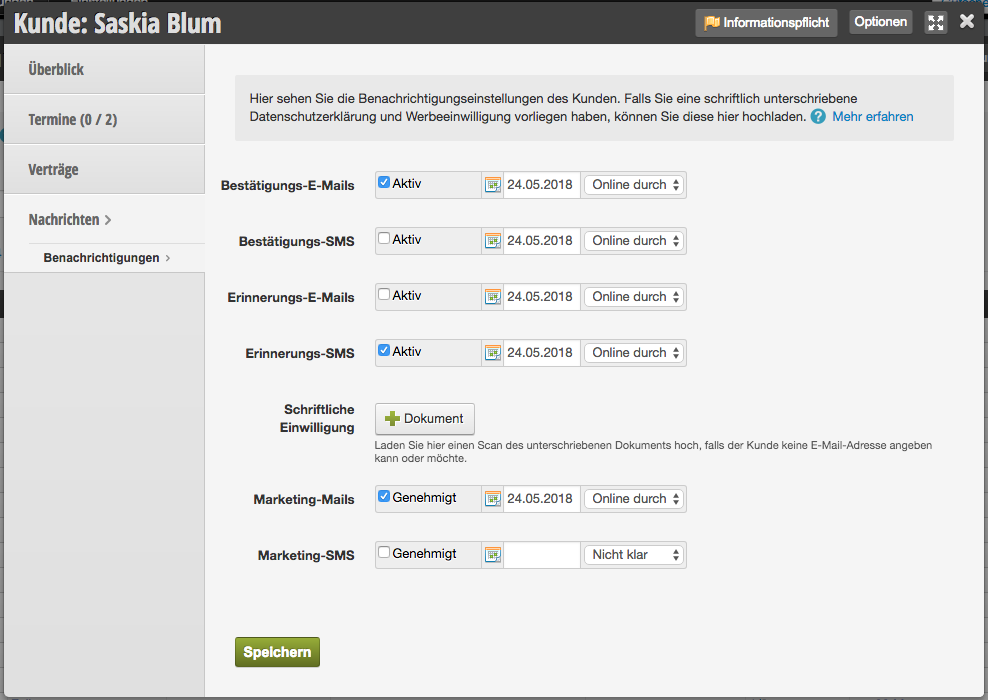
Please note that your customers must be enabled for marketing functions. You will find a corresponding option for SMS and email messages in each customer record. Only customers who have this option enabled in their customer record will receive marketing messages.


Categories: Campaigns (Newsletter & SMS)
Tags: automatische Mails, E-Mails, Geburtstag, Marketing, Newsletter, Rund-Sms
This manual is a service by belbo. Legal notice