
The CSV files exportable from Belbo are valid standard data. If you have problems setting up the desired view in Excel, you can proceed as follows.
Everything about: Statistics & Reports
Performance and Product Report
Using the Services and Products Report statistics, you can quickly find out which service or product is very popular with your customers and which service is less popular. Furthermore, you will know which services you should promote more with your customers.
Read moreExtrapolation
With the extrapolation, you get a preview of the expected sales for the current month or a definable period.
Appointment Export
Export customers
You can export your customers at any time to import the list into third-party programs or save it locally.
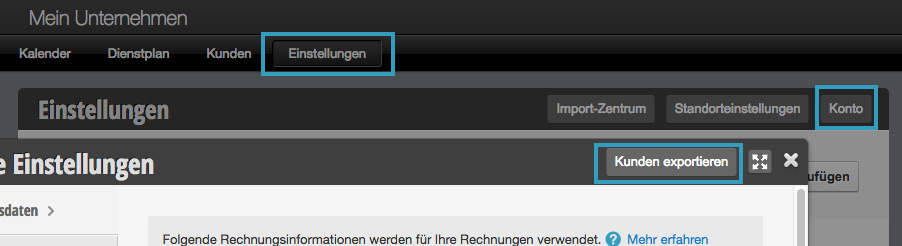
This is only permitted for employees who have the appropriate permissions.
Duty schedule: Exports
The service schedule exports give you the option to save various formats of your service schedules.
Performance and Product Report
You can compare which of your services and products were sold within a definable time period.
Analysis
In the Analysis section, you can see the breakdown of your bookings by gender, as well as by your selected employees.
Statistics of Online New Customers
In the "Information" section, you can view statistics about your online bookings. In the Online New Customers section, you can see how your bookings are categorized by new customers/regular customer status.
Employee Utilization
See the workload of your employees. This is calculated from the entered working hours and the duration of all entered appointments.