
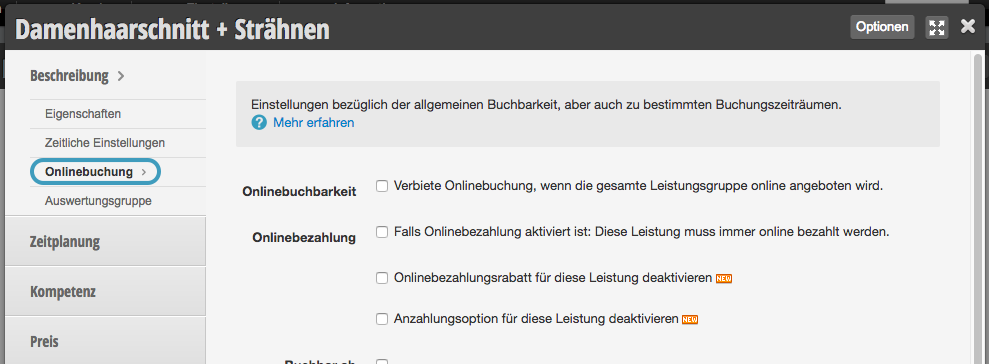
In the online booking settings of each service, you can specify the special features of your service regarding online booking.
General Options
Online bookability - Hide the service…
In online booking, the complete category is often offered and all services contained in it are automatically bookable. If you want to remove individual services from this category from online booking, activate this function.
Service can only be booked by phone
If you offer services that require explanation or are complex, which customers may only book after telephone consultation, you can set this up. You can find more information in the article Service can only be booked by phone.
New customer lock
In the online booking settings of each team member, you can specify that a person is blocked for booking by new customers. However, for individual services you can define an exception so that new customers can also book with team members who are locked for new customers.
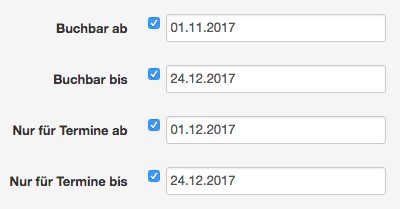
Bookable from/to and appointments from/to
If you want to offer a time-limited service, you can use the following settings to specify when it is bookable and in which time period the booked appointments may take place.
Example for an Advent promotion that takes place only during Advent season, but is available for online booking from early November:
Linked fields
If you want your customers to provide certain information when booking online for a service, you can create service fields for this. For each of your services, you can define your own service fields so that customers only have to provide information that is necessary for the desired service. You can find more information in the article Extended customer file: Service fields.
Conditional Options
The following options are only available if you have activated certain functions in Belbo.
Minimum age
Specify the minimum age from which this service may be booked. This can be useful for services such as permanent makeup or piercings. Your customers will be asked to confirm their age during online booking. You can find more information in the article Minimum age.
This service must always be paid for online.
If you have activated online payment, you can specify here that your service should generally be paid for, even if its price does not exceed the payment limit you have set.
Disable online payment discount for this service
If you grant a discount to customers paying online, you can exclude individual services from the discount.
Disable deposit option for this service
Specify whether this service must be paid as a deposit online or not.
Booking group
If you have specified in the online booking settings that your customers can select different employees when booking multiple services, booking groups help you assign these employees. Services in the same booking group are assigned to only one employee. You can find more information in the article Selection of multiple employees in online booking.