
belbo
  • Overview
    • Getting to know Belbo
    • Location Settings
    • Switch to Belbo
    • Calendar View & Navigation
    • Recurring Appointments & Courses
    • Appointment Entry & Management
    • Tasks
    • Overview
    • Multiple Locations & Head Office
    • Manage Employees
    • Logins
    • Rights
    • Overview
    • Absences & Holidays
    • Working Hours
    • Time Tracking
    • Overview
    • Data Protection (GDPR)
    • Customer Communication (Email, SMS)
    • Customer Management & Records
    • Overview
    • Bonus & Loyalty Programs
    • Campaigns (Newsletter & SMS)
    • Marketing Consents (GDPR)
    • Tracking & Analytics
    • Overview
    • Services & Prices
    • Service Packages & Subscriptions
    • Vouchers
    • Products
    • Purchasing & Suppliers
    • Stock & Inventory
    • Scanning & Sales
    • Cost of Goods & Expenses
    • Overview
    • Setup & Settings
    • Design
    • I'm ready to help you translate the category name from German to English. However, I don't see the actual text to translate in your message. Please provide the German category name that needs to be translated, and I'll translate it for you while preserving all HTML tags, comments, and WordPress shortcodes exactly as they are.
    • Integration (Website, Google, Instagram, Facebook)
    • Online payment
    • Overview
    • Accounting & Exports
    • Cash Register Settings
    • Checkout process
    • Daily Closing & Reports
    • TSE & Cash Register Anti-Tampering Ordinance
    • Overview
    • Export Overview
    • Employee Utilization
    • Revenue & Reports
    • Belbo Satellite
    • Printer
    • EC Terminal & Card Payment
    • Troubleshooting Hardware
    • Scanner & POS Devices
    • General Settings
    • API & Integrations
    • Notifications & Emails
    • Contracts & Legal
Skip to content
Calendar & Appointments›Calendar View & Navigation

Calendar Settings: Appointment Symbols

Feature: Calendar › Calendar Settings › Appointment symbols

In the "Appointment Symbols" tab, you define which symbols (icons) are displayed directly at the appointment in the calendar. This way you can recognize important information about the customer and appointment at a glance.

You can access this dialog via Settings > Calendar Settings > Appointment Symbols.
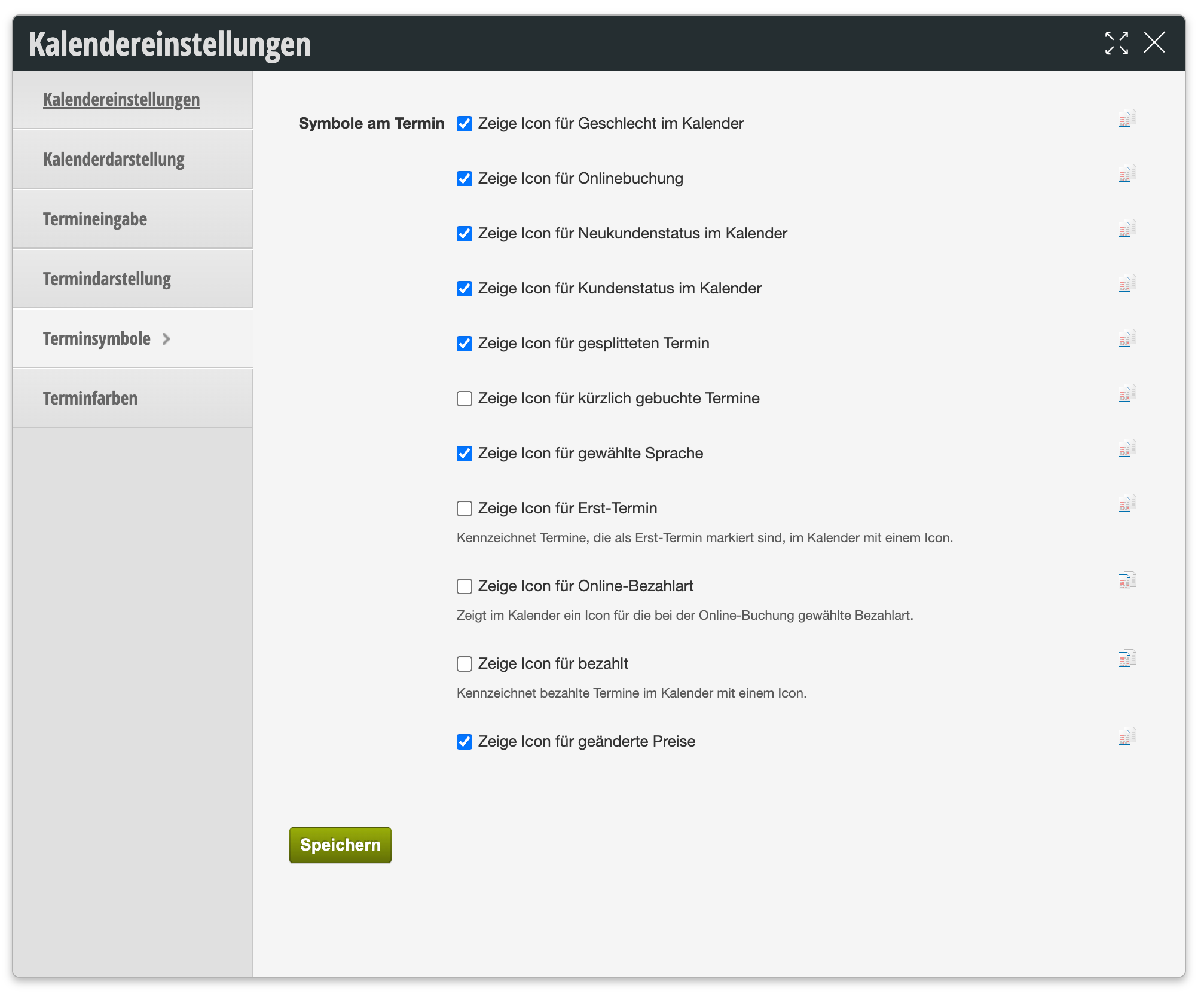
Dialog "Calendar Settings" with "Appointment Symbols" tab shows in the "Symbols at Appointment" area options for icons such as gender, online booking, customer status, first appointment, online payment method, paid, and changed prices

The following table shows all available settings options at a glance:

SettingDescription
Symbols at AppointmentShow icon for gender in calendar
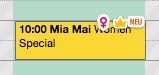
Displays a small symbol for the customer's gender directly at the appointment, so you can learn more about the customer at a glance.

Example of an appointment with gender and customer status icons:
Show icon for online booking
Marks appointments that the customer booked online themselves with a separate symbol.
Show icon for new customer status in calendar
Displays a symbol if it is a new customer.
Show icon for customer status in calendar
Shows the customer status (e.g. regular customer) as a symbol at the appointment.
Show icon for split appointment
Marks appointments that have been split across multiple staff members with a separate symbol.
Show icon for recently booked appointments
Highlights appointments that were recently booked so you can quickly identify new bookings.
Show icon for selected language
Indicates the language in which the customer booked online or communicated.
Show icon for first appointment
Marks appointments that are marked as first appointments in the calendar with an icon.
Show icon for online payment method
Shows an icon in the calendar for the payment method selected during online booking. More on online payment.
Show icon for paid
Marks paid appointments in the calendar with an icon.
Show icon for changed prices
Marks appointments with manually changed prices in the calendar with a lightning symbol, so price changes by staff are immediately recognizable.
Further settings for displaying your appointments can be found under Calendar Settings: Appointment Display. An overview of all calendar settings can be found here.
Categories: Calendar View & Navigation

Have a question? Ask it here.

This manual is a service by belbo. Legal notice