
belbo
  • Overview
    • Getting to know Belbo
    • Location Settings
    • Switch to Belbo
    • Calendar View & Navigation
    • Recurring Appointments & Courses
    • Appointment Entry & Management
    • Logins & Permissions
    • Multiple Locations & Head Office
    • Manage Employees
    • Absences & Holidays
    • General
    • Working Hours
    • Time Tracking
    • Data Protection (GDPR)
    • Customer Communication (Email, SMS)
    • Customer Management & Records
    • Bonus & Loyalty Programs
    • Campaigns (Newsletter & SMS)
    • Marketing Consents (GDPR)
    • Tracking & Analytics
    • Overview
    • Services & Prices
    • Products
    • Service Packages & Subscriptions
    • Vouchers
    • Purchasing & Suppliers
    • Stock & Inventory
    • Scanning & Sales
    • Cost of goods & expenses
    • Design & Texts
    • Setup & Settings
    • Integration (Website, Google, Instagram, Facebook)
    • Online payment
    • Accounting & Exports
    • Cash Register Settings & Hardware
    • Checkout process
    • Daily Closing & Reports
    • TSE & Cash Register Anti-Tampering Ordinance
    • Export Overview
    • Employee Utilization
    • Revenue & Reports
    • Belbo Satellite
    • Printer
    • EC Terminal & Card Payment
    • Troubleshooting Hardware
    • Scanner & POS Devices
    • General Settings
    • API & Integrations
    • Notifications & Emails
    • Contracts & Legal
Skip to content

Assign Permissions

Employees can only receive different rights if they have a user login.

You can access this area via Settings > Employees > Rights.

Available rights:

Head office
If you have multiple locations linked in one Belbo calendar, you have an overview of the statistics of all locations in the Head Office.
Employees with the "Head office" right can view the head office.

Cross-location administrator
If you have multiple locations linked in one Belbo calendar, you can switch between location calendars at any time.
Employees with the "Cross-location administrator" right can make settings that apply across locations.

Manage employee PIN
Persons with this right can view the employee PIN of all team members, change it, and edit PIN rights.

Edit time tracking records
If you use the time tracking feature, employees with this right can correct recorded working times, delete them, or make up for forgotten logouts.

Customer fields
Employees with the "Customer fields" right can create, edit or delete customer fields.

Customer message error notifications
If emails or SMS messages cannot be delivered (for example because the customer has turned off their phone), the corresponding employee receives direct messages about the undelivered customer message. This function can be activated in the SMS settings.

Invoices
Employees with the "Invoices" right can view and download Belbo invoices in the account settings.

Statistics & Reports
Employees with the "Statistics & Reports" right can view reports under Information.

Configuration
Employees with the "Configuration" right can make and change settings.

Example of missing "Configuration" right:


Services & Online booking process
Employees with the "Services & Online booking process" right can create, edit and delete services and edit the online booking process.

Release absences
You can specify in the scheduling settings that employees who are not allowed to edit their own working times are allowed to enter absences such as vacations. Employees with "Release absences" right can then plan these permanently or reject them.

Change working times
Employees with "Change working times" right are allowed to change their own working times and those of their colleagues.

Example of missing "Change working times" right:


View prices
Only employees with this right see prices in the calendar and can use the Belbo cash register system.

Manage employees
Employees with "Manage employees" right can edit the employee files of all employees and, for example, change data or colors.

Customer database
Employees with the "Customer database" right can view customer management.

View for employees without "Customer database" right:


Appointments
Employees with "Appointments" right can create and edit appointments.

Login
Employees without "Login" right can still log in at any time. This right is only needed if you want to create a very limited login without any other rights.

If you use the Belbo cash register system, you can give your employees individual cash register rights.

Distribute rights

  1. Click "Settings" in the navigation bar.
  2. Under the heading "Employees", select the function: "View and change employee rights".
  3. Click the column of the desired right within the row of the desired employee.

Example of different rights distribution:
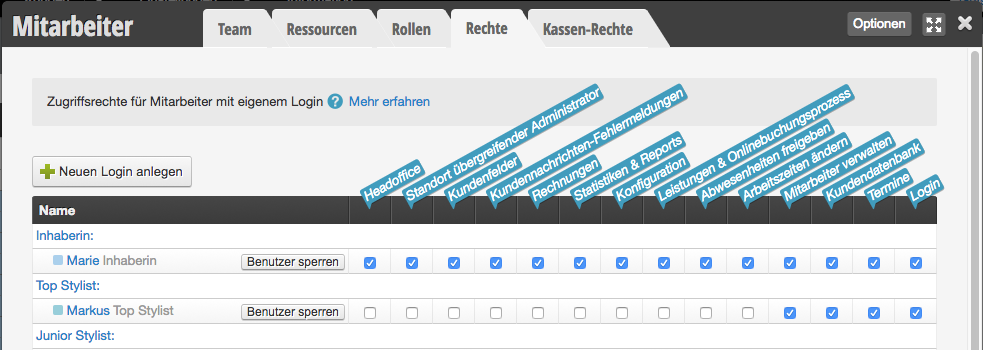
Here you will find case examples of how you can distribute the rights as well as our recommendation.

You can find an overview of all options for restricting access here.
Categories: Logins & Permissions
Tags: Mitarbeiter-Rechte, Rechte
This manual is a service by belbo. Legal notice