
belbo
  • Overview
    • Getting to know Belbo
    • Location Settings
    • Switch to Belbo
    • Calendar View & Navigation
    • Recurring Appointments & Courses
    • Appointment Entry & Management
    • Tasks
    • Overview
    • Multiple Locations & Head Office
    • Manage Employees
    • Logins
    • Rights
    • Overview
    • Absences & Holidays
    • Working Hours
    • Time Tracking
    • Overview
    • Data Protection (GDPR)
    • Customer Communication (Email, SMS)
    • Customer Management & Records
    • Overview
    • Bonus & Loyalty Programs
    • Campaigns (Newsletter & SMS)
    • Marketing Consents (GDPR)
    • Tracking & Analytics
    • Overview
    • Services & Prices
    • Service Packages & Subscriptions
    • Vouchers
    • Products
    • Purchasing & Suppliers
    • Stock & Inventory
    • Scanning & Sales
    • Material & Expenses
    • Overview
    • Setup & Settings
    • Design
    • I'm ready to help you translate the category name from German to English. However, I don't see the actual text to translate in your message. Please provide the German category name that needs to be translated, and I'll translate it for you while preserving all HTML tags, comments, and WordPress shortcodes exactly as they are.
    • Integration (Website, Google, Instagram, Facebook)
    • Online payment
    • Overview
    • Accounting & Exports
    • Cash Register Settings
    • Checkout process
    • Daily Closing & Reports
    • TSE & Cash Register Anti-Tampering Ordinance
    • Overview
    • Export Overview
    • Employee Utilization
    • Revenue & Reports
    • Belbo Satellite
    • Printer
    • EC Terminal & Card Payment
    • Troubleshooting Hardware
    • Scanner & POS Devices
    • General Settings
    • API & Integrations
    • Notifications & Emails
    • Contracts & Legal
Skip to content
Customers›Customer Management & Records

Customers: Duplicates

If your customer database contains several customer files with identical characteristics, a submenu item Duplicates is created in each of these files. If it is the same person who was accidentally created twice, you can merge the customer files to obtain clean data.

This article describes how to merge duplicates within a customer file. To specifically identify duplicate customer files, you can use the duplicate finder. More about the duplicate finder can be found here.

Merge duplicates

If you encounter duplicates in a customer file, you can merge them.
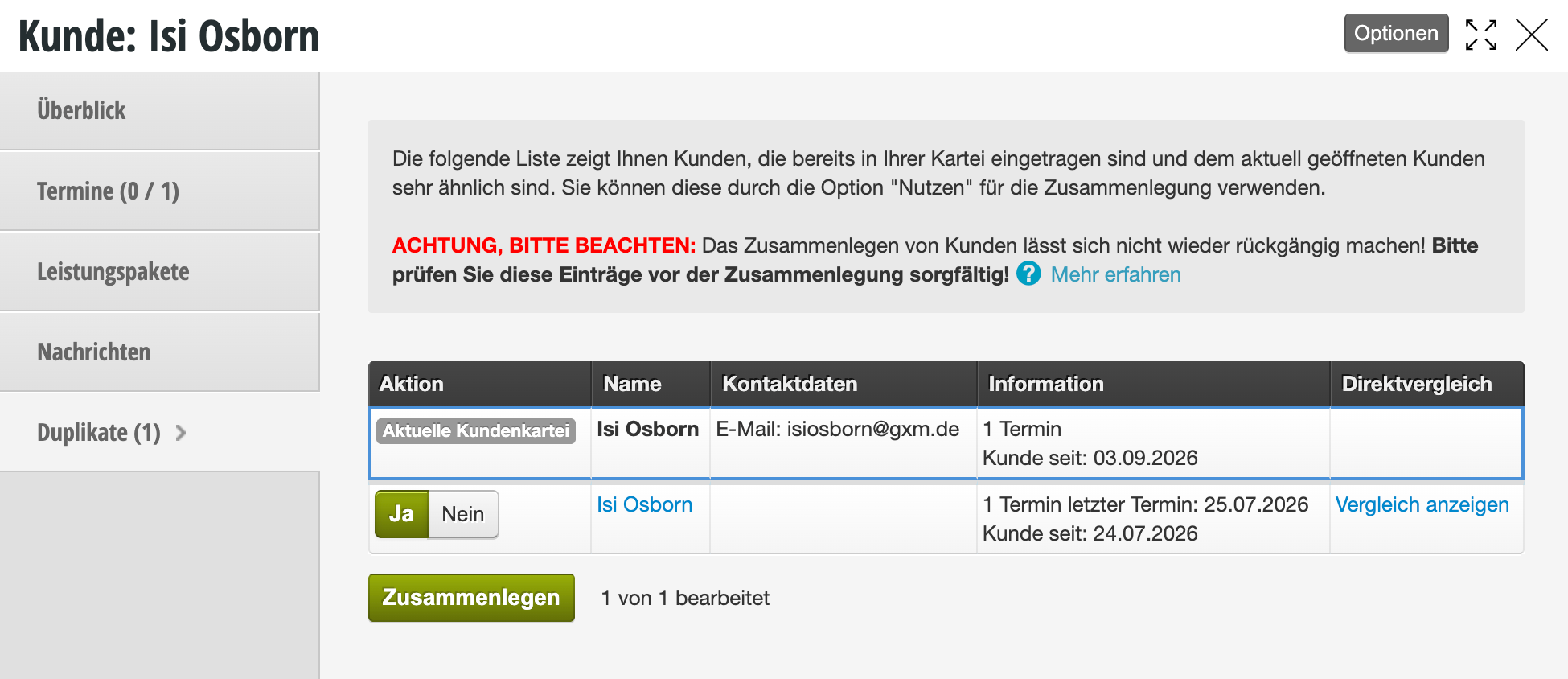
Customer duplicate merge dialog for Isi Osborn with warning and Yes/No selection options for merging two customer entries

In the row of each duplicate, there is a "use" button.
If it is black (active), this customer file will be merged.
If a customer listed in the list should not be merged with the current customer file, click "use". The button turns white (inactive) and this customer file remains unchanged.

After clicking "Merge", you will enter the comparison view, where you can specify which data should be included in the new file.
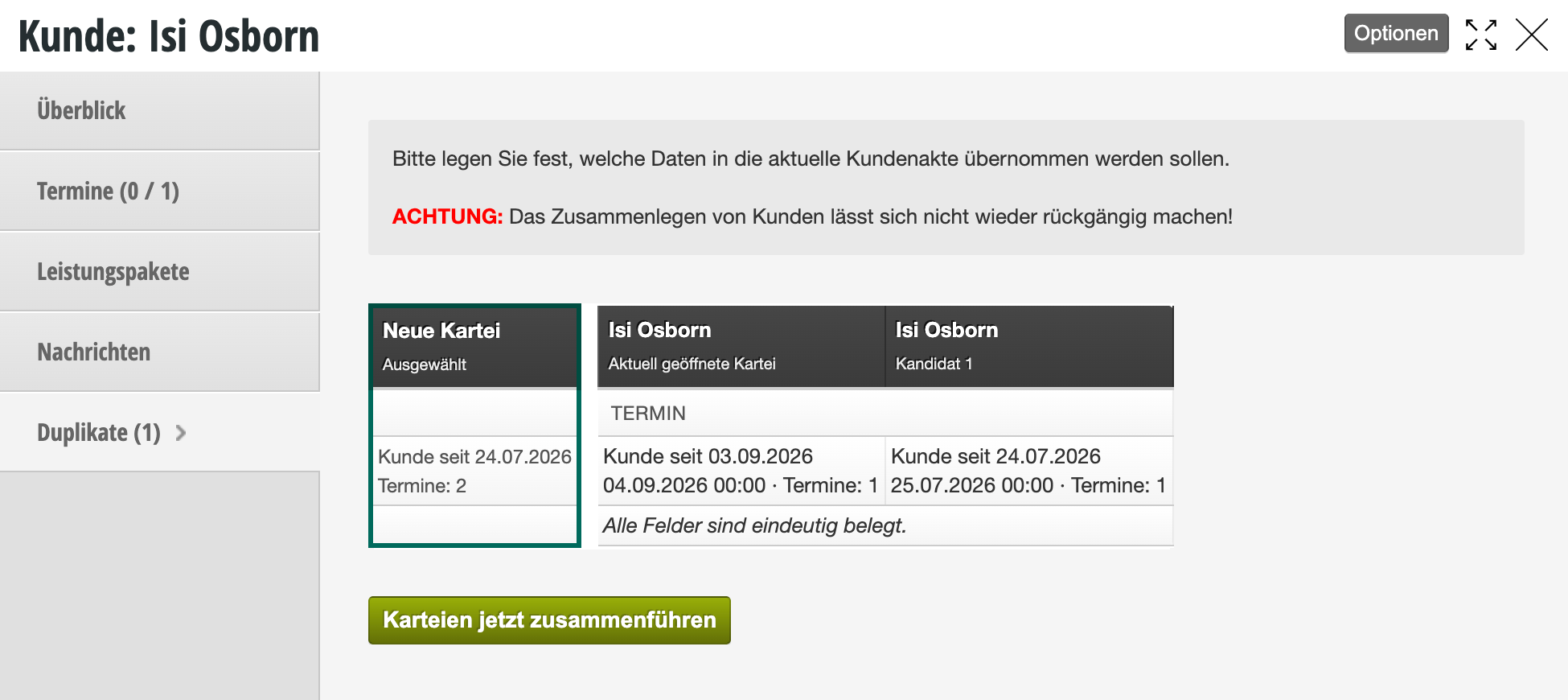
Dialog window for merging customer duplicates for Isi Osborn with warning and selection option between new and existing file

In the column with the column title "New" are the data that will be included in the new file. Select the correct data here from the conflicting data, or enter the correct data manually. Then click "Save".

The customer files are now merged. All data and appointments have been transferred and are still available.


Duplicates – ignored suggestions

If a duplicate is ignored when merging, you can use this trick to find the disappeared duplicate.

Duplicates are not found - trick


Avoid duplicates

Duplicates occur when customer data is entered again in the calendar. As soon as you enter the first letters of the name in the appointment dialog, you will receive suggestions for existing customers.
When you enter an appointment for an existing customer, you should also click on the name suggestion. Only if it is a new customer with a similar name should you enter the name manually. After you save the new appointment, a new customer file is automatically created for this customer.

Selecting an existing customer when entering an appointment:
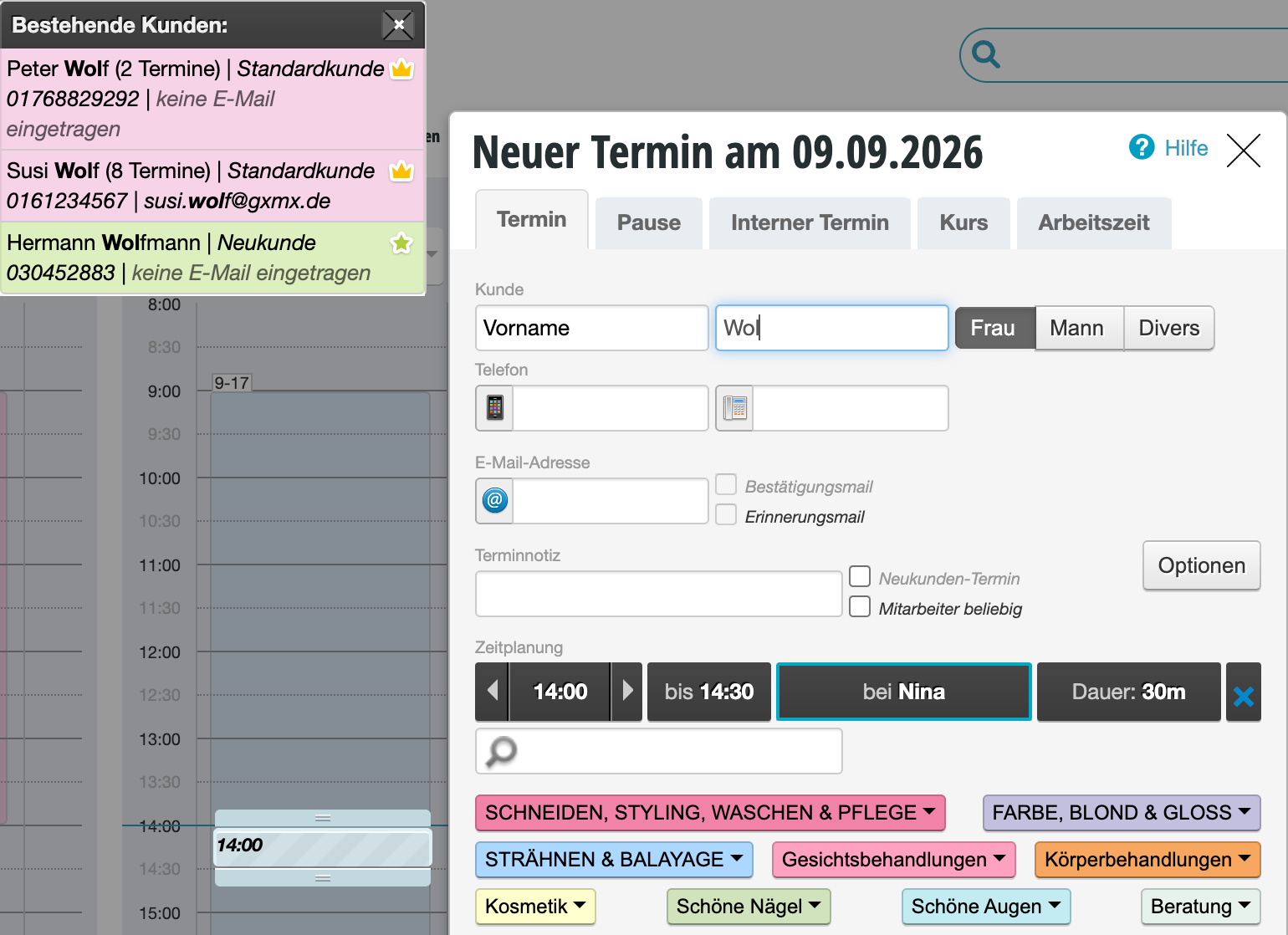
Dialog window for new appointment on 09.09.2026 with customer selection and appointment details such as time, services and employee

[video_embed][/video_embed]
Learn more about the topic customer file here.
Categories: Customer Management & Records
Tags: doppelte Kunden, Duplikate

Have a question? Ask it here.

This manual is a service by belbo. Legal notice