
belbo
  • Overview
    • Getting to know Belbo
    • Location Settings
    • Switch to Belbo
    • Calendar View & Navigation
    • Recurring Appointments & Courses
    • Appointment Entry & Management
    • Logins & Permissions
    • Multiple Locations & Head Office
    • Manage Employees
    • Absences & Holidays
    • General
    • Working Hours
    • Time Tracking
    • Data Protection (GDPR)
    • Customer Communication (Email, SMS)
    • Customer Management & Records
    • Bonus & Loyalty Programs
    • Campaigns (Newsletter & SMS)
    • Marketing Consents (GDPR)
    • Tracking & Analytics
    • Overview
    • Services & Prices
    • Products
    • Service Packages & Subscriptions
    • Vouchers
    • Purchasing & Suppliers
    • Stock & Inventory
    • Scanning & Sales
    • Materials & Costs
    • Design & Texts
    • Setup & Settings
    • Integration (Website, Google, Instagram, Facebook)
    • Online payment
    • Accounting & Exports
    • Cash Register Settings & Hardware
    • Checkout process
    • Daily Closing & Reports
    • TSE & Cash Register Anti-Tampering Ordinance
    • Export Overview
    • Employee Utilization
    • Revenue & Reports
    • Belbo Satellite
    • Printer
    • EC Terminal & Card Payment
    • Troubleshooting Hardware
    • Scanner & POS Devices
    • General Settings
    • API & Integrations
    • Notifications & Emails
    • Contracts & Legal
Skip to content

SMS-TAN

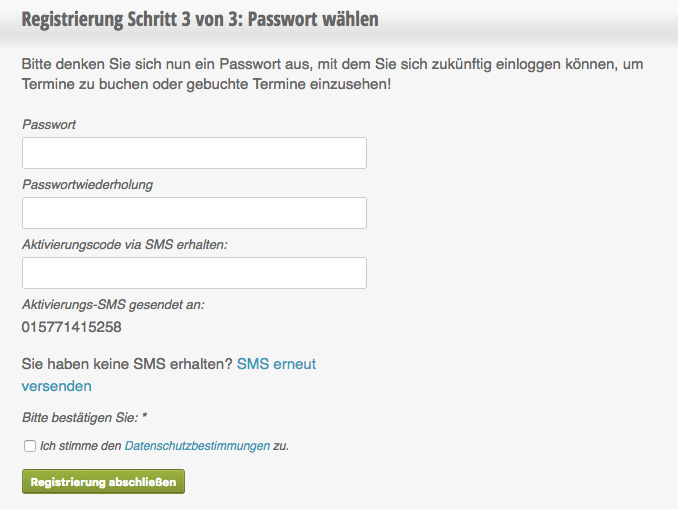
If you want to ensure that the mobile phone number provided by the customer is correct, you can activate SMS-TAN. Only after entering the TAN can the user register or book appointments. Customers cannot enter an incorrect mobile phone number, either intentionally or unintentionally.

You can access this area via Settings > SMS TAN Procedure
If this function is not activated, it can be activated via "Settings > Add Function".

Please note that the "SMS Sending" module must be active! Otherwise, SMS-TANs cannot be sent and customers may not be able to register or book online.

Example of registration with SMS-TAN:
Enforce an SMS TAN for every appointment booking

Customers can only book appointments definitively after entering the TAN sent to their mobile phone.

Sending SMS-TANs incurs costs depending on your SMS option.
Categories: Customer Communication (Email, SMS)
Tags: SMS, SMS-Tan
This manual is a service by belbo. Legal notice