
belbo
  • Overview
    • Getting to know Belbo
    • Location Settings
    • Switch to Belbo
    • Calendar View & Navigation
    • Recurring Appointments & Courses
    • Appointment Entry & Management
    • Tasks
    • Overview
    • Multiple Locations & Head Office
    • Manage Employees
    • Logins
    • Rights
    • Overview
    • Absences & Holidays
    • Working Hours
    • Time Tracking
    • Overview
    • Data Protection (GDPR)
    • Customer Communication (Email, SMS)
    • Customer Management & Records
    • Overview
    • Bonus & Loyalty Programs
    • Campaigns (Newsletter & SMS)
    • Marketing Consents (GDPR)
    • Tracking & Analytics
    • Overview
    • Services & Prices
    • Service Packages & Subscriptions
    • Vouchers
    • Products
    • Purchasing & Suppliers
    • Stock & Inventory
    • Scan & Sale
    • Goods and materials & costs
    • Overview
    • Setup & Settings
    • Design
    • I'm ready to help you translate the category name from German to English. However, I don't see the actual text to translate in your message. Please provide the German category name that needs to be translated, and I'll translate it for you while preserving all HTML tags, comments, and WordPress shortcodes exactly as they are.
    • Integration (Website, Google, Instagram, Facebook)
    • Online payment
    • Overview
    • Accounting & Exports
    • Cash Register Settings
    • Checkout process
    • Daily Closing & Reports
    • TSE & Cash Register Anti-Tampering Ordinance
    • Overview
    • Export Overview
    • Employee Utilization
    • Revenue & Reports
    • Belbo Satellite
    • Printer
    • EC Terminal & Card Payment
    • Troubleshooting Hardware
    • Scanner & POS Devices
    • General Settings
    • API & Integrations
    • Notifications & Emails
    • Contracts & Legal
Skip to content
Cash Register & Accounting›Daily Closing & Reports

Monthly closing

Once all daily closures for a month have been created, you can submit the data to your tax office. You can download and send this data manually or grant your tax office its own access so that your employee can independently access current and past closures.

You can access this area via Cash Register > Closures > Monthly Overview
If you do not see this tab, please log in with an email address for which these rights are stored.

Monthly Overview and Download

In the cash register, you will find the "Closures" menu item with the submenu "Monthly Overview". Here you will get an overview of all transactions made and your employees' sales, divided into service sales and product sales.
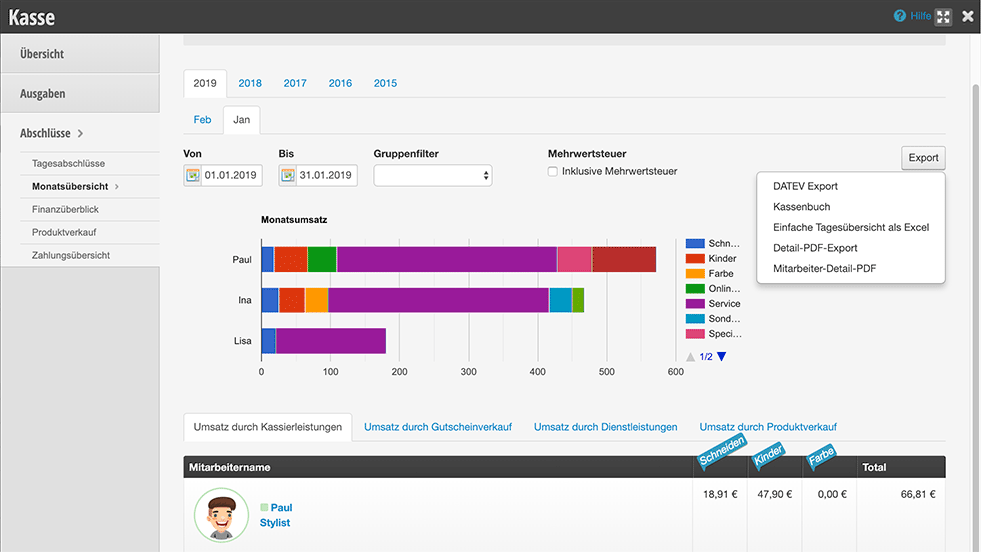
  1. To download your closures, select the "Export" button
  2. Click on the desired closure to save it on your computer.
  3. You can then send the data to your tax office by email or printed. You can find out how to grant your tax office its own access to the special financial data access in the section "Own Access for Your Tax Office".
  4. You can find out what exports are available and how to use them in the article Exports.

Own Access for Your Tax Office

You can grant your tax office its own access to your closures. This access does not provide insight into your calendar, but allows your employee to access current and past closures at any time and make account settings.

You can find more information here.
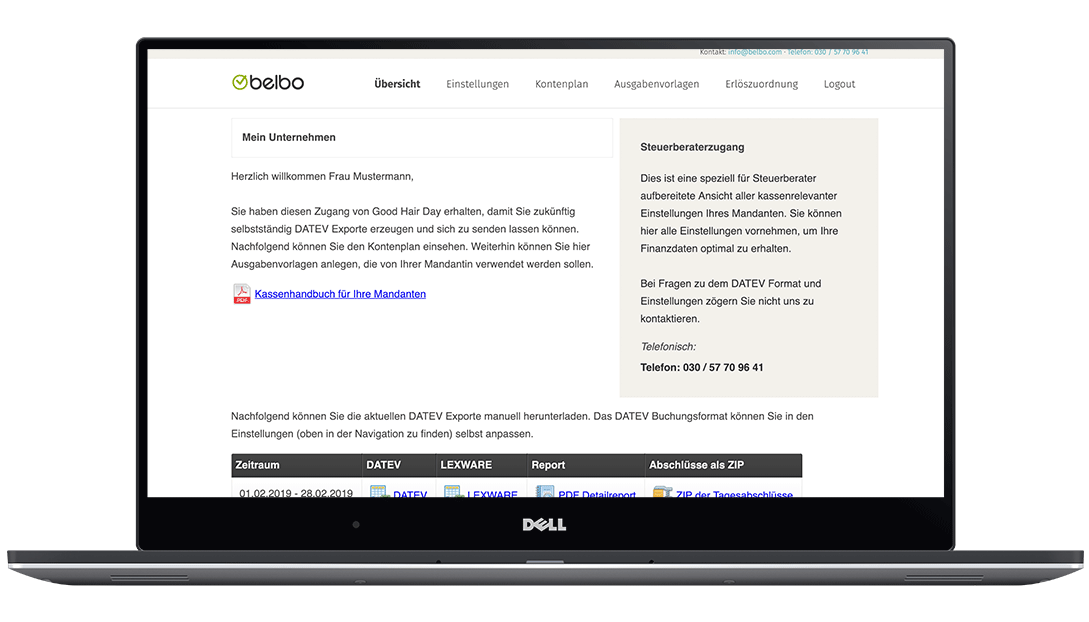
Important information about DATEV export can be found here.

Categories: Daily Closing & Reports
Tags: Monatsabschluss, Steuerberater

Have a question? Ask it here.

This manual is a service by belbo. Legal notice