
belbo
  • Overview
    • Getting to know Belbo
    • Location Settings
    • Switch to Belbo
    • Calendar View & Navigation
    • Recurring Appointments & Courses
    • Appointment Entry & Management
    • Tasks
    • Overview
    • Multiple Locations & Head Office
    • Manage Employees
    • Logins
    • Rights
    • Overview
    • Absences & Holidays
    • Working Hours
    • Time Tracking
    • Overview
    • Data Protection (GDPR)
    • Customer Communication (Email, SMS)
    • Customer Management & Records
    • Overview
    • Bonus & Loyalty Programs
    • Campaigns (Newsletter & SMS)
    • Marketing Consents (GDPR)
    • Tracking & Analytics
    • Overview
    • Services & Prices
    • Service Packages & Subscriptions
    • Vouchers
    • Products
    • Purchasing & Suppliers
    • Inventory & Stock Counts
    • Scanning & Sales
    • Cost of Goods & Expenses
    • Overview
    • Design & Texts
    • Setup & Settings
    • Integration (Website, Google, Instagram, Facebook)
    • Online payment
    • Overview
    • Accounting & Exports
    • Cash Register Settings & Hardware
    • Checkout process
    • Daily Closing & Reports
    • TSE & Cash Register Anti-Tampering Ordinance
    • Overview
    • Export Overview
    • Employee Utilization
    • Revenue & Reports
    • Belbo Satellite
    • Printer
    • EC Terminal & Card Payment
    • Troubleshooting Hardware
    • Scanner & POS Devices
    • General Settings
    • API & Integrations
    • Notifications & Emails
    • Contracts & Legal
Skip to content
Statistics & Reports›Revenue & Reports

Target Sales

Feature: Cash Register › Target Revenue › Settings

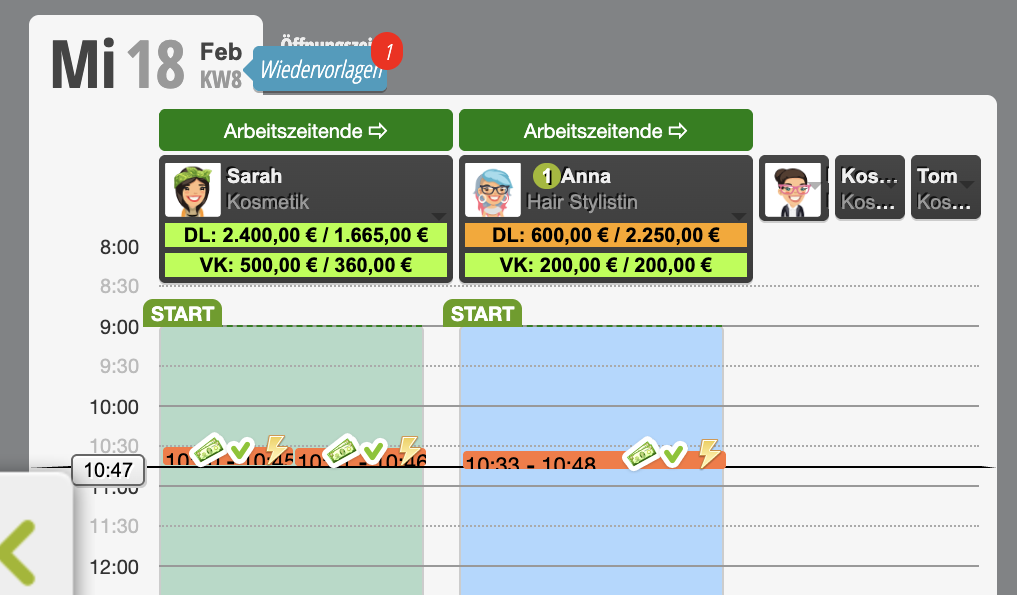
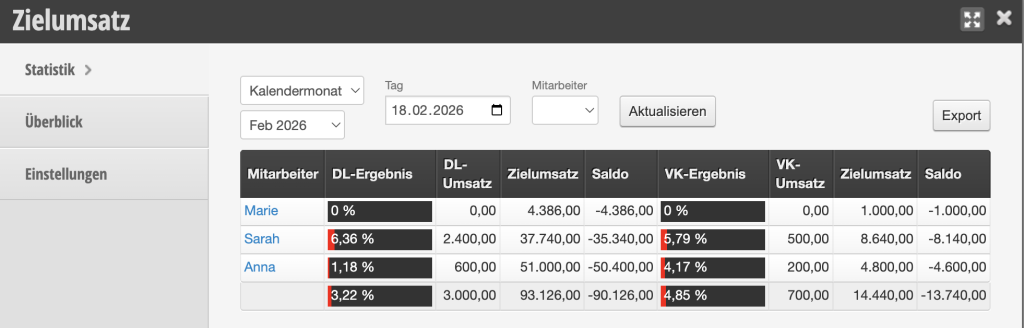
The target revenue function is a powerful tool for performance improvement and revenue optimization. Through clear visualization in the calendar and automatic calculation of target values, it supports you in sustainably promoting the individual sales performance of your employees.

First, define the desired hourly revenue per employee. Based on the stored working hours, the system automatically calculates the corresponding daily revenue target. In the calendar, both the revenue resulting from the planned appointments and the defined revenue target are then clearly compared.
Benefits of the Target Revenue Function

  • Increased motivation: Clear, measurable goals promote willingness to perform and initiative.
  • Transparency in daily work: Target and actual values are visible directly in the calendar.
  • Simple planning: Automatic calculation of daily targets saves time and reduces potential for errors.
  • Promotion of additional sales: Employees are specifically encouraged to offer additional services or products.
  • Real-time performance overview: Progress can be tracked and evaluated continuously.
Best Practice

  • Set realistic but ambitious goals.
  • Review target values regularly and adjust them as needed.
  • Use the transparency in the calendar for motivating feedback conversations.
  • Combine the target revenue function with sales campaigns or incentives.

Categories: Revenue & Reports
Tags: Kassensystem, Mitarbeiter

Have a question? Ask it here.

This manual is a service by belbo. Legal notice