belbo
  • Overview
    • Getting to know Belbo
    • Location Settings
    • Switch to Belbo
    • Calendar View & Navigation
    • Recurring Appointments & Courses
    • Appointment Entry & Management
    • Logins & Permissions
    • Multiple Locations & Head Office
    • Manage Employees
    • Absences & Holidays
    • General
    • Working Hours
    • Time Tracking
    • Data Protection (GDPR)
    • Customer Communication (Email, SMS)
    • Customer Management & Records
    • Bonus & Loyalty Programs
    • Campaigns (Newsletter & SMS)
    • Marketing Consents (GDPR)
    • Tracking & Analytics
    • Overview
    • Services & Prices
    • Products
    • Service Packages & Subscriptions
    • Vouchers
    • Purchasing & Suppliers
    • Stock & Inventory
    • Scanning & Sales
    • Materials & Costs
    • Design & Texts
    • Setup & Settings
    • Integration (Website, Google, Instagram, Facebook)
    • Online payment
    • Accounting & Exports
    • Cash Register Settings & Hardware
    • Checkout process
    • Daily Closing & Reports
    • TSE & Cash Register Anti-Tampering Ordinance
    • Export Overview
    • Employee Utilization
    • Revenue & Reports
    • Belbo Satellite
    • Printer
    • EC Terminal & Card Payment
    • Troubleshooting Hardware
    • Scanner & POS Devices
    • General Settings
    • API & Integrations
    • Notifications & Emails
    • Contracts & Legal
Skip to content

Employee Vacation Times

With Belbo you can easily keep track of vacation time.


You define the annual vacation entitlement via the target work week. This includes the annual vacation entitlement.

Important: The validity date of the target work week affects the vacation entitlement proportionally for the current year. For example, if you activate the work week only in the middle of the year, the entitlement is automatically reduced to approx. 50% of the stored value.

Calculation methods for vacation time

Depending on the desired calculation method, two variants are available:

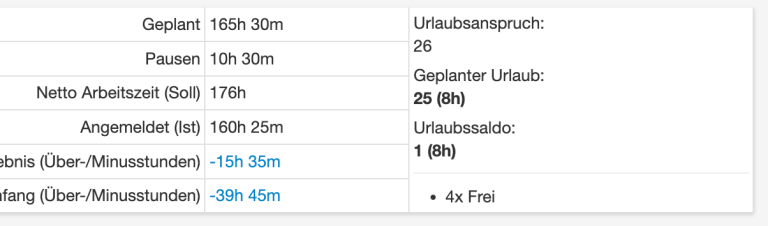
Day-based

  • Only whole or half vacation days are taken into account.
  • You do not need to define "hours per vacation day" (enter 0 if necessary).

Example:

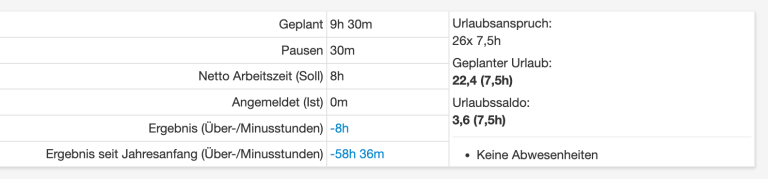
Hour-based

  • Ideal if employees have working days of different lengths.
  • The vacation taken is calculated in hours, according to the target working time of the respective day.
  • Here you must define the "hours per vacation day", e.g. for an 80% position = 6.4 hours (80% of 8 hours).

Example:
Tip for setting up the vacation account (when switching to the system)

To correctly manage the vacation balance in the introductory year, we recommend setting a target work week with 0 hours at the beginning of the year.
This way, the full vacation entitlement for the first year is retained.
The actual vacation days taken can then be entered retroactively.

Categories: Absences & Holidays
This manual is a service by belbo. Legal notice