
According to the default settings, all permitted appointments are available to your customers online as well. With the appointment offer settings, this can be adapted to your philosophy.
Certainly, a comprehensive appointment offer around the clock is a first-class service for your customers. However, under certain circumstances, you may have a need to purposefully control online bookings by restricting the offered appointments:
- Prevention of same-day bookings - appointment bundling
- Homogeneous workload and minimal idle time for staff
- Restriction of visibility of your own workload
- Promotion of longer treatments
To address these issues, you can choose between different modes and thereby meaningfully restrict the offered appointment times. The default setting is called "Customers can book at any time", which means that, taking the appointment rhythm into account, every available appointment can be booked online.
This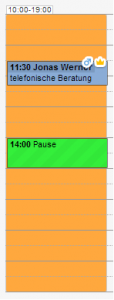 mode is often chosen to increase internal workload. In this case, all appointments that do not directly border work start, work end, or directly border another appointment or break are not offered.
In the adjacent illustration, for example, we have shown working hours from 10 to 19 o'clock. This is currently only interrupted by a lunch break from 14 to 15 o'clock, and for this day there is only a telephone consultation for a customer at 11:30 AM.
In "Flush Booking" mode, end customers are offered exclusively the following 30-minute appointments:
- 10:00 - 10:30 AM - Bordering work start
- 11:00 - 11:30 AM - Bordering an appointment
- 12:00 - 12:30 PM - Bordering an appointment
- 1:30 PM - 2:00 PM - Bordering a break
- 2:00 PM - 2:30 PM - Bordering a break
- 6:30 PM - 7:00 PM - Bordering work end
In contrast to the "Flush Booking" mode, only the earliest possible appointment is offered here to prevent any breaks through online booking. This mode is typically suitable for single studios.
In contrast to the "Flush Booking" mode, only the latest possible appointment is offered here to prevent any breaks through online booking. This mode is typically suitable for single studios.
This mode is suitable for businesses with highly varying appointment lengths. It enables the definition of rules that define an allowed length of gaps for each appointment length.
For example, you want to prevent a 2-hour appointment from being blocked by booking a 20-minute appointment. This can be easily enabled by creating the rule.