
belbo
  • Overview
    • Getting to know Belbo
    • Location Settings
    • Switch to Belbo
    • Calendar View & Navigation
    • Recurring Appointments & Courses
    • Appointment Entry & Management
    • Logins & Permissions
    • Multiple Locations & Head Office
    • Manage Employees
    • Absences & Holidays
    • General
    • Working Hours
    • Time Tracking
    • Data Protection (GDPR)
    • Customer Communication (Email, SMS)
    • Customer Management & Records
    • Bonus & Loyalty Programs
    • Campaigns (Newsletter & SMS)
    • Marketing Consents (GDPR)
    • Tracking & Analytics
    • Overview
    • Services & Prices
    • Products
    • Service Packages & Subscriptions
    • Vouchers
    • Purchasing & Suppliers
    • Stock & Inventory
    • Scanning & Sales
    • Cost of goods & expenses
    • Design & Texts
    • Setup & Settings
    • Integration (Website, Google, Instagram, Facebook)
    • Online payment
    • Accounting & Exports
    • Cash Register Settings & Hardware
    • Checkout process
    • Daily Closing & Reports
    • TSE & Cash Register Anti-Tampering Ordinance
    • Export Overview
    • Employee Utilization
    • Revenue & Reports
    • Belbo Satellite
    • Printer
    • EC Terminal & Card Payment
    • Troubleshooting Hardware
    • Scanner & POS Devices
    • General Settings
    • API & Integrations
    • Notifications & Emails
    • Contracts & Legal
Skip to content

Transfer Working Hours for the Entire Team

If work schedules of an employee repeat regularly, you can transfer them and thus save time. You will find instructions here on how to transfer the work schedules of an individual employee.

Transfer team schedules

If the work schedules of all employees repeat regularly, you can transfer them and thus save time. To do this, proceed as follows:
  1. Select "Duty Schedule" in the navigation bar.
  2. Select the week you want to transfer in the horizontally displayed calendar.
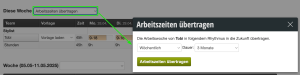
  3. Click on the selection menu at "This Week" and select "Transfer Work Schedules"
  4. By clicking the "Transfer Work Schedules" button you can select the rhythm as well as the number of months. Depending on the specifications, the program will now save the stored duty schedule for up to 12 months in the future.


Categories: Working Hours
This manual is a service by belbo. Legal notice