belbo
  • Overview
    • Getting to know Belbo
    • Location Settings
    • Switch to Belbo
    • Calendar View & Navigation
    • Recurring Appointments & Courses
    • Appointment Entry & Management
    • Logins & Permissions
    • Multiple Locations & Head Office
    • Manage Employees
    • Absences & Holidays
    • General
    • Working Hours
    • Time Tracking
    • Data Protection (GDPR)
    • Customer Communication (Email, SMS)
    • Customer Management & Records
    • Bonus & Loyalty Programs
    • Campaigns (Newsletter & SMS)
    • Marketing Consents (GDPR)
    • Tracking & Analytics
    • Overview
    • Services & Prices
    • Products
    • Service Packages & Subscriptions
    • Vouchers
    • Purchasing & Suppliers
    • Stock & Inventory
    • Scanning & Sales
    • Cost of goods & expenses
    • Design & Texts
    • Setup & Settings
    • Integration (Website, Google, Instagram, Facebook)
    • Online payment
    • Accounting & Exports
    • Cash Register Settings & Hardware
    • Checkout process
    • Daily Closing & Reports
    • TSE & Cash Register Anti-Tampering Ordinance
    • Export Overview
    • Employee Utilization
    • Revenue & Reports
    • Belbo Satellite
    • Printer
    • EC Terminal & Card Payment
    • Troubleshooting Hardware
    • Scanner & POS Devices
    • General Settings
    • API & Integrations
    • Notifications & Emails
    • Contracts & Legal
Skip to content

Customer Loss Analysis

Analyze how many of your regular customers had their last appointment in the past. This allows you to quickly and easily assess for individual employees how well they retain your customers.

You can access this area via Settings > Customer Loss Analysis
If this function is not enabled, it can be activated via "Settings > Add Function".

Example of use: Using the customer loss analysis, you can find out which customers with more than 5 appointments have not shown up for 3 months and win them back with a voucher or promotion.

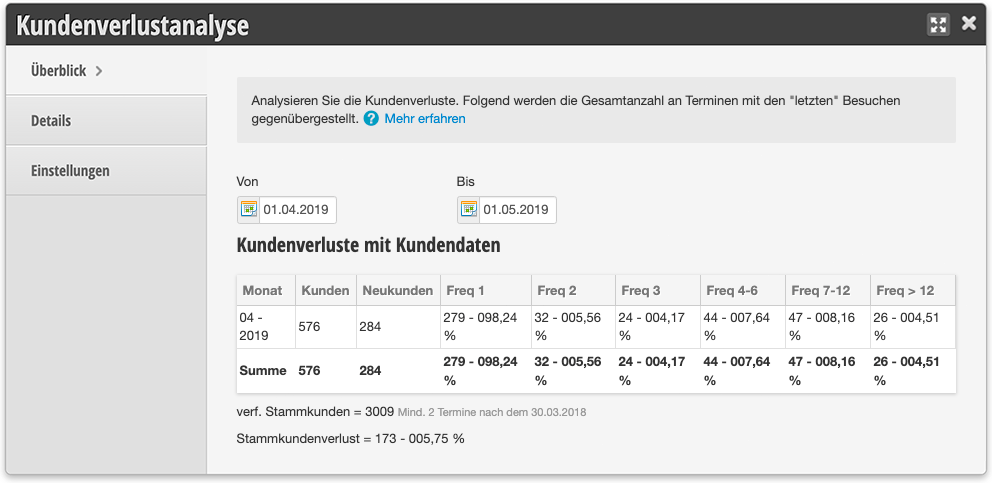
Customer Loss Analysis

Customer Loss Analysis with Customer Data

This overview shows you which of your customers last visited you during the time period specified in the header area. The displayed frequency gives you insight into how often a customer has visited you. For example, if you want to analyze which of your customers have not visited you for 6 months, you can set the time period in the header to a month that was half a year ago.
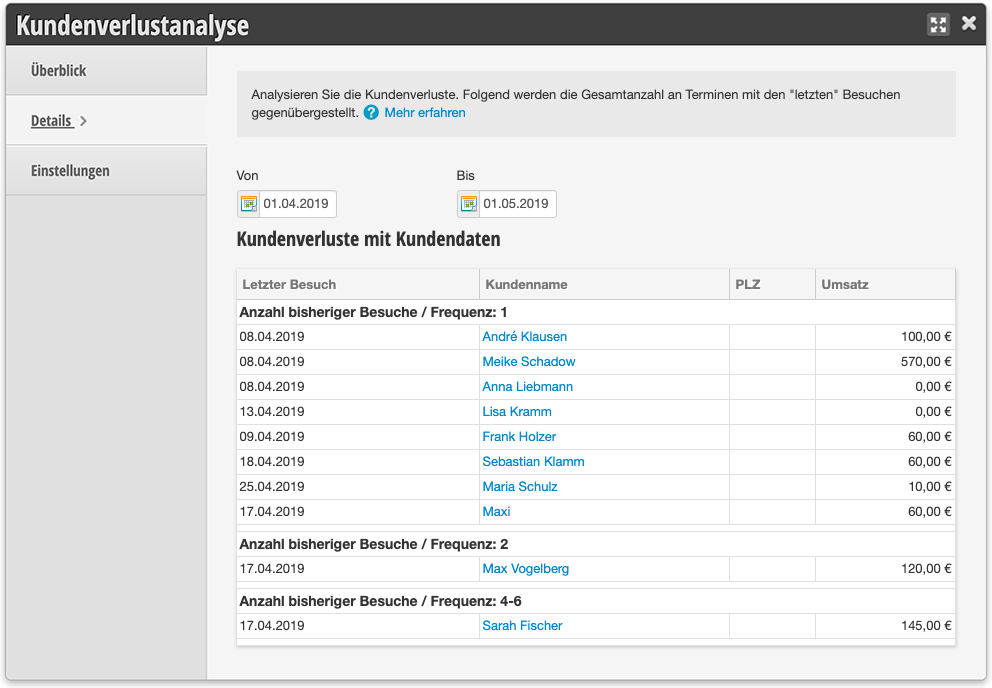
In the example above, you can see all customers who had their last appointment in the desired time period. Customer Sarah Fischer visited you frequently but has not appeared since this appointment. It might be worthwhile to contact her directly to encourage her to visit you again. You could also ask for the reason for her absence to improve your service quality.

The detail table can also be filtered by team members. This gives you an overview of which team member served your customers before they stopped coming.

Categories: Customer Management & Records
This manual is a service by belbo. Legal notice