belbo
  • Overview
    • Getting to know Belbo
    • Location Settings
    • Switch to Belbo
    • Calendar View & Navigation
    • Recurring Appointments & Courses
    • Appointment Entry & Management
    • Logins & Permissions
    • Multiple Locations & Head Office
    • Manage Employees
    • Absences & Holidays
    • General
    • Working Hours
    • Time Tracking
    • Data Protection (GDPR)
    • Customer Communication (Email, SMS)
    • Customer Management & Records
    • Bonus & Loyalty Programs
    • Campaigns (Newsletter & SMS)
    • Marketing Consents (GDPR)
    • Tracking & Analytics
    • Overview
    • Services & Prices
    • Products
    • Service Packages & Subscriptions
    • Vouchers
    • Purchasing & Suppliers
    • Stock & Inventory
    • Scanning & Sales
    • Cost of goods & expenses
    • Design & Texts
    • Setup & Settings
    • Integration (Website, Google, Instagram, Facebook)
    • Online payment
    • Accounting & Exports
    • Cash Register Settings & Hardware
    • Checkout process
    • Daily Closing & Reports
    • TSE & Cash Register Anti-Tampering Ordinance
    • Export Overview
    • Employee Utilization
    • Revenue & Reports
    • Belbo Satellite
    • Printer
    • EC Terminal & Card Payment
    • Troubleshooting Hardware
    • Scanner & POS Devices
    • General Settings
    • API & Integrations
    • Notifications & Emails
    • Contracts & Legal
Skip to content

Customer frequency

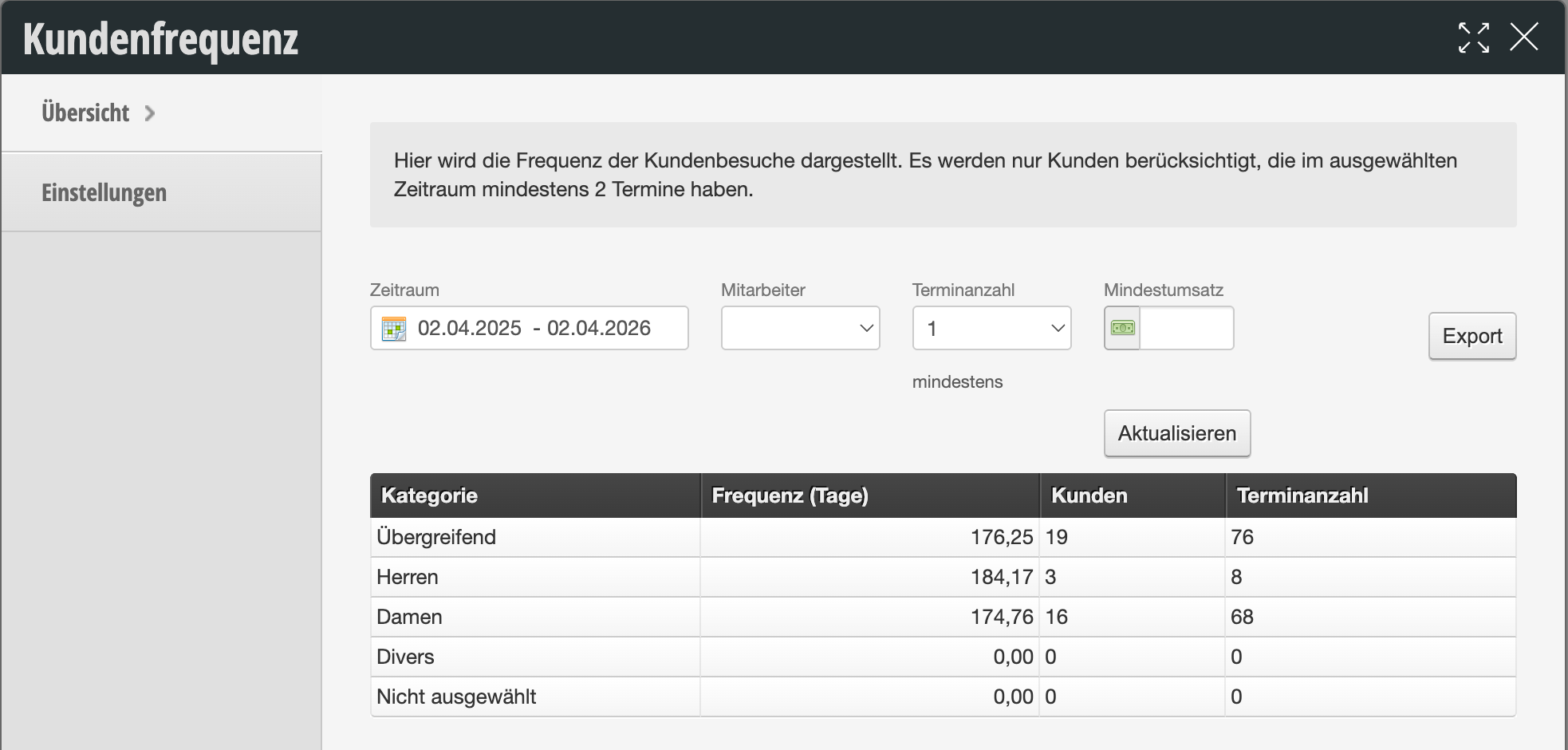
Customer frequency is a central metric that indicates the average time intervals at which your customers return. This metric is crucial for measuring your customers' loyalty to your salon or studio.


  • Category: Here the frequency is broken down by gender (Female, Male, Diverse) or "Overall". This helps you identify which customer group is most loyal.
  • Frequency (Days): This is the most important value. It indicates how many days on average pass between two appointments of a customer.

    • Example: A value of 176.25 means that your customers return on average approximately every 6 months.

  • Customers: The number of individual customers who had at least two appointments in the selected period (because frequency can only be calculated from the second visit onwards).
  • Number of Appointments: The total sum of all appointments that these customers attended during the period.
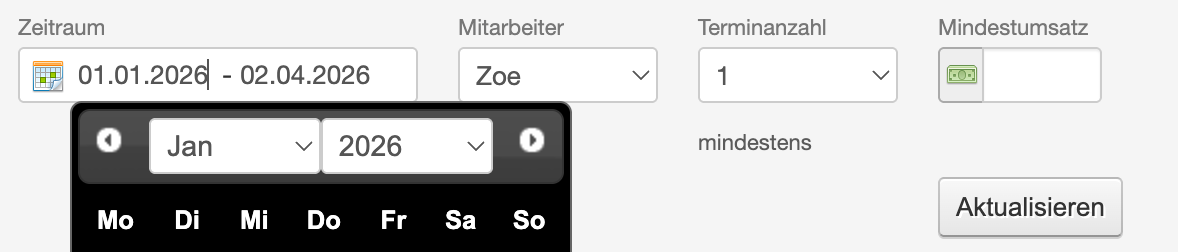
Filter Settings for Precise Data

  • Time Period: By default, the last year is often considered to balance out seasonal fluctuations.
  • Minimum Revenue: You can exclude occasional customers to analyze the frequency of your "true" regular customers.
  • Employee: Filter a specific employee to see their personal frequency.
  • Number of Appointments: Specify the minimum number of visits required for a customer to be included in the statistics (default is at least 2).


Categories: Customer Management & Records
This manual is a service by belbo. Legal notice