Special settings allow you to specify custom times for your services for each customer.
You can access this area via Settings > Customer-specific Times
If this function is not enabled, it can be activated via "Settings > Add Function".
Application example:
For customer Maria Sommer, you need more time for the "Ladies Haircut & Blow Dry" service because of her very long, thick hair. You can specify the time deviation in the customer file so that appointments entered for this customer in the future will always take a bit longer.
Creating customer-specific times
Quick explanation via video
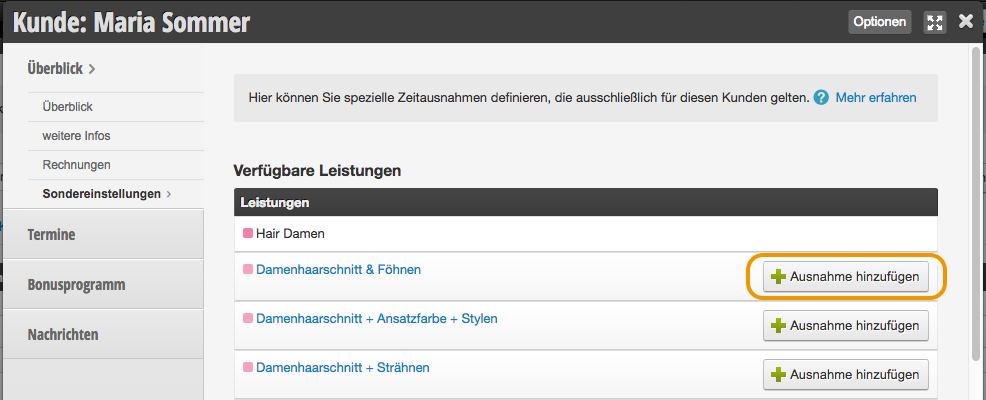
More detailed explanation Once the function has been activated, select the service in the Special Settings submenu for which you want to add an exception and click "Add Exception" in the corresponding row.
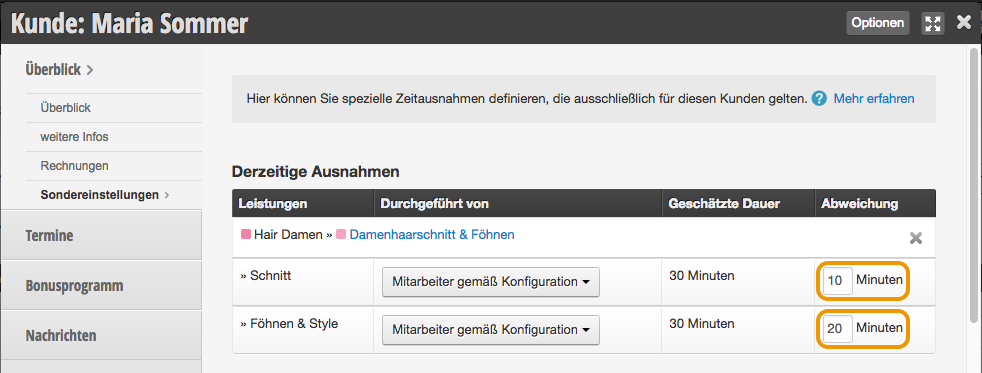
Then add a time deviation to the desired steps.
Note that the entered time is added to the original duration.
A step that is specified as 30 minutes in your service settings will be extended by 10 minutes if you enter "10" in the input field. The step will then be 40 minutes long for this customer.
If you enter "-10", the step will be shortened to 20 minutes.
Here you can define special time exceptions that apply exclusively to this customer.
For customers who need less time, simply write, for example, -15
If a team member is selected here, this service will be entered exclusively with this person, regardless of which team member is selected online.
We recommend always storing "Assigned Staff Member" here.