belbo
  • Overview
    • Getting to know Belbo
    • Location Settings
    • Switch to Belbo
    • Calendar View & Navigation
    • Recurring Appointments & Courses
    • Appointment Entry & Management
    • Logins & Permissions
    • Multiple Locations & Head Office
    • Manage Employees
    • Absences & Holidays
    • General
    • Working Hours
    • Time Tracking
    • Data Protection (GDPR)
    • Customer Communication (Email, SMS)
    • Customer Management & Records
    • Bonus & Loyalty Programs
    • Campaigns (Newsletter & SMS)
    • Marketing Consents (GDPR)
    • Tracking & Analytics
    • Overview
    • Services & Prices
    • Products
    • Service Packages & Subscriptions
    • Vouchers
    • Purchasing & Suppliers
    • Stock & Inventory
    • Scanning & Sales
    • Cost of goods & expenses
    • Design & Texts
    • Setup & Settings
    • Integration (Website, Google, Instagram, Facebook)
    • Online payment
    • Accounting & Exports
    • Cash Register Settings & Hardware
    • Checkout process
    • Daily Closing & Reports
    • TSE & Cash Register Anti-Tampering Ordinance
    • Export Overview
    • Employee Utilization
    • Revenue & Reports
    • Belbo Satellite
    • Printer
    • EC Terminal & Card Payment
    • Troubleshooting Hardware
    • Scanner & POS Devices
    • General Settings
    • API & Integrations
    • Notifications & Emails
    • Contracts & Legal
Skip to content

Tax office: Posting

In cooperation with your tax office, you can specify which revenue accounts should be used for posting your services and sales goods if you want to distinguish between them.

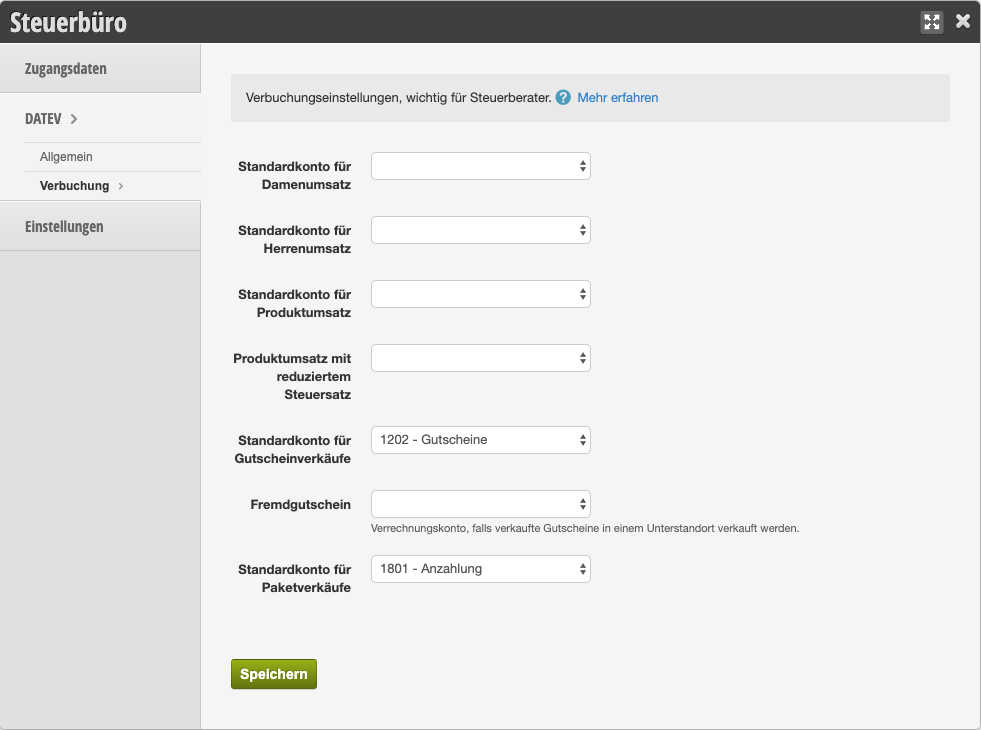
You can access this area via Settings > Tax Office > DATEV > Posting
If this function is not activated, it can be activated via "Settings > Add Function".

Revenue Posting for Products and Services

Generally, the standard revenue account of your chart of accounts is used for all revenues. You can leave the selection boxes here empty if the standard account is already the correct revenue account for your services and products. Only if you want to distinguish between women's and men's sales or sales goods in your financial statements should you specify the appropriate revenue accounts here. If these do not yet exist, they can be defined in the Own Chart of Accounts.

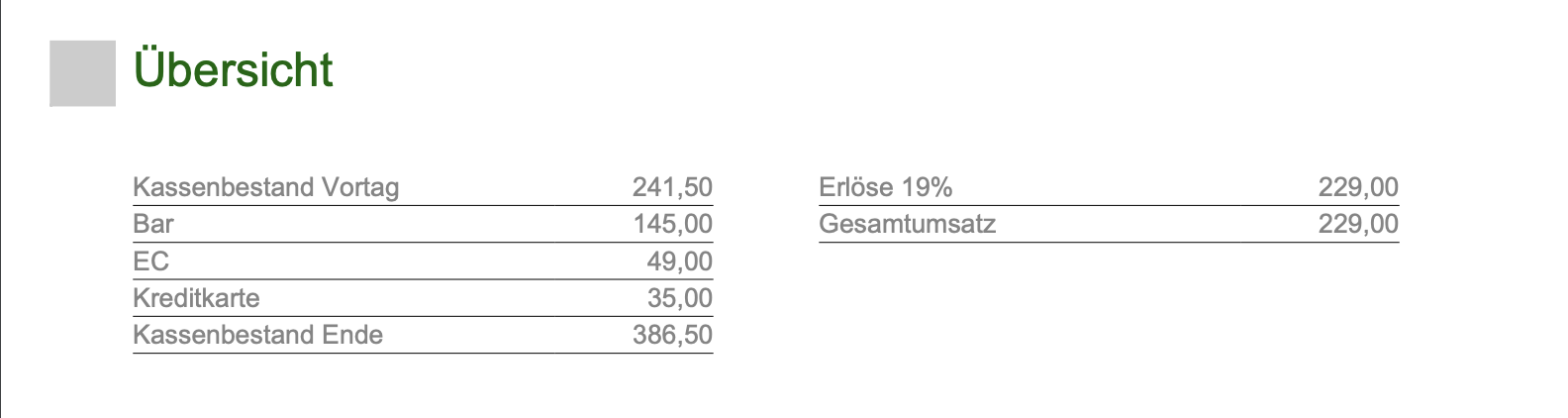
Example of a daily settlement with standard revenue account (no assignment was made under "Posting"):
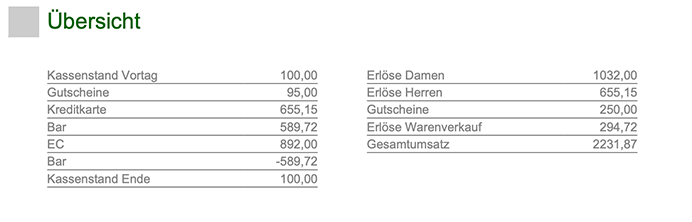
Example of a daily settlement with individually specified revenue accounts (assignments were made under "Posting"):
Voucher Revenues

Most tax offices have specific requirements for posting sales vouchers. Please ask your tax office which revenue account should be used here.

Package Sales

If you use performance packages, you can post the revenues accordingly. The preset account is normally the correct revenue account for these sales.

Categories: Accounting & Exports
This manual is a service by belbo. Legal notice