
belbo
  • Overview
    • Getting to know Belbo
    • Location Settings
    • Switch to Belbo
    • Calendar View & Navigation
    • Recurring Appointments & Courses
    • Appointment Entry & Management
    • Tasks
    • Overview
    • Multiple Locations & Head Office
    • Manage Employees
    • Logins
    • Rights
    • Overview
    • Absences & Holidays
    • Working Hours
    • Time Tracking
    • Overview
    • Data Protection (GDPR)
    • Customer Communication (Email, SMS)
    • Customer Management & Records
    • Overview
    • Bonus & Loyalty Programs
    • Campaigns (Newsletter & SMS)
    • Marketing Consents (GDPR)
    • Tracking & Analytics
    • Overview
    • Services & Prices
    • Service Packages & Subscriptions
    • Vouchers
    • Products
    • Purchasing & Suppliers
    • Stock & Inventory
    • Scanning & Sales
    • Cost of goods & Expenses
    • Overview
    • Setup & Settings
    • Design
    • I'm ready to help you translate the category name from German to English. However, I don't see the actual text to translate in your message. Please provide the German category name that needs to be translated, and I'll translate it for you while preserving all HTML tags, comments, and WordPress shortcodes exactly as they are.
    • Integration (Website, Google, Instagram, Facebook)
    • Online payment
    • Overview
    • Accounting & Exports
    • Cash Register Settings
    • Checkout process
    • Daily Closing & Reports
    • TSE & Cash Register Anti-Tampering Ordinance
    • Overview
    • Export Overview
    • Employee Utilization
    • Revenue & Reports
    • Belbo Satellite
    • Printer
    • EC Terminal & Card Payment
    • Troubleshooting Hardware
    • Scanner & POS Devices
    • General Settings
    • API & Integrations
    • Notifications & Emails
    • Contracts & Legal
Skip to content
Cash Register & Accounting›Cash Register Settings

Till: Settings – Till Balance

Feature: Cash Register › Cash Register System › Basic Settings › Cash Register Status

With the automatic cash register balance, you can automate cash withdrawals at each daily closing. This should only be done if you deposit money to the bank or into an envelope in a safe daily.
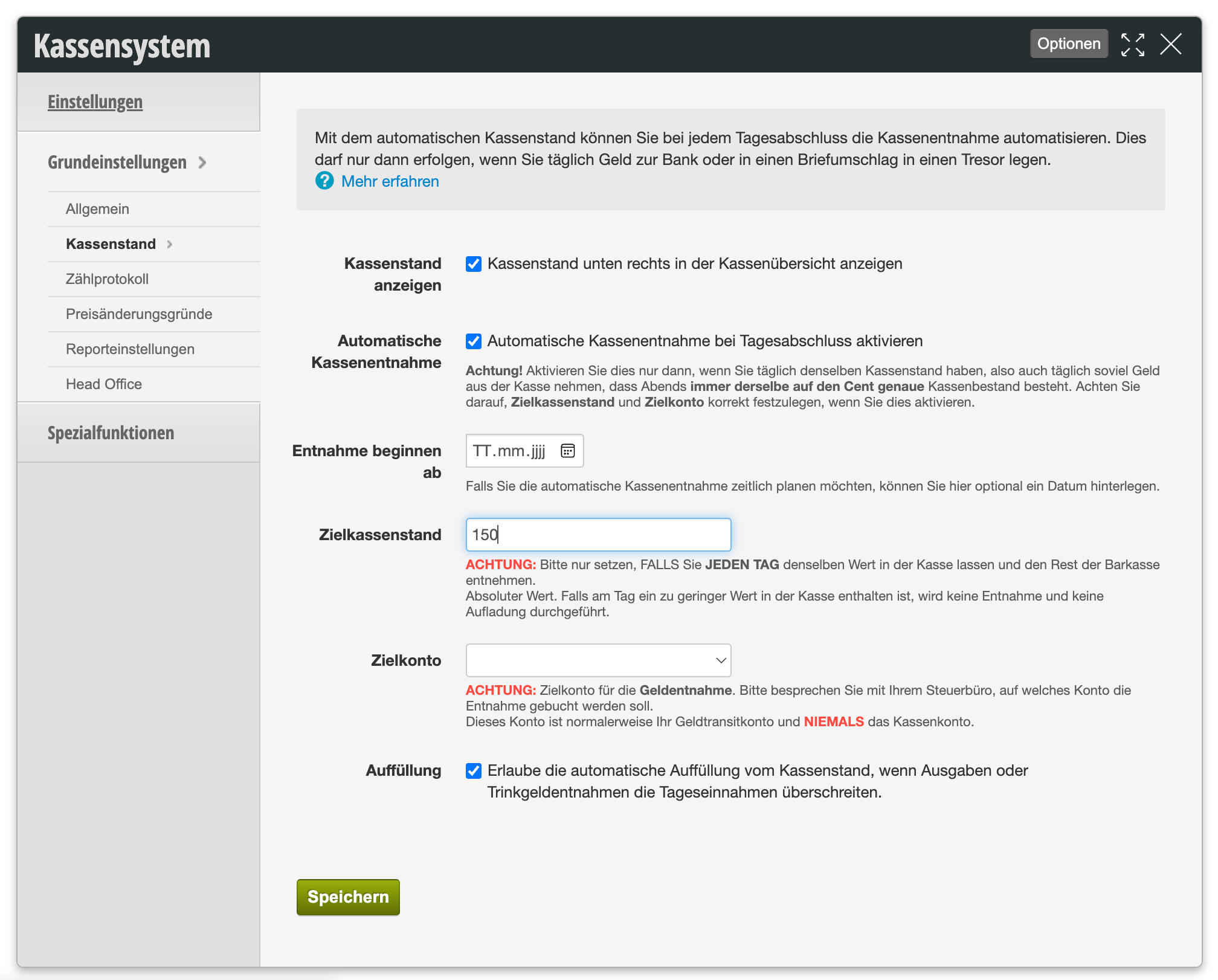
Settings area for automatic cash register withdrawal with fields for cash register balance display, automatic cash withdrawal, withdrawal begins from, target cash balance, target account and top-up

The following table shows an overview of all available settings:

Setting Description
Cash register balance display
"Display cash register balance at the bottom right of the cash register overview"

Displays the current cash register balance at the bottom right of the cash register overview.

Automatic cash withdrawal
"Enable automatic cash withdrawal at daily closing"

Only enable this if you have the same cash register balance every day, meaning you also withdraw the same amount of money from the cash register daily so that the cash balance is always the same at the end of the day, down to the cent. Make sure to set the target cash balance and target account correctly if you enable this.

Withdrawal begins from If you want to schedule the automatic cash withdrawal in terms of timing, you can optionally enter a date here from which it should take effect.
Target cash balance Set the amount that remains in the cash register here. This is an absolute value – only set it if you leave the same amount in the cash register every day and withdraw the rest from the cash register. If on any day there is too little value in the cash register, by default neither a withdrawal nor a top-up will be performed (see the "Top-up" option below).
Target account Define a target account here. The target account is the account to which the money is posted when withdrawn. It is never the cash account, but normally your cash transit account. Please discuss with your tax office which account the withdrawal should be posted to.
Top-up
"Allow automatic top-up of the cash balance if expenses or tip withdrawals exceed daily revenue"

When this option is enabled, Belbo automatically posts a safe withdrawal if needed to restore the cash balance to the set target cash balance – provided there is actually enough cash in the safe. If the option is not enabled, a cash balance that has temporarily fallen below the target cash balance will automatically recover once sufficient cash receipts occur again. For more information, see the article Cash balance falls below fixed cash balance.

For detailed information about the Belbo cash system, please refer to our cash register documentation (PDF).

Categories: Cash Register Settings
Tags: Kassenstand, Kassensystem

Have a question? Ask it here.

This manual is a service by belbo. Legal notice