belbo
  • Overview
    • Getting to know Belbo
    • Location Settings
    • Switch to Belbo
    • Calendar View & Navigation
    • Recurring Appointments & Courses
    • Appointment Entry & Management
    • Tasks
    • Overview
    • Multiple Locations & Head Office
    • Manage Employees
    • Logins
    • Rights
    • Overview
    • Absences & Holidays
    • Working Hours
    • Time Tracking
    • Overview
    • Data Protection (GDPR)
    • Customer Communication (Email, SMS)
    • Customer Management & Records
    • Overview
    • Bonus & Loyalty Programs
    • Campaigns (Newsletter & SMS)
    • Marketing Consents (GDPR)
    • Tracking & Analytics
    • Overview
    • Services & Prices
    • Service Packages & Subscriptions
    • Vouchers
    • Products
    • Purchasing & Suppliers
    • Stock & Inventory
    • Scanning & Sales
    • Cost of Goods & Expenses
    • Overview
    • Setup & Settings
    • Design
    • I'm ready to help you translate the category name from German to English. However, I don't see the actual text to translate in your message. Please provide the German category name that needs to be translated, and I'll translate it for you while preserving all HTML tags, comments, and WordPress shortcodes exactly as they are.
    • Integration (Website, Google, Instagram, Facebook)
    • Online payment
    • Overview
    • Accounting & Exports
    • Cash Register Settings
    • Checkout process
    • Daily Closing & Reports
    • TSE & Cash Register Anti-Tampering Ordinance
    • Overview
    • Export Overview
    • Employee Utilization
    • Revenue & Reports
    • Belbo Satellite
    • Printer
    • EC Terminal & Card Payment
    • Troubleshooting Hardware
    • Scanner & POS Devices
    • General Settings
    • API & Integrations
    • Notifications & Emails
    • Contracts & Legal
Skip to content
Duty roster›Working Hours

Flexible Break

With the flexible break, you set a time window for an employee during which a break of a specific duration should take place. The exact time of the break is not yet fixed: it is only finalized when an appointment touches the time window. This keeps the employee available for booking throughout the entire time window while still ensuring the break.

Example: Employee A is to take a 60-minute break between 12:00 and 14:00. The exact time depends on when appointments are booked. For example, if an appointment is entered from 12:00 to 13:00, the break is fixed from 13:00 to 14:00.

How the flexible break works

  • Time window: You specify the time period during which the break should take place, e.g., from 12:00 to 14:00.
  • Break duration: You specify how long the break should be, e.g., 60 minutes.
  • Fixation upon booking: As long as no appointment touches the time window, the break is scheduled somewhere within the time window. As soon as an appointment touches the time window, it is entered as a fixed break.

Enter a flexible break

  1. 1
    In the calendar, drag an appointment for the desired employee over the desired time window, e.g., from 12:00 to 14:00.
  2. 2
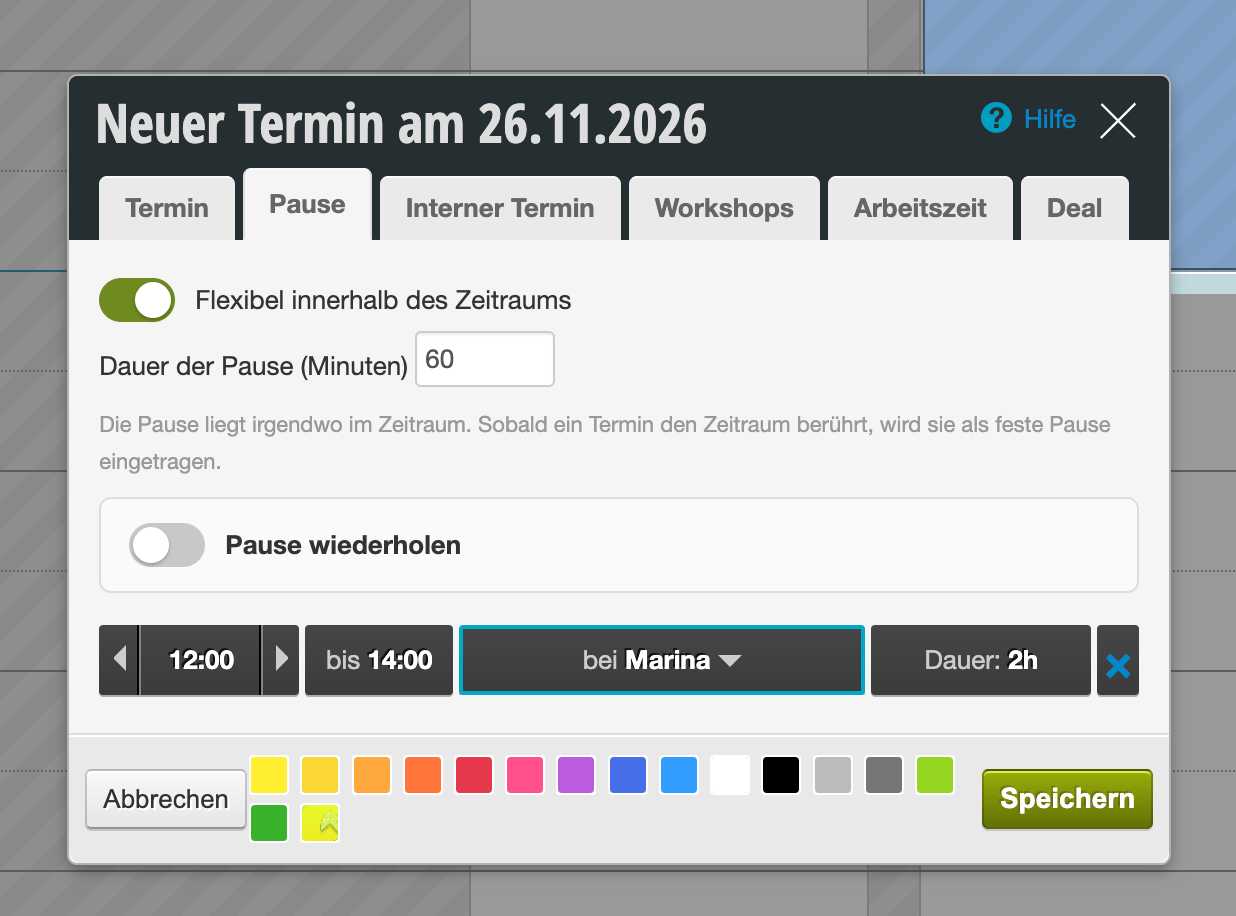
    In the appointment dialog, select the Break tab.
  3. 3
    Enable the Flexible within the time period toggle.
  4. 4
    Under Break duration (minutes), enter the length of the break, e.g., 60.
  5. 5
    Check the start and end time of the time window as well as the employee, and adjust them if necessary.
  6. 6
    Click Save.
Dialog for creating a new appointment with flexible break: time window 12:00 to 14:00 for Marina, duration 2 hours, with color selection.

Display in the calendar

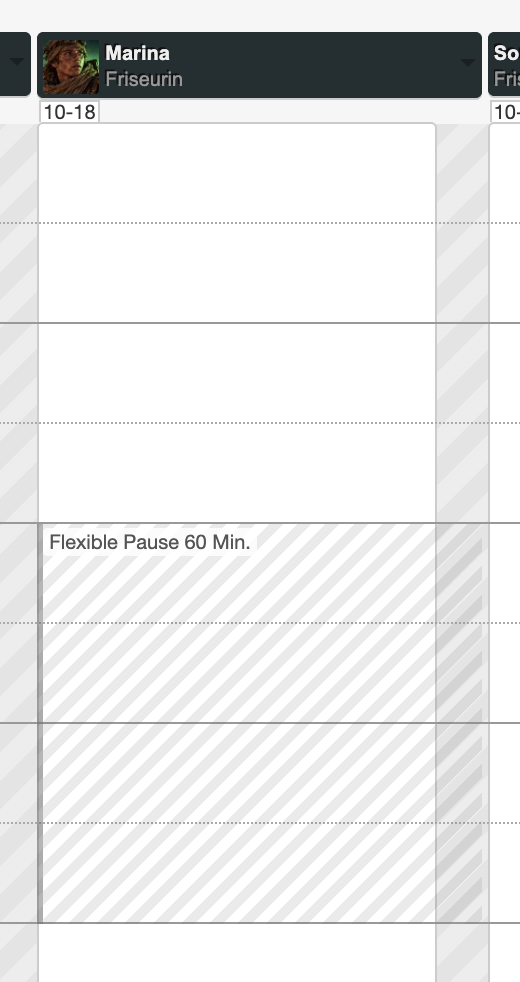
In the calendar, the flexible break is displayed as a hatched block across the entire time window, labeled with Flexible Break and the break duration, e.g., "Flexible Break 60 Min.".
Difference from a fixed break

A fixed break is entered with a specific start and end time, e.g., daily from 12:00 to 13:00. No appointments can be booked during this time. The flexible break is suitable when the exact break time depends on workload and you want to keep as many booking options available as possible within the time window.

To learn how to enter fixed breaks in the duty roster or calendar, see the article Enter breaks.
Categories: Working Hours

Have a question? Ask it here.

This manual is a service by belbo. Legal notice