
You want to offer a bonus program in which the customer can collect points and then convert them into a discount once a certain number of points has been reached. Here you will learn how to do this.
Example:
-
Goal: You want to grant 1 point for every €15 of turnover.
Implementation: In this case, you need to divide 1 by 15 to get the factor for the points. Enter this value into the first field of the bonus program. Here you enter the value 0.066666. After saving, the decimal places may no longer be fully displayed.
Please note that if you save again, the decimal places will then disappear. -
Goal: Each point should now be convertible into an amount. For example, 22 points should equal 15 euros.
Implementation: In this case, you need to divide 15 by 22 to get the redemption factor. Enter this value into the second field of the bonus program. Here you enter the value 0.68181. -
Goal: You want to only allow redemption from a certain number of points onwards (e.g. 22).
Implementation: Enter the value 22 in the "Redeemable from minimum points" field. -
Goal: You want to only allow redemption from €50 onwards.
Implementation: Divide 50 by the redemption factor (in this case 0.68181) and enter this rounded value in the "Redeemable from minimum points" field. -
Goal: You want to limit the maximum point redemption. For example, you want to grant a maximum discount of €30 per appointment.
Implementation: Enter 30 in the "Maximum redeemable amount per appointment" field.
Here you can only enter round amounts.
Here you can see the values stored for the example above:
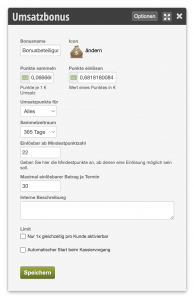
Note: Changes to the template of a bonus program do not affect bonus programs already issued/created for your customers. These must then be closed and started anew.