
belbo
  • Overview
    • Getting to know Belbo
    • Location Settings
    • Switch to Belbo
    • Calendar View & Navigation
    • Recurring Appointments & Courses
    • Appointment Entry & Management
    • Logins & Permissions
    • Multiple Locations & Head Office
    • Manage Employees
    • Absences & Holidays
    • General
    • Working Hours
    • Time Tracking
    • Data Protection (GDPR)
    • Customer Communication (Email, SMS)
    • Customer Management & Records
    • Bonus & Loyalty Programs
    • Campaigns (Newsletter & SMS)
    • Marketing Consents (GDPR)
    • Tracking & Analytics
    • Overview
    • Services & Prices
    • Products
    • Service Packages & Subscriptions
    • Vouchers
    • Purchasing & Suppliers
    • Stock & Inventory
    • Scanning & Sales
    • Materials & Costs
    • Design & Texts
    • Setup & Settings
    • Integration (Website, Google, Instagram, Facebook)
    • Online payment
    • Accounting & Exports
    • Cash Register Settings & Hardware
    • Checkout process
    • Daily Closing & Reports
    • TSE & Cash Register Anti-Tampering Ordinance
    • Export Overview
    • Employee Utilization
    • Revenue & Reports
    • Belbo Satellite
    • Printer
    • EC Terminal & Card Payment
    • Troubleshooting Hardware
    • Scanner & POS Devices
    • General Settings
    • API & Integrations
    • Notifications & Emails
    • Contracts & Legal
Skip to content

Top Customers

The "Top Customers" module provides you with a clear overview of your customers along with essential data such as total revenue, service revenue or product revenue.

You can access this area via Settings > Top Customers
If this function is not enabled, it can be activated via "Settings > Add Function".

You can display those customers for a desired time period who have generated the greatest revenue for you. This view can also be filtered by individual employees.
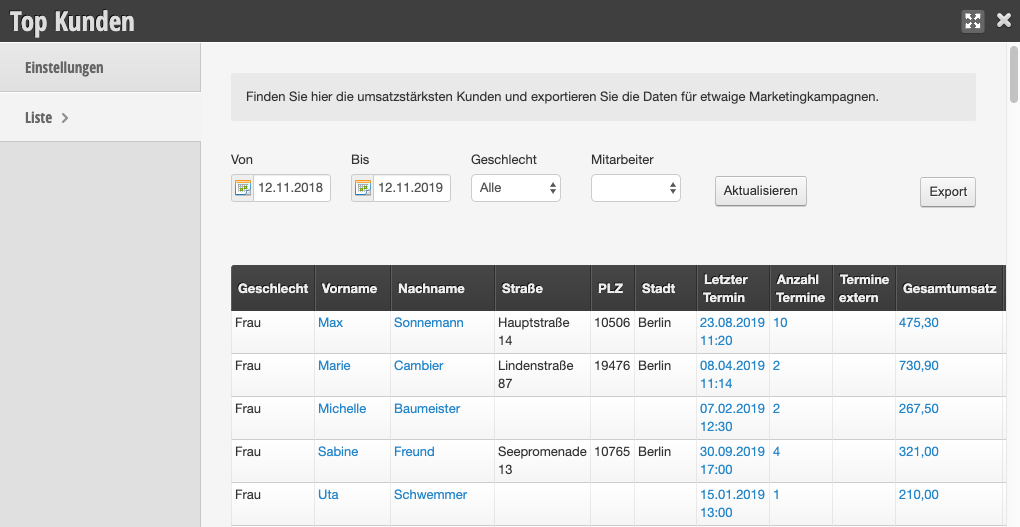
  • First, enter the observation period and, if applicable, the desired employee.
  • If you do not select an employee, the revenue for all employees will be displayed.
  • Then click "refresh".
  • The results list can then also be exported and processed in other software.

This function can also be used if you do not use the Belbo cash register.

Tip: This function is ideal if, for example, you want to send your best customer a small surprise gift.

Categories: Customer Management & Records
Tags: Kunden, Umsatz, Umsatzstark
This manual is a service by belbo. Legal notice