
belbo
  • Overview
    • Getting to know Belbo
    • Location Settings
    • Switch to Belbo
    • Calendar View & Navigation
    • Recurring Appointments & Courses
    • Appointment Entry & Management
    • Tasks
    • Overview
    • Multiple Locations & Head Office
    • Manage Employees
    • Logins
    • Rights
    • Overview
    • Absences & Holidays
    • Working Hours
    • Time Tracking
    • Overview
    • Data Protection (GDPR)
    • Customer Communication (Email, SMS)
    • Customer Management & Records
    • Overview
    • Bonus & Loyalty Programs
    • Campaigns (Newsletter & SMS)
    • Marketing Consents (GDPR)
    • Tracking & Analytics
    • Overview
    • Services & Prices
    • Service Packages & Subscriptions
    • Vouchers
    • Products
    • Purchasing & Suppliers
    • Stock & Inventory
    • Scan & Sale
    • Goods and materials & costs
    • Overview
    • Setup & Settings
    • Design
    • I'm ready to help you translate the category name from German to English. However, I don't see the actual text to translate in your message. Please provide the German category name that needs to be translated, and I'll translate it for you while preserving all HTML tags, comments, and WordPress shortcodes exactly as they are.
    • Integration (Website, Google, Instagram, Facebook)
    • Online payment
    • Overview
    • Accounting & Exports
    • Cash Register Settings
    • Checkout process
    • Daily Closing & Reports
    • TSE & Cash Register Anti-Tampering Ordinance
    • Overview
    • Export Overview
    • Employee Utilization
    • Revenue & Reports
    • Belbo Satellite
    • Printer
    • EC Terminal & Card Payment
    • Troubleshooting Hardware
    • Scanner & POS Devices
    • General Settings
    • API & Integrations
    • Notifications & Emails
    • Contracts & Legal
Skip to content
Calendar & Appointments›Appointment Entry & Management

Appointment Analysis

View the appointment evaluation for a freely definable time period. This allows you to keep track of the number of your appointments and compare them with other time periods.

You can access this area via Settings > Statistics & Reports

When you call up this statistic, the time period of the last seven days is always displayed for all services. This allows you to see all appointments from the recent past at a glance.

In the header area of the statistic, you will find filters with which you can narrow down the viewing period and the service.
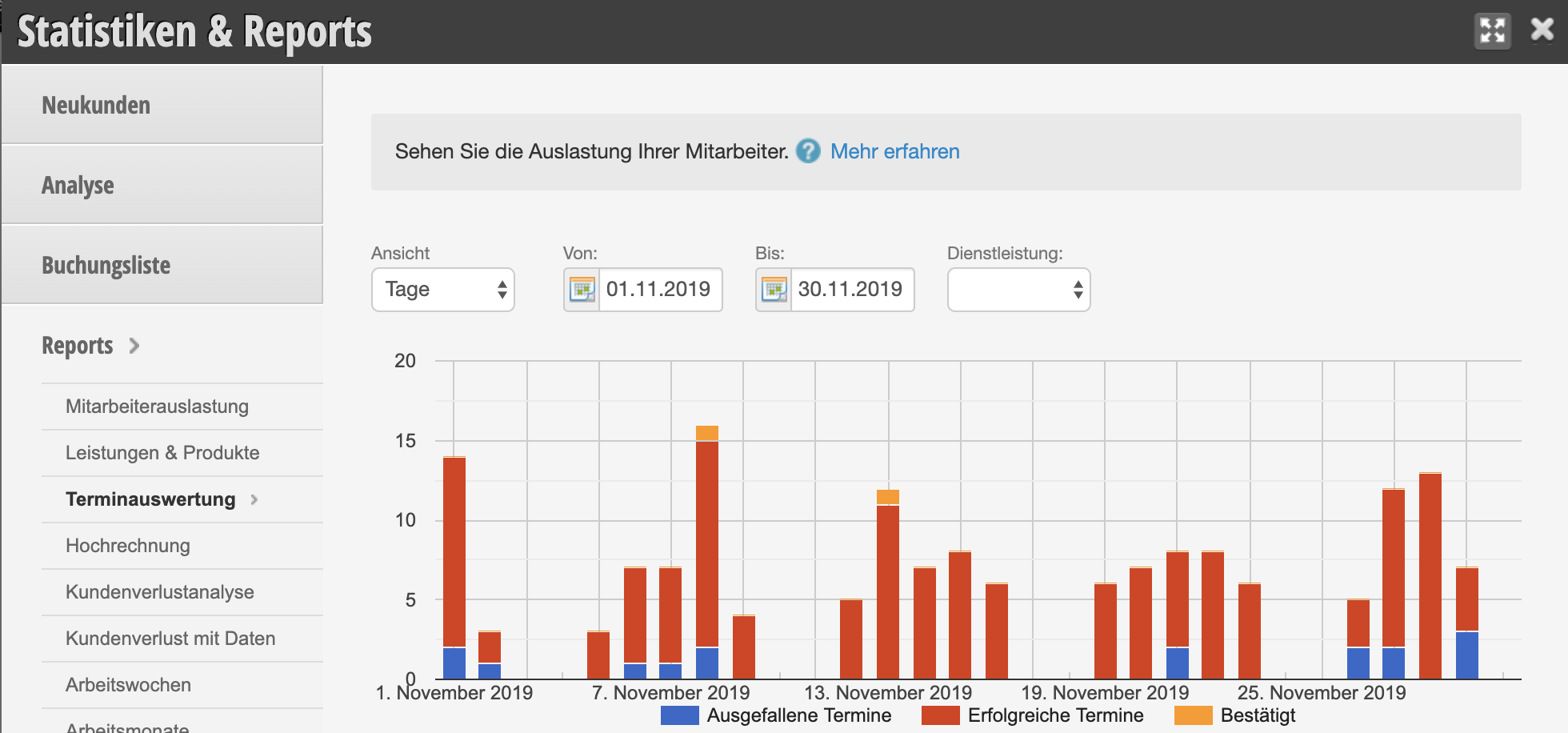
You can find more statistics and reports under Statistics & Reports
Categories: Appointment Entry & Management

Have a question? Ask it here.

This manual is a service by belbo. Legal notice