
Questions or issues? Write to us in the help chat!
I cannot connect my device to the scanner. What should I do?
It's possible that your scanner is still connected to another device or that the wrong mode is active. Make sure you disconnect the scanner from all devices in the Bluetooth settings.
After that, scan this code, it will reset the scanner to its factory settings.
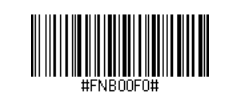
(If scanning doesn't work, print this page and try again. These barcodes are also included in the manual that comes with the scanner.)
Now scan the barcode that activates keyboard mode:
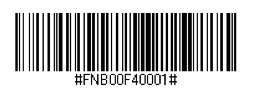
You can now connect the Mobile Socket Scanner CHS 7Ci to a Bluetooth-enabled device as described in the instructions above.
I want to connect my scanner to an iOS device, what do I need to do?

Continue to change the distance and angle from which you scan until you hear multiple beeps (this time the scanner will not turn off).
After you have heard approximately 3 beeps, you can go to iPad > Settings > Bluetooth and select your device there.
I want to connect my scanner to a second device, what do I need to do?
The Mobile Socket Scanner CHS 7Ci can only be connected to one device at a time. To connect it to another device, you must disconnect it from the first device in the Bluetooth settings:
- Turn on the CHS.
- Press and hold the trigger.
- Press and hold the power button.
- Release both buttons after 3 beeps have sounded.
The CHS will be unpaired and automatically turned off. The next time you turn on the CHS, it can be detected.