belbo
  • Overview
    • Getting to know Belbo
    • Location Settings
    • Switch to Belbo
    • Calendar View & Navigation
    • Recurring Appointments & Courses
    • Appointment Entry & Management
    • Logins & Permissions
    • Multiple Locations & Head Office
    • Manage Employees
    • Absences & Holidays
    • General
    • Working Hours
    • Time Tracking
    • Data Protection (GDPR)
    • Customer Communication (Email, SMS)
    • Customer Management & Records
    • Bonus & Loyalty Programs
    • Campaigns (Newsletter & SMS)
    • Marketing Consents (GDPR)
    • Tracking & Analytics
    • Overview
    • Services & Prices
    • Products
    • Service Packages & Subscriptions
    • Vouchers
    • Purchasing & Suppliers
    • Stock & Inventory
    • Scanning & Sales
    • Materials & Costs
    • Design & Texts
    • Setup & Settings
    • Integration (Website, Google, Instagram, Facebook)
    • Online payment
    • Accounting & Exports
    • Cash Register Settings & Hardware
    • Checkout process
    • Daily Closing & Reports
    • TSE & Cash Register Anti-Tampering Ordinance
    • Export Overview
    • Employee Utilization
    • Revenue & Reports
    • Belbo Satellite
    • Printer
    • EC Terminal & Card Payment
    • Troubleshooting Hardware
    • Scanner & POS Devices
    • General Settings
    • API & Integrations
    • Notifications & Emails
    • Contracts & Legal
Skip to content

Suitable Printers for the Belbo TSE

If your company is based in Germany, you will likely need a Technical Security Device. We recommend certain bond printers in connection with the TSE.

German flagThis article is particularly relevant for users from Germany.

Notes on Bond Printers and TSE

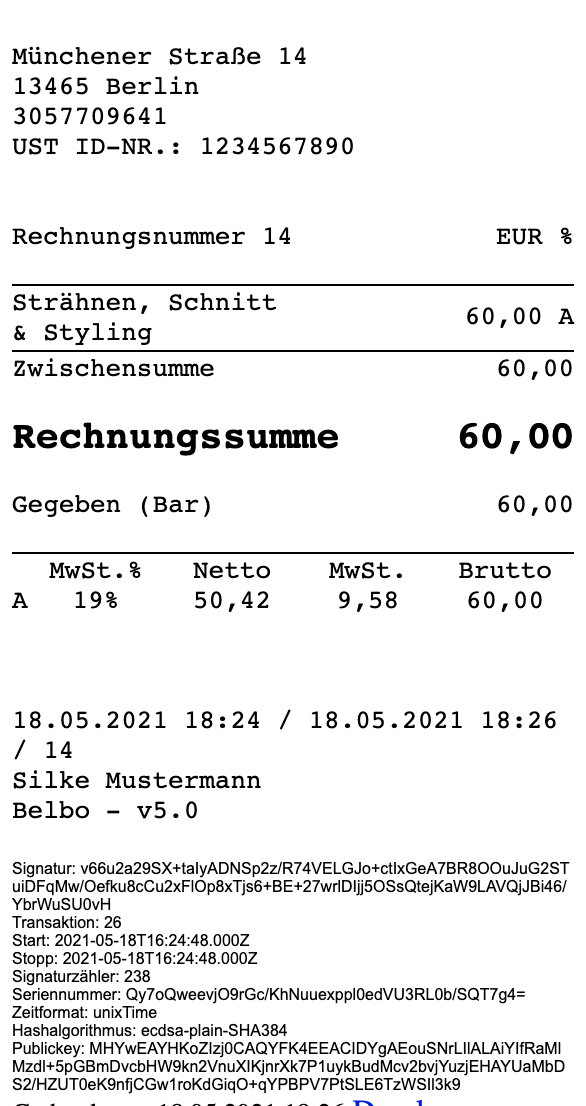
The TSE generates bar codes that are printed on every receipt. Older printers may not be able to print these codes. In this case, only a long number code is output, which however is not scannable. The number code is also valid, but a quick and easy verification of your TSE is not possible and could take somewhat more time during a tax audit.

Recommended Printers

To ensure that your printer displays the code correctly, please select one of the recommended devices listed here: https://belbo.com/zubehoer/

Example of receipt with long number code in the footer area:

Categories: Scanner & POS Devices
This manual is a service by belbo. Legal notice