
belbo
  • Overview
    • Getting to know Belbo
    • Location Settings
    • Switch to Belbo
    • Calendar View & Navigation
    • Recurring Appointments & Courses
    • Appointment Entry & Management
    • Logins & Permissions
    • Multiple Locations & Head Office
    • Manage Employees
    • Absences & Holidays
    • General
    • Working Hours
    • Time Tracking
    • Data Protection (GDPR)
    • Customer Communication (Email, SMS)
    • Customer Management & Records
    • Bonus & Loyalty Programs
    • Campaigns (Newsletter & SMS)
    • Marketing Consents (GDPR)
    • Tracking & Analytics
    • Overview
    • Services & Prices
    • Products
    • Service Packages & Subscriptions
    • Vouchers
    • Purchasing & Suppliers
    • Stock & Inventory
    • Scanning & Sales
    • Cost of goods & expenses
    • Design & Texts
    • Setup & Settings
    • Integration (Website, Google, Instagram, Facebook)
    • Online payment
    • Accounting & Exports
    • Cash Register Settings & Hardware
    • Checkout process
    • Daily Closing & Reports
    • TSE & Cash Register Anti-Tampering Ordinance
    • Export Overview
    • Employee Utilization
    • Revenue & Reports
    • Belbo Satellite
    • Printer
    • EC Terminal & Card Payment
    • Troubleshooting Hardware
    • Scanner & POS Devices
    • General Settings
    • API & Integrations
    • Notifications & Emails
    • Contracts & Legal
Skip to content

Cash Register System Settings

In the basic settings of your cash register system, you can make essential settings. You can find an overview of the most important functions of your cash register system here.
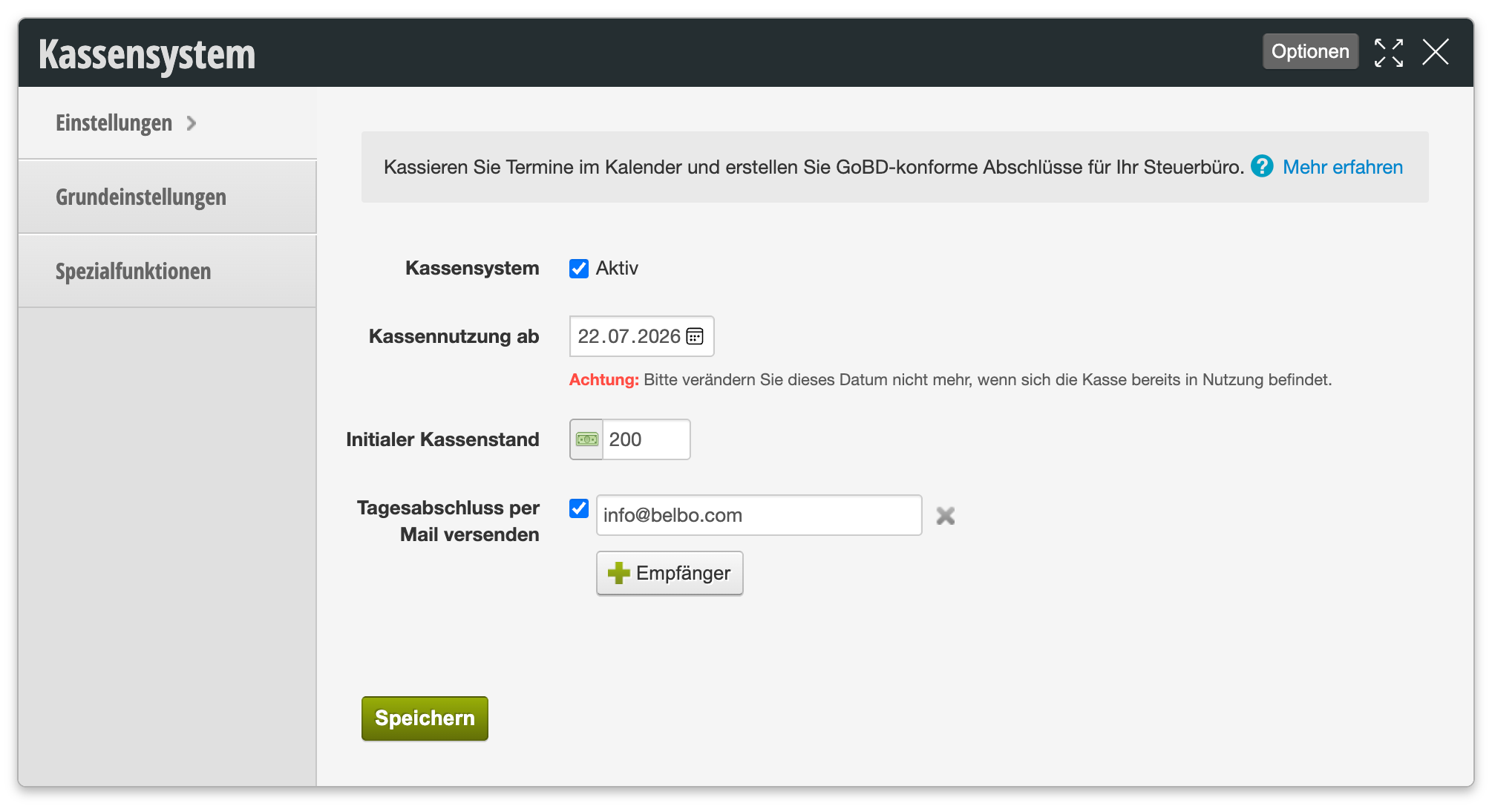
You can access this area via Settings > Cash Register System
If this function is not enabled, it can be activated via "Settings > Add Function".

Activate Cash Register System

Only when the cash register system is activated can you use it in your Belbo calendar. Please deactivate your cash register system only if you no longer wish to use it. Afterwards, the cash register and all associated buttons will be hidden from Belbo.

Cash Register Usage From

The start date of cash register usage is always one day before the actual start of usage. This is relevant for calculating the cash register balance and displaying data in your cash register. Please do not change this date without consulting the Belbo team!

Send Daily Closing via Email

If you wish, the daily closing can be sent via email to a specific address. This allows you to ensure that you save all created daily closings in PDF form.

You can find detailed information about the Belbo Cash Register System in our Cash Register Documentation (PDF).
Categories: Cash Register Settings & Hardware
This manual is a service by belbo. Legal notice