
You can integrate Belbo with other software products in various ways. In addition to ready-made integrations that you can simply activate via the function list, such as calendar synchronization with Google, you can also programmatically create bookings and query data.
We distinguish between two types of data:
Opening hours, services, and availability of services and staff. You can query this data via REST API without a key.
Calendar and customer data. To query it, you need an API key.
You create this in your calendar under global settings as an API access.
After you have created an API access, you can use the token to perform queries. Basically, all interfaces are located at the URL with the following structure:
https://<YourBusiness>.belbo.com/office/api/<Name>?token=<Token>
Webhooks
In addition to actively querying data, you can also store webhooks in the API function. A webhook reverses the direction: your system does not need to regularly check if there is something new – Belbo contacts you on its own.
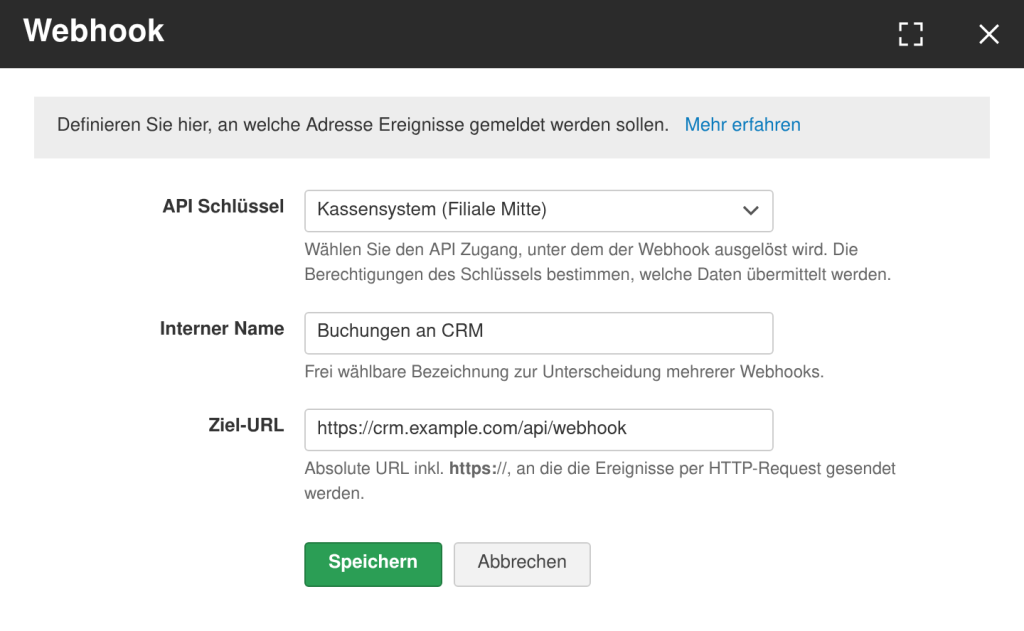
You create a webhook directly in the API function. Three pieces of information are required for the definition:
A selection box with the API accesses created in your calendar. The selected key determines with which permissions the webhook is triggered.
A freely selectable name to distinguish between multiple webhooks. It is only displayed internally.
The complete target address including https://, to which Belbo sends the events. Relative addresses are not possible.
Which events trigger a webhook:
Each call carries an event type (event_type). The type determines when Belbo sends – and which data is in the payload. There are three payload types: appointment, customer, and waitlist. The same events also form the basis of the Zapier app.
| Payload | event_type | Is triggered |
|---|---|---|
| Appointment | new_appointment | An appointment was booked. |
new_course_booking | A course was booked. | |
voucher_bought | A voucher was purchased. | |
product_bought | A product was sold. | |
customer_registered | The customer registered for the appointment. | |
customer_checked_in | The customer was checked in for the appointment. | |
appointment_reminder | The appointment reminder is due. | |
| Customer | new_customer | A new customer was created. |
updated_customer | Customer data was changed. | |
| Waitlist | new_waitlist | A new waitlist entry was created. |
All appointment-related events – including course, voucher, and product sales – deliver the same structure. What was purchased or booked is listed in services:
{
  "booking_id": 53429371,
  "appointment_start": "2026-10-17T07:00:00+0000",
  "appointment_end": "2026-10-17T07:30:00+0000",
  "services": [
    "Package A (Haircut & Blow Dry)"
  ],
  "gender_type": "MALE",
  "first_name": "Max",
  "last_name": "Mustermann",
  "email": "max.mustermann@example.com",
  "mobile": "123123123"
}
Time specifications come in the format YYYY-MM-DD'T'hh:mm:ss+0000, services is always a list (if multiple services are booked, it contains multiple entries). The events new_customer and updated_customer send only the customer record instead of the appointment data, new_waitlist sends the waitlist entry.
Automations with Zapier
In addition to direct API usage, Belbo also offers the ability to use events from Belbo via a Zapier app and process them automatically. With Zapier, you can subscribe to typical events and integrate them into over 6,000 other applications to automate workflows.
These events are available as triggers:
- new appointment bookings
- waitlist entries
- appointment changes or cancellations
- new customers or customer data updates
This allows you to trigger actions in other tools:
- sending emails or SMS
- entries in CRM systems
- creation of tasks in project management tools
- synchronization with marketing or reporting tools
Zapier acts as a bridge between Belbo and other systems, enabling automations even without custom development. Technically, this is based on so-called triggers and actions that can be implemented via integrations or webhooks.