
belbo
  • Overview
    • Getting to know Belbo
    • Location Settings
    • Switch to Belbo
    • Calendar View & Navigation
    • Recurring Appointments & Courses
    • Appointment Entry & Management
    • Tasks
    • Overview
    • Multiple Locations & Head Office
    • Manage Employees
    • Logins
    • Rights
    • Overview
    • Absences & Holidays
    • Working Hours
    • Time Tracking
    • Overview
    • Data Protection (GDPR)
    • Customer Communication (Email, SMS)
    • Customer Management & Records
    • Overview
    • Bonus & Loyalty Programs
    • Campaigns (Newsletter & SMS)
    • Marketing Consents (GDPR)
    • Tracking & Analytics
    • Overview
    • Services & Prices
    • Service Packages & Subscriptions
    • Vouchers
    • Products
    • Purchasing & Suppliers
    • Stock & Inventory
    • Scanning & Sales
    • Material & Expenses
    • Overview
    • Setup & Settings
    • Design
    • I'm ready to help you translate the category name from German to English. However, I don't see the actual text to translate in your message. Please provide the German category name that needs to be translated, and I'll translate it for you while preserving all HTML tags, comments, and WordPress shortcodes exactly as they are.
    • Integration (Website, Google, Instagram, Facebook)
    • Online payment
    • Overview
    • Accounting & Exports
    • Cash Register Settings
    • Checkout process
    • Daily Closing & Reports
    • TSE & Cash Register Anti-Tampering Ordinance
    • Overview
    • Export Overview
    • Employee Utilization
    • Revenue & Reports
    • Belbo Satellite
    • Printer
    • EC Terminal & Card Payment
    • Troubleshooting Hardware
    • Scanner & POS Devices
    • General Settings
    • API & Integrations
    • Notifications & Emails
    • Contracts & Legal
Skip to content
Settings & Administration›API & Integrations

API Interfaces

Feature: General › API Access › Settings

You can connect Belbo with other software products in various ways. In addition to ready-made integrations that you can easily activate via the feature list, such as calendar synchronization with Google, you can also programmatically create bookings and query data.

We distinguish between two types of data:

Public Data

Opening hours, services and availabilities of services and employees. You can query this data without a key via REST-API.

Sensitive Data

Calendar and customer data. To query them, you need an API key.

You can create this in your calendar under global settings as an API access.

REST-API Documentation All available endpoints, parameters and example responses – continuously maintained on Postman.
Open Documentation

After you have created an API access, you can make queries using the token. Basically, all interfaces are located at the URL with the following structure:

Structure of the Interface URL https://<YourBusiness>.belbo.com/office/api/<Name>?token=<Token>

Webhooks

In addition to actively querying data, you can also store webhooks in the API function. A webhook reverses the direction: your system doesn't have to ask regularly if there's anything new – Belbo contacts you automatically.

Event Occurs For example, a new booking in Belbo.
Belbo Sends An HTTP request is immediately sent to your stored target URL.
Your System Responds CRM, inventory management or custom application processes the data further.

You create a webhook directly in the API function. Three entries are required for the definition:

API Key

A selection box with the API accesses created in your calendar. The selected key determines with which permissions the webhook is triggered.

Internal Name

A freely selectable name to distinguish between multiple webhooks. It is only displayed internally.

Absolute URL

The complete target address including https://, where Belbo sends the events. Relative addresses are not possible.
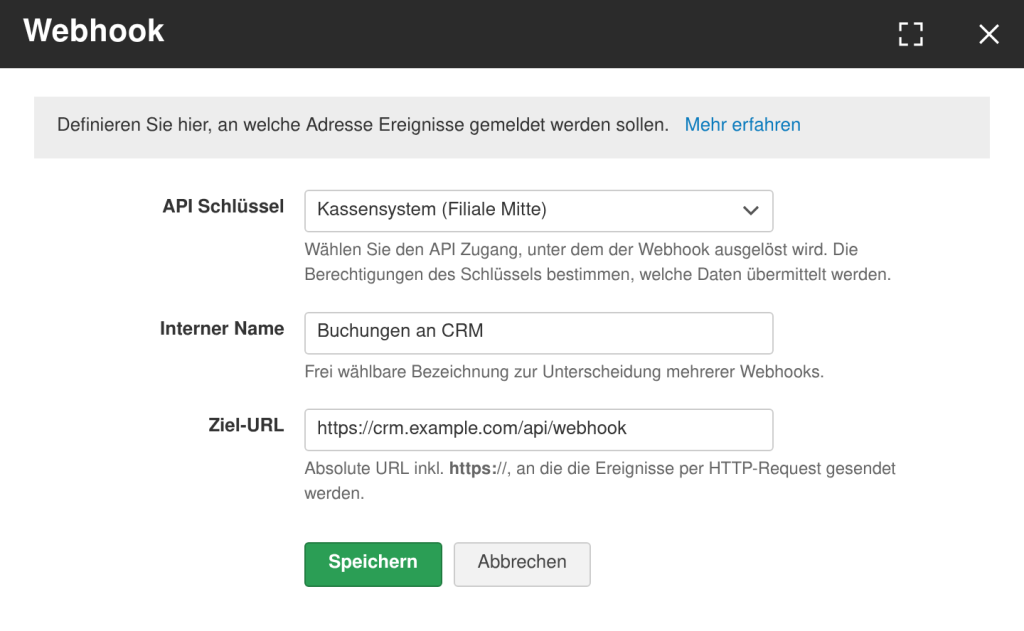
Dialog for defining a webhook with selection box for API key, internal name and absolute target URL
Definition of a webhook in the API function
The target URL must be publicly accessible from outside and accept requests via HTTPS. You can create multiple webhooks in parallel, for example one per connected system.

Automations with Zapier

In addition to direct API usage, Belbo also offers the ability to use events from Belbo via a Zapier app and automatically process them further. With Zapier, you can subscribe to typical events and integrate them into over 6,000 other applications to automate workflows.

These events are available as triggers:

  • new appointment bookings
  • waitlist entries
  • appointment changes or cancellations
  • new customers or updates to customer data

This allows you to trigger actions in other tools:

  • sending emails or SMS
  • entries in CRM systems
  • creation of tasks in project management tools
  • synchronization with marketing or reporting tools

Zapier acts as a bridge between Belbo and other systems and enables automations without requiring your own development. Technically, this is based on so-called triggers and actions that can be implemented via integrations or webhooks.

Zapier App for Belbo Invitation to the Belbo app on Zapier – there you activate the events for your own Zapier account.
Activate Zapier App
Categories: API & Integrations
Tags: API, Schnittstellen

Have a question? Ask it here.

This manual is a service by belbo. Legal notice